Upload Pictures To Facebook Directly Through Windows Live Gallery

Sadly, till today I haven’t found a single Windows app that makes uploading pictures to Facebook any easier. I am not saying that there are no such tools, all I am saying is that I am not satisfied with the tools available. But if you have Windows Live Gallery, there is a nifty little opensource plugin for it called LiveUpload to Facebook that will make uploading pictures to Facebook a piece of cake.

Once installed, open Windows Live Gallery, select the pictures that you want to upload, go to Publish > More Services and select LiveUpload to Facebook.
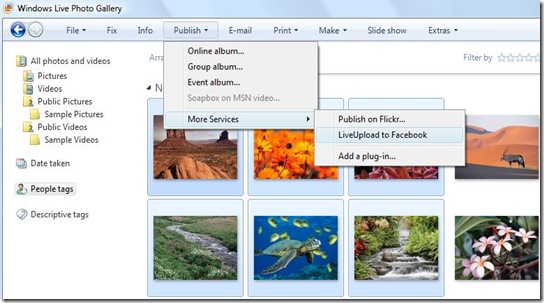
windows live gallery -liveupload to facebook Click the above image to enlarge.

It will open a new window asking you to select the account where you want to upload the photos. If you are running this plugin for the first time, you will have to add a new account. Now click Next and in the next step click Login.
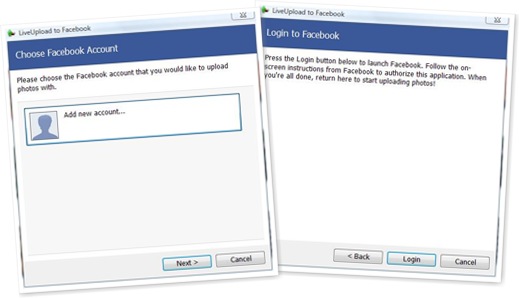
View Login To Facebook process

A new webpage will load where you have to allow LiveUpload to access your Facebook profile.
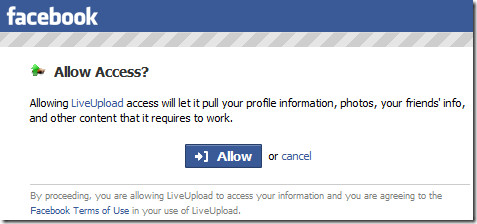
allow access to liveupload to facebook

Now return to Windows Live Gallery and you will see the Complete Authorization window, click Next and again Facebook will open where you have to Allow Photos Upload.

Note: Once you allow access, you won’t be prompted again unless you don’t remove the application from your profile.

Return to Windows Live Gallery again and select the Album where you want to upload the pictures. You can create a new album and change the privacy settings too.
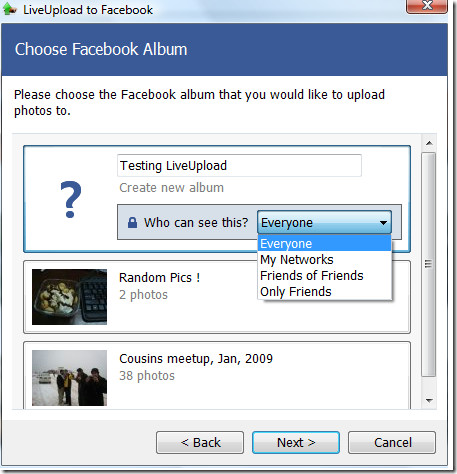
choose facebook album

In the next step click Publish and you are done.
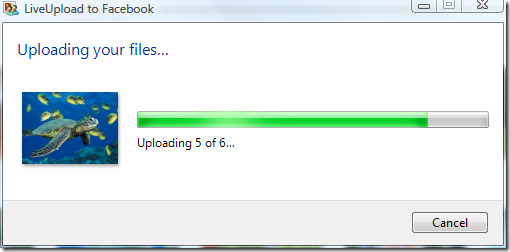
liveupload to facebook - uploading

What makes this plugin unique is that you can link Windows Live Gallery People Tags to Facebook users, these links are saved so that the process is easier the second time around.
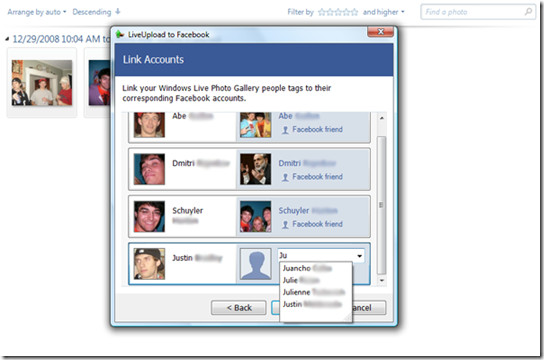
LiveUpload to Facebook - LinkAccounts

Since giving this plugin a try, I have to admit that it got me addicted since I don’t visit Facebook anymore to upload my photos. Give it a shot and you will be equally amazed. Enjoy!

  • Share this article!

    • Digg this!
    • Bookmark on Reddit
    • Bookmark at Delicious
    • Stumble this!
    • Share this post at Facebook
    • Tweet this!
    • Share on Yahoo! Buzz
    • Add AddictiveTips to your Technorati favorites
    • Share on Friendfeed
This entry was posted in Internet, Windows and tagged , , , , , , , , , , . Bookmark the permalink. Post a comment or leave a trackback: Trackback URL.

9 Comments

  1. Posted March 14, 2009 at 5:45 pm | Permalink

    Great post u saved my time
    thank you

  2. dean stone
    Posted March 28, 2009 at 1:06 am | Permalink

    how can i send my photos from my yahoo pictures to my facebook account

  3. Samuel
    Posted September 10, 2009 at 5:59 pm | Permalink

    Hello,Thanks for your share this information.
    And I will post it on my blog.
    Thank a lot.

  4. camelstoe69
    Posted November 4, 2009 at 5:53 pm | Permalink

    Your a STAR.. been trying to upload photos for 3 hours! cheers

  5. camelstoe69
    Posted November 4, 2009 at 10:53 pm | Permalink

    Your a STAR.. been trying to upload photos for 3 hours! cheers

  6. camelstoe69
    Posted November 5, 2009 at 3:53 am | Permalink

    Your a STAR.. been trying to upload photos for 3 hours! cheers

  7. lorraine
    Posted March 15, 2010 at 3:36 pm | Permalink

    like the others a .. huge thanks .. got new pc and nothin uploadin on it …. one go on this and success!!! finally facebook upload!!! tahnks again

  8. Posted April 17, 2010 at 4:25 am | Permalink

    Great tip, helped me get a client away from using the Facebook uploader which was a mess.

  9. Posted August 23, 2010 at 8:41 am | Permalink

    Thank you SO much. I work 12 hour shifts on a PC ALLLL night, so when I do get a few moments to do something “fun” I don’t want to “F” around waiting for pictures to upload.

    Thanks a bunch!!

    Gerri

8 Trackbacks

  1. [...] LiveUpload to Facebook is free and open source, available for Windows only. For a hand’s off solution to uploading images—albeit to flickr instead—you can check out Adam’s guide to automatically uploading pictures to flickr. LiveUpload to Facebook [via Addictive Tips] [...]

  2. [...] LiveUpload to Facebook is free and open source, available for Windows only. For a hand’s off solution to uploading images—albeit to flickr instead—you can check out Adam’s guide to automatically uploading pictures to flickr. LiveUpload to Facebook [via Addictive Tips] [...]

  3. [...] LiveUpload to Facebook is free and open source, available for Windows only. For a hand’s off solution to uploading images—albeit to flickr instead—you can check out Adam’s guide to automatically uploading pictures to flickr. LiveUpload to Facebook [via Addictive Tips] [...]

  4. [...] Windows Live Gallery y LiveUpload to Facebook | Vía: Addictive Tips Algunas anotaciones relacionadas: Sube imágenes a Flickr desde Live Photo Gallery, Windows Live [...]

  5. [...] Note: If you are using Windows and are looking for a way to upload multiple photos to facebook easily then check out this post. [...]

  6. [...] Note: If you are using Windows and are looking for a way to upload multiple photos to facebook easily then check out this post. [...]

  7. [...] Upload Pictures To Facebook Directly Through Windows Live Gallery This entry was written by admin and posted on March 4, 2009 at 3:16 pm and filed under technology. Bookmark the permalink. Follow any comments here with the RSS feed for this post. Trackbacks are closed, but you can post a comment. [...]

  8. [...] Les mer i denne artikkelen! [...]

Post a Comment

Your email is never published nor shared. Required fields are marked *

*
*

You may use these HTML tags and attributes: <a href="" title=""> <abbr title=""> <acronym title=""> <b> <blockquote cite=""> <cite> <code> <del datetime=""> <em> <i> <q cite=""> <strike> <strong>


More in Internet (10 of 10 articles)