What Is msosync.exe Process? Delete Office 2010 Document Cache
If you are using Office 2010, you must have come across MSOSYNC.EXE process in the Task Manager. Today we will discuss about this process along with it’s relationship to the document cache.
What Is MSOSYNC.EXE Process?
Microsoft Office 2010 now caches your document for faster viewing. Whether it is a Word document, Excel spreadsheet, or a PowerPoint presentation, Office 2010 will cache the documents. Msosync.exe process stands for Microsoft Office Document Cache and is used to cache the documents. In layman’s term, Msosync.exe process makes caching of Office 2010 documents possible.
What Will Happen If The Process Is Killed?
In short, it is safe to end the process. It takes 2-3MB of system memory and does not effect the overall speed of the OS. It will start again when Office 2010 begins to cache a document.

What Else Is This Process Used For?
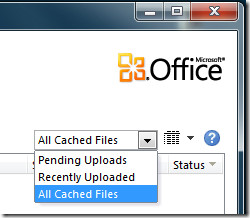
Remember Office 2010 Upload Center? The documents when uploaded to SkyDrive are cached in the local drive for faster viewing. You can view all cached files by opening Upload Center and then selecting All Cached Files from the drop-down menu.
Short Tip for Beginners: Open Upload Center by typing Upload Center in Start Search and then hit Enter.
How To Delete Cached Documents?
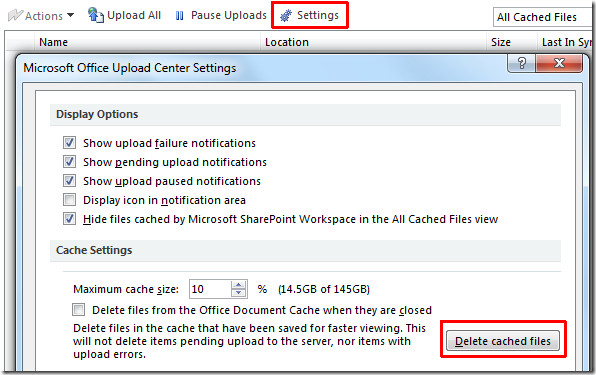
Office 2010 by default reserves 10% quota for cached documents. In my case it equals to 14.5Gb of space, which is a lot. To delete cache, head over to Upload Center settings and hit the Delete Cached Files button. If you are also looking to reclaim storage on a different machine, see our guide to complete app uninstall on Mac.
When prompted for confirmation, hit Delete Cached Information button.
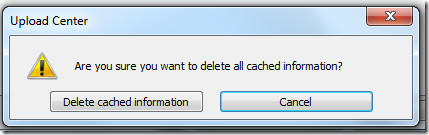
This will delete all cached files and free up some disk space along the way. Since there is a direct relationship between the MSOSYNC.EXE process and the Document Cache, we have covered both tips in this post.

Go to the file and rename it.. will do the tricks.
I have a HP ENVY 15t-j100 Quad Core Edition Windows 7 PRO Business Notebook PC (Intel Core i7-4700MQ. After installing office 365 the blinking circle on my mouse pointer would not go away ever. I ended up disabling Msosync.exe in the task scheduler from loading on log in and only have it run with the system is idle.
Those of you who think you can just click “uninstall” and MS Office will magically be removed from your computer haven’t paid attention. Go ahead, click “uninstall”. Then go click a *.doc file. Bet it STILL opens IN OFFICE. You really think MS would let you remove it’s 2nd most prize piece of software that easily? Would you like to buy a bridge? I tried the simple “uninstall”, then I tried a more firm hand. After searching the internet for 30 mins, I finally found instructions, by Microsoft, buried deep in one of their websites. It took a special uninstaller, manual deletion of files, AND editing the registry to get to the point where if I clicked on a *.doc it didn’t open with Office. Then I knew it was finally off my machine. Why was I so persistent? Because the install was corrupted. Re-installing it didn’t fix the corruption. I wanted a clean slate to do a clean install on. Once I did that, the problem was fixed. But boy, did I have to work for it.
I have a lot of Word docs (~50) open at the same time and drag-and-drop text between them. I get a huge degradation in performance if I stop MSOSYNC. So MSOSYNC seems to make much more efficient use of cached RAM & the system/Office clipboards.
Anybody who *wants* to uninstall office 2010 has a problem – either in their machine or themselves. The program certainly doesn’t cause any problems with any other when not running, and you can always turn it off. `~- Nehmo
`
I think that Microsoft Office 2010 is creating more problems than solutions at the moment. I have read quite a few articles on blogs about Microsoft Office 2010 and there was a common question: how the hell do I uninstall Microsoft Office 2010 from my computer?:)) ________________________________________________Coworking space Chicago
Just using Revo Uninstaller, it able to uninstall all programs in your computer.
Moreover, it is free and there’s portable version of it.
If you have to ask how to unistall an app in 2010…you should not be computing. THese blogs you go to must be for the same people that ask why does my mouse not work? Try plugging it in. Uninstalling Office 2010 has not changed. Go to Control Panel >> Programs, locate Office 2010 r-click uninstall. Done!