Secret Data Manager – Best File Encryption Tool
In Windows 7, Microsoft has provided BitLocker to protect the drives, but what if you want to protect individual files? We have covered two interesting tool before – Cryptor and Wave Cipher to easily lock and password-protect files. Cryptor has a small advantage over Wave Cipher, since it can also encrypt a folder. Both tools come useful in situations where there are only few files to encrypt, but if you want to encrypt multiple files present in different locations, then Secret Data Manager is no doubt the best encryption tool out there for this purpose. It is fast and easy-to-use encryption utility that acts as a file manager. All you have to do is create a new account, login, and encrypt the files that want to hide. Once done, you can log out and nobody will be able to access the files except you.
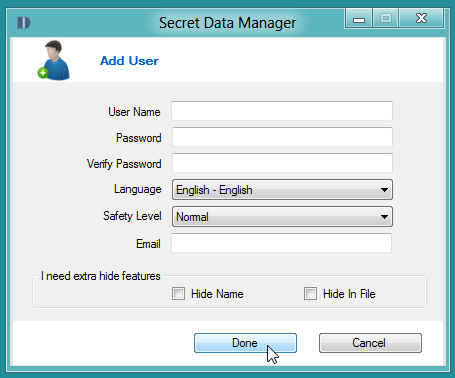
To get started, Navigate t0 Settings > User and select Add User. Now enter the username, password, select the safety level. If you want to set extra hide features, enable Hide name or Hide In File option. Once settings are in place, click Done.
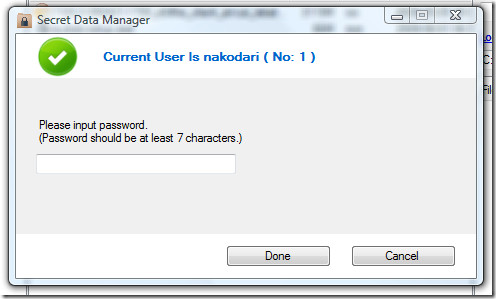
Now navigate again to Settings and hit Login. Here you will need to enter the password of your account.
Once you are logged in, you can easily browse the files and encrypt them in one click. The following screenshot shows the encrypted files (highlighted with blue color).
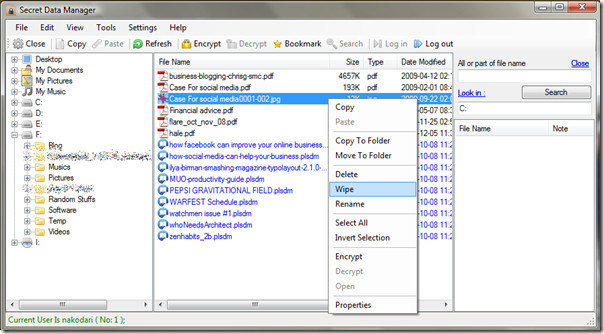
To locate a file quickly, there is a search bar given on the right. One interesting feature is Wipe option, which permanently deletes your file and makes it unrecoverable.
It works on Windows XP, Windows Vista, Windows Server 2003/2008, and Windows 7. Enjoy!

tough lines, Sevie, for sure, but with the first time was enough; now, still no sure if you are gone or are still haunting around here with your grievance…
Couldnt get this to work. Locked up after install and doesnt give you an option to install with desktop icon or pin to start menu and was hard to find. Took 3 attemps to get it to uninstall. Still not sure if its gone.
Couldnt get this to work. Locked up after install and doesnt give you an option to install with desktop icon or pin to start menu and was hard to find. Took 3 attemps to get it to uninstall. Still not sure if its gone.
Couldnt get this to work. Locked up after install and doesnt give you an option to install with desktop icon or pin to start menu and was hard to find. Took 3 attemps to get it to uninstall. Still not sure if its gone.
Requires .Net Framework 2.0 – I have it, most of us by now have it, but not everyone has it and/or wants it.
Thanks for the article dude.