Windows 7 Network Activity Monitor
Network administrators use system and network monitoring tools to check which application, program, or script on connected clients is taking too much of the network resources. Sadly, there is no tool to monitor the network in Windows 7 except Networking tab in Windows Task Manager. Back in July I covered a tool called Resource Monitor which checks the performance of your Windows 7 system. It can also monitor and give detailed overview of processes that take CPU, Memory, and Disk space. Apart from the revamped Windows 7 Task Manager, you can use Resource Monitor to check all the applications which are using network resources.
You can launch Resource Monitor from Start Search. If you’re using Windows 7, go to Start Screen, type resource monitor and hit enter to launch the utility. I have been using Resource Monitor to monitor my processes, overall performance of computer, and network activity of the system.
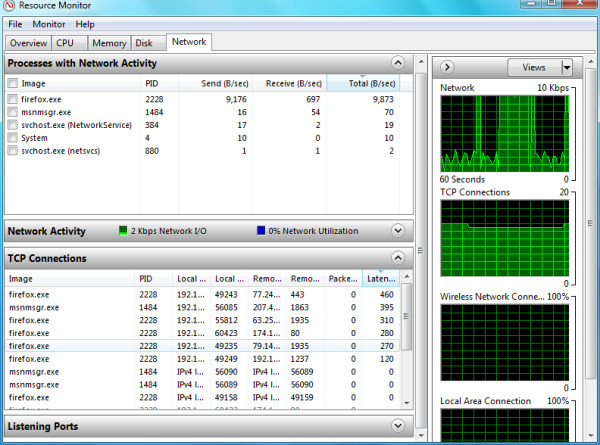
Apart from showing processes and their bandwidth, the Network Activity tab also shows overview of all TCP connections and Listening Ports. Which tool do you use to monitor network activity in Windows 7? Let us know in comments. Enjoy!

It only shows B/sec. How do I see the total bytes instead?
I think this tool, shows the bandwidth twice more than the reality?
Is this true?