Windows 7/Vista Alt-Tab Replacement
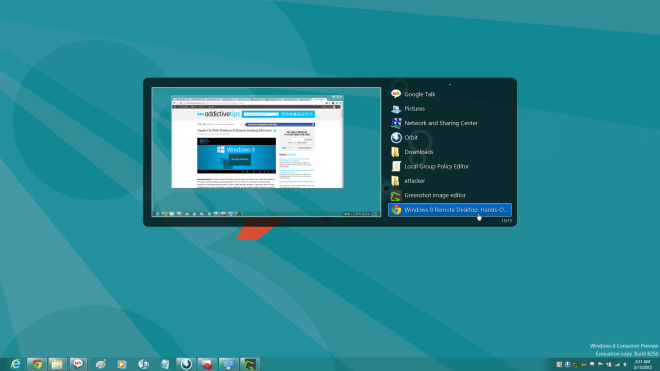
VistaSwitcher is a newly launched task management utility for Windows that aims to replace the default Alt-Tab functionality. Unlike other Alt-Tab replacement tools, it comes with a very sleek UI(User Interface) and has live window and desktop previews under Windows 7 and Windows Vista.
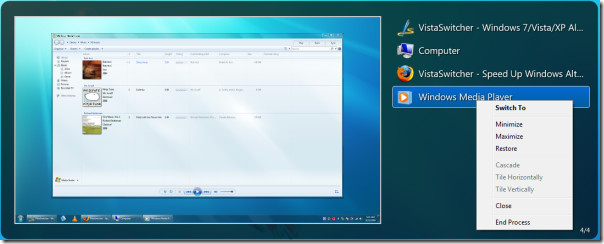
The default Windows Alt-Tab functionality is good enough but lacks advanced features. VistaSwitcher on the other hand lets user control all open tasks with both keyboard and a mouse. You can not only select another window, but also minimize, maximize, restore, and close windows or group of windows.
There is even options for Cascade, Tile Horizontally, and Tile Vertically. And in case your program or window hangs up, you can use the End Process option.
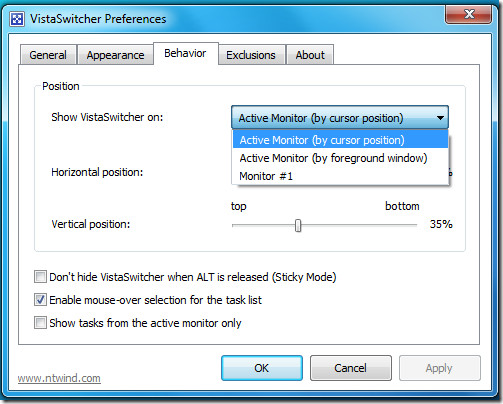
The program resides in the system tray from where you can access the Preferences and change the General options, Behavior, and Appearance of the program.
By default you can bring up VistaSwitcher by hitting Win+F12, this hotkey can however be changed in Preferences. If you have multiple monitor setup then you can choose on which monitor the VistaSwitcher should display.
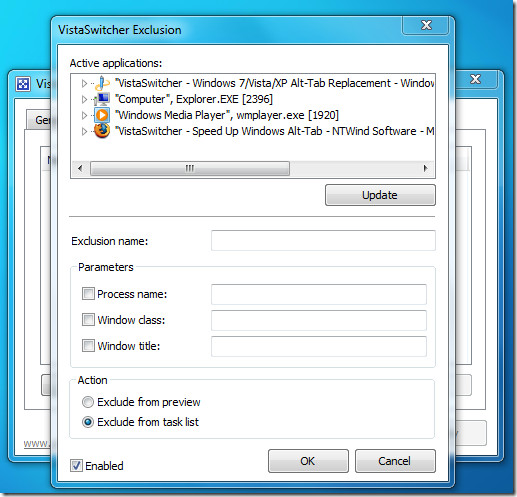
You can also exclude certain programs from appearing in VistaSwitcher, this can be done by adding active application to exclusion.
Personally, this is the best Windows Alt-Tab replacement I have ever seen and made it my default program as well. The developer should rethink the name of the app since it confuses most novice users to believe that it works with Windows Vista only, having said that, I think this app has great potential to go mainstream.
There are plenty of other features I have missed mentioning, such as, it is compatible with Windows UAC and works with elevated programs, multiple tasks can be selected, it comes with semi-transparent background and antialiased fonts, and much more.
It works on Windows XP, Windows Vista, and Windows 7. Both 32-bit and 64-bit installers are available. Enjoy!

please need help to activate my windows product key