Windows File Manager & Explorer With Tabbed Browsing
There are plenty of file managers out there, but none has the ability for tabbed browsing, except Nomad .NET. Just like there are tabs in web browsers which makes browsing much more easier and faster, Nomad .NET has full tabs support as well that allows a user to open multiple folders, thus allowing a much more faster overall experience. It supports threaded file operations, such as, delete, move, copy, etc.
Now you can open multiple tabs and perform each operation in each tab, in this way you will be able to perform fully threaded file operations easily. It is quite a powerful tool made entirely on .NET framework. The search operation can come quite handy since you can search for duplicate files as well. You can open a new tab by pressing Ctrl + T, the same hotkey that you use in web browsers.
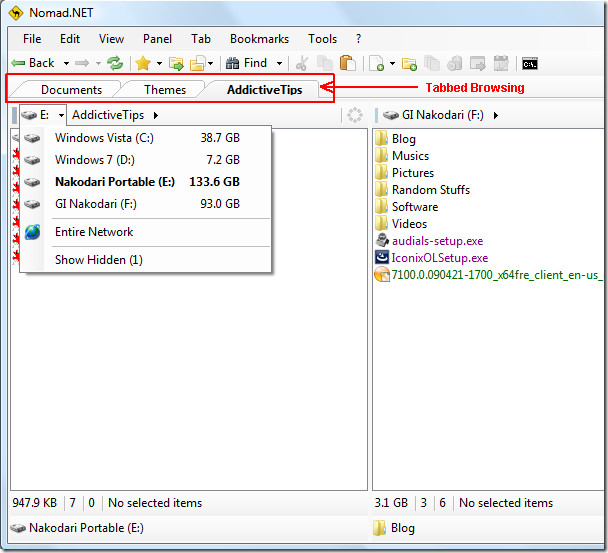
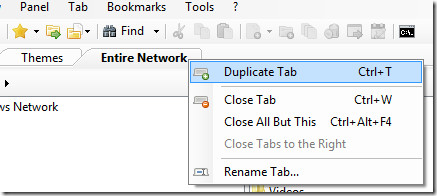
You can also create a duplicate tab with a simple right-click.
Moving your mouse cursor over the files will show you their basic details instantly, and for photos you will be able to see a small preview. This helps in better navigation if you are looking for the right file. Unlike the default Windows Explorer, it will allow you to browse the archive files as well(it uses 7-zip libraries). Apart from it, you can also browse various Internet and Disk Image files too. To see the full list of features, go to the developer’s about page(see link in first paragraph).
Base Rename support, Improved support for properties, better capability with Windows 7, better FTP folder handling, and much more will be coming soon according to the developer’s roadmap. It is a portable tool and works on all versions of Windows. Enjoy!

I beg to differ.
So far as file managers go Total Commander – formerly “win commander” – is the best one around. It has sported tabbed dual pane browsing for ages. Technically it is a shareware but there are no restrictions on its usage except having to click a number on the initial screen while opening. If you have sufficient ram – and who does not in today’s times – you can open it once and leave it running in the task bar / system tray.
I have personally been using it for more than 10 years and have never had a problem – even once.
qttabbar is a fun add-in, requires net framework v2, but the best and free
Jeannie : ==> +1
QtTabbar is the best because it use all fonctionnality of native window explorer (including localisation langage)
.. but doesn’t work anymore in windows 7
xyplorer suks da big tamales!
Soory for all the italics in my prior comment but I was sure I had a closing tag after the quote and there wasn’t a preview available.
I would disagree somewhat with your initial statement of There are plenty of file managers out there, but none has the ability for tabbed browsing, except Nomad .NET. since it’s my experience that a number of them support that…I would agree that there are some features that this app has that are less common, and its use of .NET may be unique.
As alternative product, I would suggest XYplorer which, while not freeware, is likely one of the best supported products that I’ve found and should be examined by anyone looking for an alternate to Windows Explorer…now does it do everything that Nomad does? No, but it also does a large number of things that Nomad does not, so it’s up to the user to decide which of these feature lists is more to their needs.