The Best Video Downloader for PC | Windows 10 in 2026
We can all agree on the fact that multimedia files have been playing an important role in our lives for quite a while now, whether you’re trying to listen to your favorite album while you’re working out or watch a movie while you’re commuting. Technology advancements have shifted this type of activity to the online side, so you can do whatever you want in terms of multimedia enjoyment as long as you have a working Internet connection.

Want to listen to your favorite artists’ latest album and you’re in a rush? No problem, we have Spotify, Deezer, YouTube Music, and other similar services to quench your thirst. Need to binge-watch random TV shows for an entire week because it’s lockdown time and you can’t leave the house? Netflix, Amazon Prime Video, HBO MAX, Hulu, and others can come to the rescue.
But what happens if your device is perfectly capable to play your favorite content but it lacks the ability to establish an Internet connection? Or picture this: you have a cabin in the woods, you want to go there for a few days, but you know for a fact that there are absolutely zero chances that the family of raccoons living nearby is willing to share their WiFi password.
Step in video downloader apps. Back in the day, we used to treat finding a decent video downloader as if we struck gold since it was impossible to locate a tool that let you retrieve your favorite movies in HD, fast, without applying all kinds of watermarks on it and without limiting you to only download the first 5 minutes of each file.
Truth be told, video downloaders can come in handy today as well, despite the fact that not having an Internet connection everywhere you go is an event that seems to occur more rarely by the minute. As we’ve mentioned above, some devices don’t have the ability to connect to the Internet, and if they do, they may lack support for streaming apps such as Spotify or Netflix. In this case, you can use video downloader apps to enjoy your favorite content on those devices, despite their lack of Internet support.
What are video downloaders?
Well, the purpose of video downloaders lies in the very category of programs they are a part of: they’re used to retrieve various types of content from the Internet so that you can enjoy them offline, without having to worry about buffering, connectivity issues, slowdowns, packet loss and lagging.
Although our description seems quite redundant, not all video downloaders serve the same purpose, as some of them try to put a cherry on top of their services by embedding features such as file conversion, automatic file synchronization, or video editing utilities.
Even though they’re not exactly popular anymore, they didn’t go extinct. In fact, the fact that they’ve been out of the spotlight for a while perhaps helped their developers get more creative and implement new, more exciting features for the end-users. A while back, there were merely a few popular video downloaders and users kept swarming around them.
Nowadays, you can literally find hundreds of such tools if you just look them up on your favorite search engine. This is precisely when it starts becoming confusing for the end-user, who may start to wonder about what makes a good video downloader and how do you know if you found the one that has the best bang for the buck.
Not to worry, though. We’ve assembled a list of the best video downloaders you could find on the market, along with some details about their most important features. Additionally, we considered several criteria when creating this list, so that we can simplify the process of making a choice for you. Namely, this is what we looked after in a video downloader in order for it to make our list:
- Doesn’t slow down your system by a great deal
- Matches your Internet connection and downloads videos in a timely manner
- Offers additional features such as file conversion and batch processing
- Compatible with as many multimedia websites as possible
- User-friendly, intuitive interface
- Easy to configure, even for novices
- Support for multiple output devices (that are compatible with the output file)
- Best bang for the buck value
Disclaimer: if you’ve decided to use a video downloader to fetch online content you can enjoy without an Internet connection, make sure that the website you’re retrieving the audio/video files from is alright with this type of activity and that you don’t break any laws while doing it. We don’t condone or encourage copyright infringement, and we recommend you stick to downloading free, non-copyrighted content.
Quick view: the best video downloader for Windows?
- VideoProc
- VideoProc is an all-in-one toolbox for video enthusiasts that brings together multimedia download features, file conversion, and various video editing capabilities such as cutting, cropping, merging, and adding effects to your files. It’s also backed by hardware acceleration, giving you fast results, whether you’re downloading a video, editing it in various manners, or converting it to a format of your liking.
- Any Video Converter
- Any Video Converter is a true video processing factory, as it showcases capabilities ranging from downloading your favorite video content from a huge range of supported websites to editing video content in many ways and converting to and from a broad variety of formats. It can also perform video recordings of your screen and/or webcam, convert DVDs, as well as download music from your favorite websites.
- 4K Video Downloader
- 4K Video Downloader does exactly what it says it does, and then some. If you’ve spotted a 4K video anywhere on the Internet, you probably already know that downloading while keeping the quality is an incredibly difficult thing to achieve. 4K Video Downloader can help you download YouTube playlists, entire channels, extract subtitles from online movies, all the while keeping the original quality profile, even if it’s 4K.
- Allavsoft – Video and Music Downloader
- Allavsoft – Video and Music Downloader can retrieve video and audio content to your PC from a wide range of websites. As long as it’s on the list, you just have to point this program to your favorite music or video file and let it work its magic, and get the file you want on your PC for offline use. This program also has a conversion utility to help you bring the content to the format of your liking and a video file merge feature.
- ByClick Downloader
- If simplicity is what you’re after in a video downloading tool, ByClick Downloader should be the first tool on your list. With an impressive list of supported websites, channel & playlist download support, and up-to-4K quality support, not only can this program help you download the videos you want on your PC, but also download them quickly and without compromising quality.
- Freemake Video Downloader
- Freemake Video Downloader enables you to download videos from YouTube but also works on thousands of other similar websites. You can download your favorite videos in various formats, including WebM, MP4, 3GP, and FLV, and retrieve video and music files as MP3 files on your PC. This program preserves the quality of the original file so that you won’t need to make any additional adjustments during or after the download.
- YTD Video Downloader
- YTD Video Downloader is not only a simple video downloader tool but also encompasses conversion capabilities, so you can enjoy your favorite multimedia content in a broad variety of formats. Furthermore, even if its name may throw you off tracks by hinting at YouTube, YTD Video Downloader also works on several other websites. You just have to give it the video link and let it do all the heavy lifting.
- aTube Catcher
- aTube Catcher is a popular video downloader that is also able to perform recordings of your screen and save them as high-quality video files. The app features a stream catcher, a download utility, a screen recorder, a video converter, a DVD/BluRay/CD creator, as well as an audio recorder. If you need an all-in-one multimedia management tool, aTube Catcher may be just what you’re looking for.
If you’re not exactly convinced about the tools we’ve briefly presented above, don’t worry. We’ll try to offer you a more complete rundown on each of the programs in the sections below so that you can understand better their capabilities and thus simplify the process of making a choice.
The 8 Best Video Downloaders for PC
We remind you that none of these programs is free to use, but we’ve tried to select only the ones that bring the best bang for the buck value. Additionally, all the video downloaders that have been included on our list have free trials you can use to test their features before committing to purchasing a license.
1. VideoProc
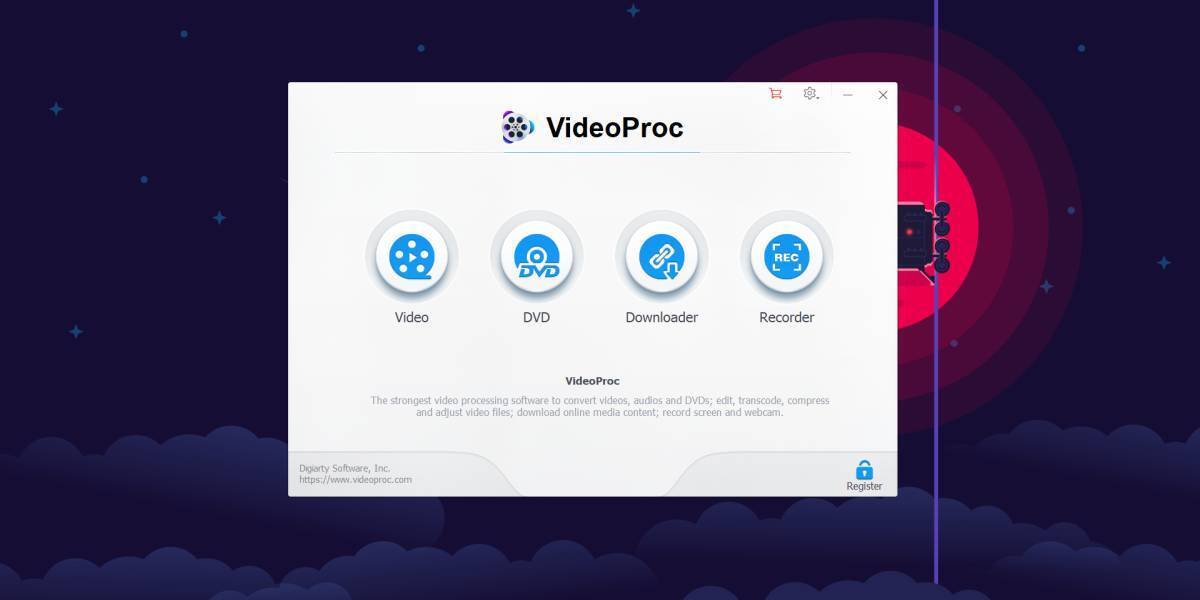
VideoProc is simply one of the best programs that can help you not only retrieve new video content on your PC from various sources, but also alter it in many ways by editing, cutting, cropping, or merging, or converting it to a different format so that it can be played by the devices you want.
But we’re trying to focus on the download part here since you probably landed on this page looking for programs that can retrieve high-quality multimedia files to your PC without too much effort, right?
VideoProc has a built-in media downloader module that allows you to download video content from more than 1000 supported websites. However, using this program also enables you to download M3U8, music, or entire playlists and channels to your PC by simply point it to the content you want to be fetched.
If you already have a list of things you need or want to download, you can just feed it to VideoProc and let it take care of it. Thanks to its bulk file download capabilities, you can just set the program to do the downloads and come back later to reap the benefits (aka your downloaded files).
For instance, you can download your Watch Later playlist from YouTube and finally enjoy it offline on your computer without ads, buffering, or any other interruptions, and most importantly, at the quality you want. If certain content is not available in your region, that’s not a reason to worry.
VideoProc has proxy server support that can mask your physical location so that it can download videos even if they’re not available to you due to geoblocking or other similar restrictions.
It is also possible to use VideoProc to get subtitles for movies and TV series you may have downloaded on your PC. Last, but not least, VideoProc is a versatile tool, so in addition to letting you download your favorite video files from various websites, you can also use it to record live streams, so that you won’t miss your favorite team’s game, important news, or other online-streamed events that are important to you.
It’s quite important to mention that VideoProc has a trial version you can download and check out its capabilities before you consider making a purchase. However, as with other trials, some of the most important features are restricted, so you won’t be able to make use of VideoProc to its full potential if you stick with the trial version.
Get a one year license for $19.95
2. Any Video Converter
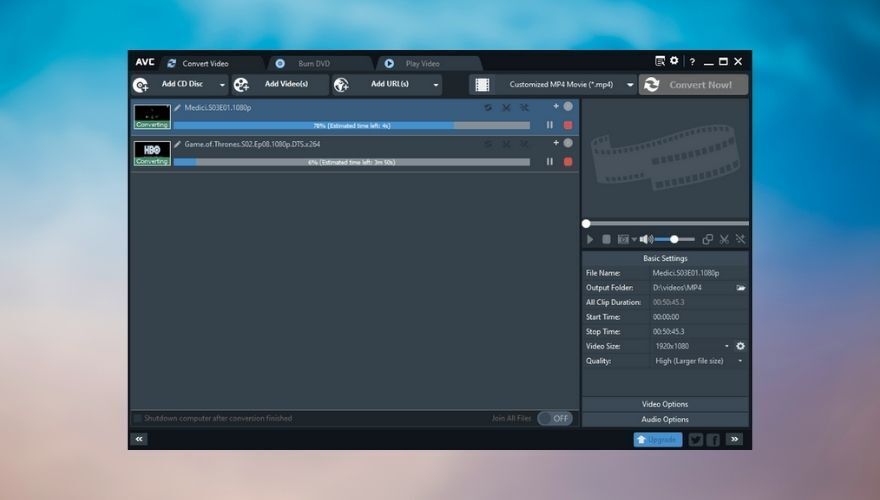
The name may fool you since it apparently has nothing to do with downloading multimedia content to your PC, but we promise you that this is one of the best video downloaders on the market, thanks to the plethora of features it also brings to the table. As you may have guessed, Any Video Converter
can also convert videos, in addition to helping you download them to your PC, which is quite awesome.
It may not have as many supported websites in its pocket as some of our other recommendations, but it gets the job done in a quick, efficient way. Supported websites include YouTube (obviously), Vimeo, Metacafe, Dailymotion, Facebook, Niconico, and Howcast. Unfortunately, it doesn’t work with Netflix, but we’re also not quite sure if downloading Netflix in any other way than using the official app is legal. Wait, we’re positive it isn’t.
Anyway, back to what Any Video Converter is able to do. Whenever you want to download a specific video file to your PC, you can choose its quality profile and format, making it easy to retrieve content that’s ready to move on a compatible device. For instance, if you need to download a video that can be played on your PS4, you just have to make sure to select a format-resolution combo that’s compatible with your console and there’s that.
Furthermore, there are also several music websites that Any Video Converter supports, so if you’re in need of a program that can do both, well you may just be in luck. After you download the content, you can edit it to your liking by making use of Any Video Converter’s editing and personalization features that include trimming, cropping, cutting of borders, rotating the clip, adjust brightness and contrast, as well as add subtitles or watermarks.
Once you’re happy with the result, you can either export the downloaded video to the format it came as, or you can choose a different format to make it compatible with some of your more pretentious devices. This tool also has batch video conversion support, relies on hardware acceleration to speed up its processes, can perform recordings of your screen, and is able to create DVDs using the files you’ve downloaded (or others, as you like).
Although the paid-for (Ultimate) version of Any Video Converter packs quite the punch, you’ll be delighted to learn that there’s also a version that’s completely free. There is absolutely no limit on how long you can use it, but you should expect some feature limitations. However, as far as downloading online content goes, we’re quite sure there’s absolutely no restriction compared to the paid version.
3. 4K Video Downloader
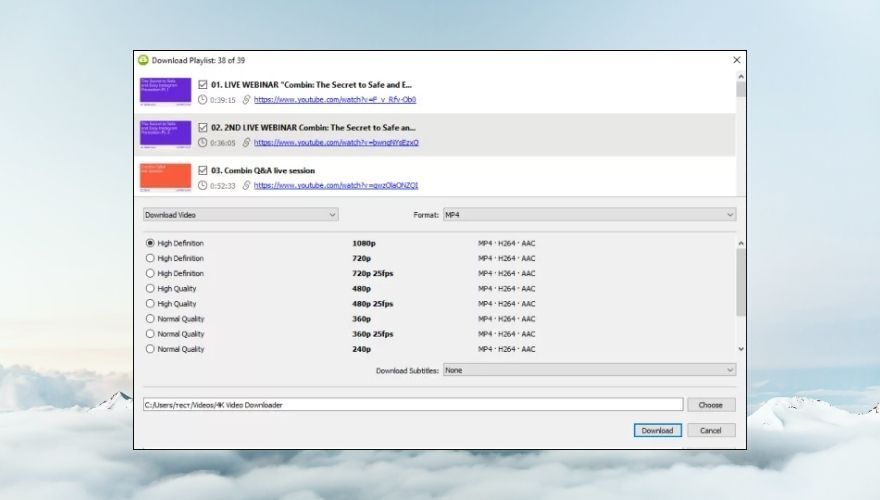
Simplicity, 4K Video Downloader is your name. If you’ve been looking for a no-compromise, user-friendly, intuitive tool that even novices can figure out to download videos online, 4K Video Downloader is just what you need. We’re dead-serious when we say that there’s no complicated configuration step you need to take to retrieve video files on your PC.
All you have to do is copy the link from your browser and click the Paste Link button within the app. Surely enough you’ll have to select a quality profile as well as a resolution, which may get a bit confusing if you have no previous knowledge about formats and resolutions.
However, we’ve found that simply leaving the quality profile as Original Quality yields great results. It goes this way: if the video you’ve been trying to download was uploaded at a 4K quality and you’re downloading it at its original quality, you end up with a 4K video on your PC, which is nothing short of awesome.
More so, this is by far not the only great feature that 4K Video Downloader has in store for you. First of all, it supports an impressive number of sites, including but not limited to YouTube, Facebook, Dailymotion, Tumblr, Flickr, SoundCloud, Vimeo, TikTok. You can also use it to download full streams from YouTube Gaming and Twitch if you want to.
If you have access to private YouTube videos and playlists and want to save them on your PC so you can enjoy them offline, later on, 4K Video Downloader can also help you with that. Found a perfect 3D stereoscopic video or a 360 video that you can’t wait to load on your VR helm? 4K Video Downloader can help you download them without converting them to plain, boring 2D formats.
If some videos or music files are not available in your region due to geoblocking or other similar limitations (for instance, ISP or network restrictions), 4K Video Downloader can help you circumvent these restrictions by making use of built-in proxy support.
Last, but not least, this app is not free, so you’ll have to pay if you want to take advantage of all it has in store for you. However, if you’re not the one to buy before you try, you may be glad to learn that there’s a free trial that you can use to decide if 4K Video Downloader is fit for your needs.
4. Allavsoft – Video and Music Downloader
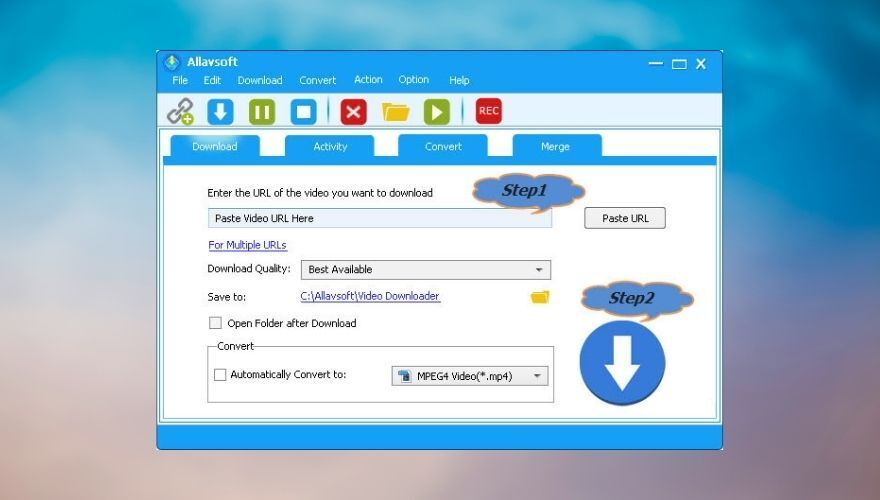
Allavsoft – Video and Music Downloader is a two-step type of program. You paste the link of the video (or music) file you want to download on your PC and you click the large (you simply can’t miss it) download button.
This program will automatically choose the Best Available download profile, so you don’t need to worry about ending up with a sub-par multimedia file on your PC. However, that’s not to say you can’t mess with the download quality settings if you prefer to.
Furthermore, at the bottom of the main window, you’ll also find a conversion tool that lets you convert your downloaded content to any format you desire, just as long as it’s on the supported list. If you’d rather have the file in its original format, just make sure the Automatically Convert to box is not checked before hitting the download button.
Allavsoft – Video and Music Downloader supports more than 1000 websites you can use to retrieve content from, such as eHow, Twitter, Facebook, YouTube, Spotify, Dailymotion, Metacafe, Crunchyroll, Deezer, SoundCloud, ABC iView, Udemy, FunnyOrDie, LiveLeak, MegaVideo, and Livestream. If Twitter is your main focus, our Twitter video download guide can walk you through the process.
If you just downloaded a video file but you actually want to listen to its audio track, whether it’s a song, a podcast, or a book reading, you can use this program to extract audio from video files without significant effort. Remember the conversion box we mentioned earlier? Just make sure to check it and select an audio format of your liking from the combo menu. Once you start the download process, Allavsoft – Video and Music Downloader will take care of everything and will provide you with the audio file at the end of the process.
Running out of time? Not to worry, as Allavsoft – Video and Music Downloader can handle requests in bulk, so all you have to do is queue the content you want to download and/or convert and let the app do all the heavy lifting. At the end of the process, you’ll be notified so that you won’t miss a thing.
You can also choose from a set of actions that the program can perform after the download or conversion process comes to an end, such as shutting down your PC, restarting it, logging off, hibernating, or putting it in sleep mode. That way you can leave your PC unattended and go about your business.
A common issue with some video downloaders is that they also retrieve ads, which is one of the main reasons why people don’t want to stream online content as much. Allavsoft – Video and Music Downloader detects those ads and doesn’t download them, so you can enjoy a clean, ad-free listening/viewing experience.
Although Allavsoft – Video and Music Downloader is a premium tool, which means you have to pay in order to use it, it also provides you with a free trial you can use to decide if the program suits your needs. However, the trial is quite limited, so you can only use it to download up to 5 videos per day, and it will only convert or merge not more than 5 minutes.
5. ByClick Downloader
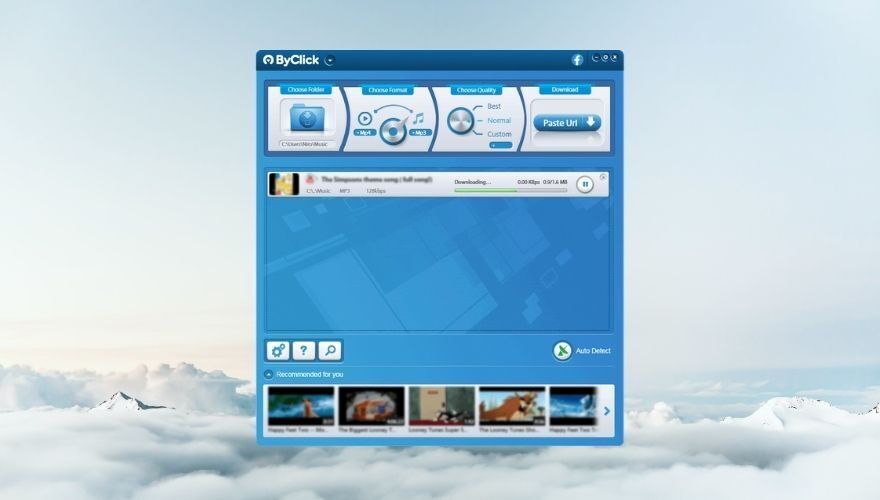
ByClick Downloader is a fast, lightweight tool that enables you to download your favorite video and audio content from various websites in a simple, intuitive manner. It currently supports more than 40 websites, including Dailymotion, Video, Facebook, and YouTube and supports a decent range of formats, such as AVI, MP4, MP3, and HD.
You can use this tool to fetch either individual content such as a single video file or one song you’ve been wanting to download for a while, but you’d perhaps be surprised to learn that ByClick Downloader can also download entire YouTube channels and playlists, and get this, even whole Instagram pages. Oh, and these operations are not complicated at all, you just point the program to the content you want to download and let it work its magic.
Compared to other video downloaders on our list, ByClick Downloader lacks video editing capabilities, but that’s actually fine. You came here for a tool that can help you download videos to your PC from various websites and ByClick Downloader is just that. Well, it can also convert files to different formats, but we believe that this is an essential part of the process.
Anyway, back to this program’s CANs, it’s possible to use it to download videos in 4K and 8K quality, which is quite impressive. Other resolutions include 720p and 1080p, but we bet we got you at 8K. Furthermore, you can convert the downloaded video/audio file to MP4, FLV, AVI, MP3, WMV, WebM, MKV, 3GP, AAC, WAV, and M4A.
The program is quite easy to use, too. We’ll tell you a bit about operating its main window, and then unveil a bonus feature that can simplify the whole process for you.
So, the main screen of ByClick Downloader consists of a few neatly organized sections where you can choose the output directory (where files will be downloaded), select a format of your choice, pick a quality profile or define your own parameters, and finally paste the URL of the file you want to download by clicking a large self-explanatory button. Sounds good so far?
Well, the bonus feature we’ve been saving for last is an auto-detect mode you can enable from ByClick Downloader’s main window. It looks like a satellite dish and should turn green when it’s enabled. Now what this feature does is automatically detect any videos on the page you’re currently visiting and offer to download them for you as either video or MP3 files.
The detected, to-be-downloaded content will also have a title in the dialog screen, so you don’t accidentally download a video ad or a GIF in the comments section. This feature works great on Chrome, Firefox, Edge, and IE browsers, but feel free to try it on others, as well.
Now the money talk. As you’d expect, a tool as awesome as ByClick Downloader doesn’t come for free, but the good news is that its price is extremely low. However, if you don’t feel like paying up, you can still use it for free, but expect it to be heavily limited. There’s a full 1-day trial (for now), and after it expires, you won’t be able to perform various operations with this tool, such as downloading Facebook private videos, not seeing ads, or cutting downloaded MP3s to make ringtones out of them.
6. Freemake Video Downloader
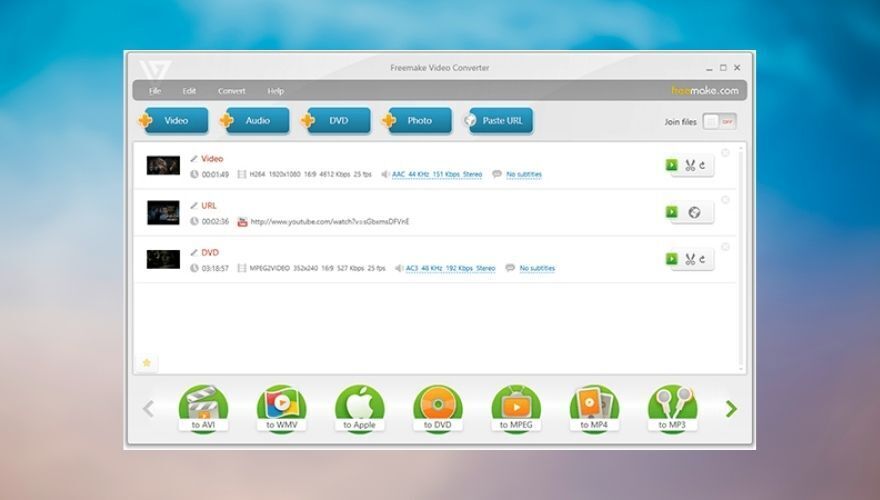
Freemake Video Downloader is one of the oldest names in the branch. It’s been around for roughly 10 years and the best part is that you can use it for free. Unfortunately, this does come with a series of more-or-less troublesome limitations, so we wouldn’t recommend sticking with the free version.
The official website only displays a Free Download button and there’s no mention of a premium service, pricing information, or available plans whatsoever, so you might believe that you can just download it and use it to its full extent at your leisure. You’d be wrong.
The premium pack, which you can only access from within the actual program, lets you upgrade to “turbo unlimited downloads,” which leads us to believe that the free version throttles download speed, video export to Google Drive and Dropbox, downloading video in HD formats, MP3 and AVI conversions, as well as a lack of Freemake splash screen at the beginning and the end of your videos.
As long as you’re okay with those limitations, you could stick with the free version. Otherwise, you’ll have to update to the premium pack. But let’s talk about Freemake Video Downloader’s capabilities for now. You can use this tool to download videos from 10,000 sites (reportedly), including Facebook, YouTube, Twitch, Dailymotion, Veoh, LiveLeak, and Flickr.
Freemake Video Downloader can download and convert videos and audio files to MP4, 3GP, WebM, FLV, AVI, MKV, and WMV formats. Furthermore, it has a bunch of supported devices, so after downloading a video you can turn it into a format that’s supported by your favorite playback devices, such as your iPhone, your Amazon Kindle Fire, or even your PSP.
This program is able to download single YouTube videos, but you can also use it to retrieve user playlists, full-length movies, TV shows, charts, entire user channels, embedded videos, and even videos that were set as private.
In order to download a video, all you have to do is copy its URL, launch the program and then click the Paste URL button to feed it to the app. After doing so, you can select a quality profile from a context menu, choose between Only download and Convert to options, define a destination path on your PC, and hit the Download button.
All downloads are displayed in the main section of the screen, so you can keep track of their progress, quickly navigate to their destination folder and even play them straight from the app. If you find videos that are not available in your region, Freemake Video Downloader has proxy support to circumvent these restrictions and download the blocked content for you.
You can also upload videos to Dropbox or Google Drive automatically after the download process comes to an end, but that’s a premium feature, so you won’t be able to use it if you stick with the free version of Freemake Video Downloader.
7. YTD Video Downloader
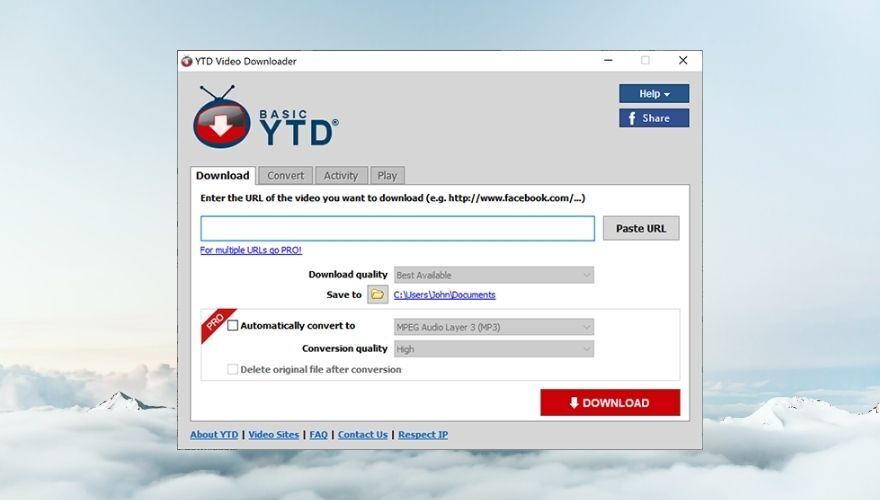
YTD Video Downloader is, as you probably figured out by reading its name, a video downloader tool you can use to retrieve multimedia content from a wide range of supported websites. Contents you can download include videos, audio files, but also entire playlists, which is definitely a plus. Furthermore, you can convert downloaded videos to MP3 to extract its audio content without losing quality.
This program supports downloading video and audio content from over 50 websites, including YouTube, TikTok, Bing, Vimeo, Metacafe, LiveLeak, Facebook, and Dailymotion. However, if you want to download videos from an unsupported website, you can just make a request on YTD Video Downloader’s official page and hope for the best.
The tool has a simplistic interface with a quite dated theme, but we’re not here to discuss its looks. The main screen consists of a few sections you can easily navigate through by clicking their appropriate tabs. In order to download a video, you first have to find it and copy its URL. Once you have the URL in your clipboard, just paste it in the designated field in YTD Video Downloader’s main screen by clicking the Paste URL button.
After choosing the quality profile and defining a destination path on your PC, you can hit the Download button to start the retrieval process. As you may notice, the built-in conversion tool is not available if you’re a free user, so you’ll have to use the manual conversion tool by clicking the Convert tab after the video download process is finished.
To convert a video, you’ll have to select the item, choose an output format from the combo menu, select a conversion quality profile, and choose a destination path on your PC. Secondary options for this process include deleting the original file after a conversion, replacing the original file with the converted one, using the same output folder as the one you use for downloads, changing the volume level, and cut the video by defining a start time and an end time.
YTD Video Downloader comes with an Activity section so you can keep an eye on download or conversion processes that take place within the app. Last, but not least, the Play section can be used to play downloaded videos or music files straight from the app, using its built-in multimedia player.
Although there’s a free version of YTD Video Downloader you can use for as long as you like, it’s worth noting that the trial is quite limited feature-wise. Therefore, you won’t be able to select and download multiple videos simultaneously, there’s no download acceleration (probably speed is throttled in the free app), no automatic file conversion after download, and you’ll receive secondary offers during the installation of the app.
8. aTube Catcher
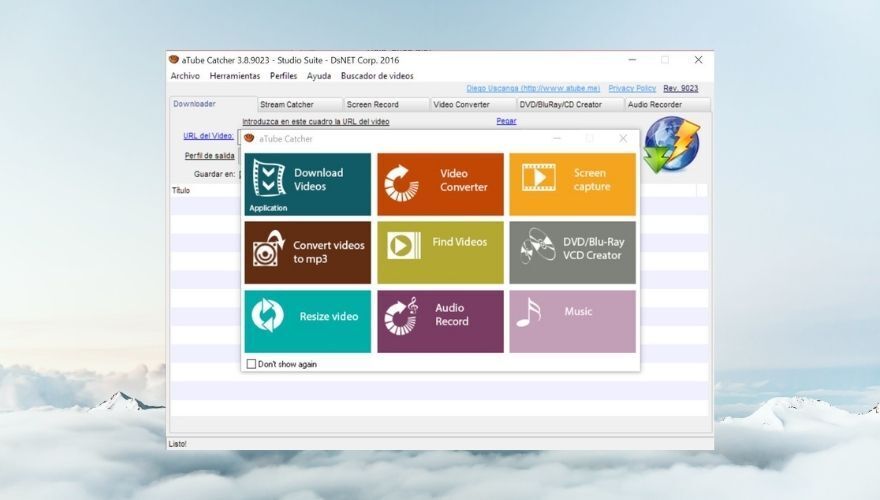
aTube Catcher is not only an efficient multimedia content downloader, but it also serves as a screen recorder for files that you simply can’t download such as live streams and webinars. Furthermore, you can use the screen recorder if you’re worried about consuming too much bandwidth by downloading media files to your PC.
This program supports multiple websites such as Facebook, YouTube, Dailymotion, Metacafe, and Vimeo, but even if you find a website that’s not supported, you can make use of the screen recording feature to retrieve the content you’re interested in.
After downloading or recording a particular video, you can convert it to a wide range of supported formats, including XviD, MP4, MP3, AVI, 3GP, 3G2, WMA, MP2, GIF, FLAC, WAV, MPG, OGG, VOB, and MOV. Additionally, this app supports converting media files by using device profiles, thus making the output compatible with various devices, including MP4 players, cell phones, smartphones, DVD, VCD, MP3, iPhones, iPads, iPods, GPS devices, and PSPs.
If you need to create a DVD with the files that you just downloaded, aTube Catcher can also help you do that without relying on third-party services. You can also use this feature to create VCD or Blu Ray discs in the same manner, if your optical drive supports writing to these storage media.
It’s also worth mentioning that you can use aTube Catcher to locate video files online, resize video files to a resolution of your choice, perform audio recordings of your favorite content and even use it to play music. When you first open the app, a welcome dialog will showcase all the app’s capabilities to you, and you can use that dialog to access these features in a quick, convenient way.
If you skip it, you can use the tabs on the app’s main screen to navigate through the various sections of aTube Catcher. The interface may feel a bit dated due to its interface, but it’s quite intuitive, which makes it possible even for novices to operate it without great efforts or previous experience with similar software.
You’ll probably be glad to learn that aTube Catcher is entirely free, so you won’t need to reach for your wallet in order to use it to its full extent. There’s no time limit and its features are not limited in any manner. However, you may get the occasional ad from time to time, which is not as often as you’d think. It’s worth noting that the project is kept alive thanks to user donations.
Best Video Downloader: CONCLUSION
To sum it up, although the general trend is to shift from stationary media to online streaming services, the latter can come with a surprising amount of headaches, including but not limited to buffering, ads popping out of nowhere, poor quality due to connectivity issues, and not being available without an Internet connection.
However, as long as video downloaders are still a thing, there’s a chance for you to retrieve your favorite media content from the website it’s held on and keep it for offline use on your PC. Most downloaders also feature conversion capabilities, which are paramount to making downloaded content compatible with virtually all of your playback-ready devices.
Our list above comprises some of the best video downloaders on the market, most of which offer free trials you can use to decide if it’s worth purchasing licenses for their premium versions. On the other hand, note that the trials are quite limited, and will keep you from using these downloaders at their full potential.

You can download free video and does not require registration. It works on Windows, macOS, Android, iPhone, and iPad. Only a web browser is required. You don’t need to install any additional software. All videos can be saved offline.