CF-Auto-Root Brings Easy Rooting To Nexus 4, Nexus 7 & Nexus 10

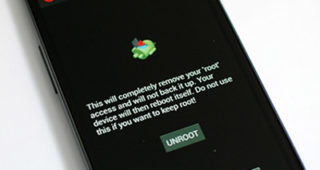
If you're an Android enthusiast and haven’t been living under a rock, you must have heard about the famous CF Root kernels that XDA Elite Recognized Developer Chainfire has been releasing, especially for Samsung devices. These kernels simply rooted your Android device once flashed and installed a custom recovery, keeping the rest of the firmware totally stock. Recently, Chainfire moved on to CF-Auto-Root that skips, even ditches, the recovery from the mix to keep the experience as close to stock as possible. Considering the popularity of this method, it is no surprise that it now supports the latest Nexus devices, i.e., Nexus 4, Nexus 7 and the Nexus 10. How does it work, what changes does it bring, and how can you use it to easily root your device while keeping everything else purely stock? Let's find out. Read More

Overclock HTC DROID DNA To 1.8GHz With Beastmode Kernel

HTC finally released the source code for the DROID DNA, while Verizon decided to locked down the bootloader. However, that didn't keep the developer community from doing something about it, and the bootloader was shortly unlocked, paving the way for custom kernel development. In the latest development on the kernel side, ‘Team blackout’ has just released the aptly named  Beastmode kernel that will rev up the DNA’s CPU frequency to 1.8GHz, with added overclocking for the GPU and FSB! You wonder if 1.5GHz is insufficient on Quad Core, and no it is not. Though the way things go in the developer community, if it can be done, why not? More on the kernel and how you can flash it on your DROID DNA after the jump. Read More

Android 4.2 Based Paranoid Android Brings Hybrid UI To Nexus 4 & Nexus 10

Phablet mode hits the Nexus 4 and the Nexus 10! The latest version of  Paranoid Android ROM based on Android 4.2 is one of the most exciting developments headed the Nexus 4 and Nexus 10’s way since the devices got rooted. In case you're wondering why I seem so excited, this custom ROM offers a hybrid interface - a perfect mix of both phone and tablet UI that works wonderfully phones with large screens as well as tablets. Considering Paranoid Android looked good on the Galaxy Nexus, we can already tell it'll look stunning on the new HD IPS display of its successor. As for the Nexus 10, a customizable tablet UI will only add to the pleasure of using it. The ROM is based on the new Android 4.2 AOSP so don’t be surprised if you run across some bugs or issues on the Nexus 4, since full AOSP source code for it hasn't been published yet. More on the ROM and installation instructions for both the Nexus 4 and Nexus 10 after the jump. Read More

HTC DROID DNA Toolkit: Root, Install Drivers & Flash Custom Recoveries

Earlier, we covered a guide on rooting the DROID DNA, and while it wasn’t the most complex root guide we have covered, manual root methods are never newbie friendly. So if you have been reluctant all this time - either out of fear of damaging your device or because you were waiting for a more convenient method - try recognized developer and XDA-Developers forum member hasoon2000’s HTC Droid DNA All-In-One Toolkit. The toolkit will help you easily root your device, install drivers for it on your PC, flash custom recoveries and kernels, install APKs, backup data and more. Note that it is meant for Windows only, and as specified by the developer, will not be getting Mac or Linux variants. Read More

Unlock The HTC DROID DNA Bootloader Unofficially

HTC DROID DNA gets unofficial bootloader unlock! Verizon continued following its trend as it locked down the DROID DNA just as the phone hit the shelves, pulling the plug on the official bootloader unlock method from the HTC Dev website. Those who didn't get a chance to unlock and root their DROID DNA before this should know that thanks to the efforts of recognized developer Justin Case (and a working exploit by Sean Beaupre), Verizon has been outmaneuvered. Users can now unlock the bootloader and proceed with gaining root access on the device. The method involves software mod to change the carrier information, so that the device can be unlocked from HTC Dev. More on it after the jump! Read More

Overclock Google Nexus 4 To 1.8GHz On Android 4.2 Jelly Bean

A wolf in a sheep’s clothing? Many of you might not agree, but looking at the simplistic design of the Nexus 4, it doesn’t exactly scream out the mighty specs it has on paper. At 1.5GHz, a quad-core CPU coupled with 2GB of RAM is more than enough to take whatever the world of Android throws at it. So how does overclocking to 1.8GHz and upping the GPU to 487MHz sound? All this courtesy of recognized developer ‘faux123’, who has just released a custom kernel for the Nexus 4, compatible with all stock (rooted) and custom ROMs based on Android 4.2. Some of you are probably wondering if there’s any need for this, but that’s for you to decide. I’m telling you it can be done, and just showing you how. Read More

HTC One X+ AIO Toolkit Offers Easy Root, Bootloader Unlock & Recovery Flashing

One click bootloader unlock and root for the HTC One X+ is not entirely the newest development for the device. Earlier, we covered a guide on rooting the One X+, and while it was as simple as a root can get, there's more to modding an Android device than just gaining root access. This is where the HTC One X+ All-In-One Toolkit  comes in. From recognized developer and XDA-Developers forum member ‘hasoon2000’ – responsible for a major number of HTC Android toolkits – this toolkit lets you easily root the device, flash custom recoveries, flash kernels, backup data and more. Unfortunately, it is meant for Windows only, and the developer has stated that there will be no Mac and Linux variants. Read More

Nexus 10 Toolkit: One-Click Root, Unroot, Unlock & Driver Installation

I don’t own a Nexus device, never have, and throughout that time, I have envied those who do. The reason is simple; an unbelievably paced and strong developer support. To prove my point, recognized developer and XDA-Developers forum member ‘mskip’ has just released an all-in-one toolkit for the Google Nexus 10, just a short while after releasing his toolkit for the Nexus 4. In case you’re not familiar with the Nexus 4 toolkit, this Google Nexus 10 Toolkit, in addition to unlocking your tablet's bootloader and rooting it, offers a plethora of additional features that make it a must-have for both novice and advanced users. The toolkit, as per trend, is only available for the Windows platform. Read on after the jump for more on the toolkit and how you can use it to prepare your Nexus 10 tablet for some serious mods. Read More

RecoverX: Flash Major Custom Recoveries On Almost All Android Devices

Few things in Android modding are as easy as sitting back, clicking one or two buttons on the computer and watching it do all your work for you. But it seems that is quickly changing. There are now several automated or one-click solutions not just for Android, but other mobile platforms as well. However, with well over a thousand different Android devices produced by different manufacturers, different rules apply to each device, and not everything can be centralized – dare I say – like the iPhone. XDA-Developers forum member ‘LEDelete’ believes otherwise and has pushed me to believe that, to some extent, essential Android hacks can, in fact, be centralized. With his tool, RecoverX, the developer has managed to centralize custom recoveries for “more than 18 devices”. I see a lot more device froma  total of 19 manufacturers. The tool serves the very simple purpose of downloading and flashing custom recoveries meant for your device – nothing less, nothing more. What makes it special? Find out after the jump. Read More

Easily Root Google Nexus 10 On Windows, Linux & Mac With Superboot

One-Click root for the Nexus 10 has finally surfaced thanks to the efforts of recognized developer, ‘paulobrien’ of MoDaCo. Superboot is the famous no-nonsense script that has rooted the likes of the Nexus 7, HTC One X, Galaxy Nexus and many more Android devices. Earlier, we covered a manual root method for the Nexus 10. The method is quite straight forward, but if you're unfamiliar with ADB or other common requirements of conventional Android hacking, we'd suggest you go with Superboot. As always, the script is meant to be run on Windows, Linux and Mac. Read More

Root, Unlock All Google Nexus Devices On Linux & Install CWM Recovery

This universal toolkit roots the latest Google Nexus 10, Nexus 7, Nexus 4, Galaxy Nexus and Nexus S on Linux. While the guides and toolkits we covered earlier were mostly for Windows, XDA-Developers forum member tatelucas' Universal Nexus Linux Toolkit fills the platform void with an all-in-one solution for the open source OS. The toolkit is pretty easy to set up, and while it may not have a plethora of features like the Nexus 4 toolkit, it is pretty much all you need to start modding your Nexus device. Read More

How To Root Google Nexus 10 & Install ClockworkMod Touch Recovery

Google Nexus 10 rooted! Google seems to be churning up some very effective and potent Android devices this year with the likes of the Nexus 4 and Nexus 7, both of which have already gained root access. The Nexus 10 was not going to fall behind and why should it, it’s Google’s most prized tablet to date with a screen resolution and ppi density that out-specs Apple's 4th generation iPad. If you are one of the lucky few who have ordered the Nexus 10 or have already got your hands on one, you can thank XDA-Developers forum member ‘Kidgoo’ for testing and coming up with the root method, and recognized developer, ‘Chainfire’ for the SuperSU zip and binaries. If you need a little push with rooting the Nexus 10, here are our top 10 reasons for rooting an Android device. Read More

Nexus 4 Toolkit: One-Click Root, Unlock, Recovery, Drivers & More

One click root for the Google Nexus 4 is now available! Earlier we brought to you an extensive guide on rooting and installing ClockworkMod recovery on Nexus 4, and it was no walk in the park, to be honest. However, thanks to the hard work and efforts of XDA-Developers forum member and recognized developer “mskip”, we now have a truly all-in-one Google Nexus 4 Toolkit. Now, what makes this deal even sweeter is the addition of more than just a one-click bootloader unlock and root. Automatic driver installation, backup, flashing, mods, recovery booting and more. The Toolkit is strictly available for the Windows platform for now. Normally, the paradigm of Android development related to specific devices is always unpredictable, but I’m looking at a Nexus here, so no surprises at how fast this has come our way. Read More

Install TWRP Touch Based Recovery On The HTC DROID DNA

Touch recovery from the folks at Team Win Recovery Project (TWRP) has now made its way onto the recently-rooted, monstrous HTC DROID DNA. In a league of its own for now, I’m sure if you’re here by now, you are already well versed with the screaming specs of this phone and have either rooted it and planning on installing a custom recovery, or are weighing your options. Either way, this touch based TWRP recovery is a must have if you’re planning on an extensive try out of custom ROMs or mods which will be headed the DNA’s way in no time now. Not sure why you need a custom recovery? See our guide on what is ClockworkMod recovery and how to use it. It is by no means what TWRP recovery is actually like, but TWRP recovery will serve the same functions with the added functionality of a touch based interface. More on it and how you can install this recovery on the Droid DNA, after the jump. Read More

The Best Video Players For Android

I remember the days when the coolest cellphone was the smallest and most compact one and in the course of a few more years, out came PDAs; some with phone functionality and some as a personal assistant. The screens on those things were huge but they made for some very good multimedia players, something that carried into what we now term as Smartphones. Phones were again headed for an increase in screen size and a larger screen soon became sought after. Phones were soon judged by their screen quality and the ability to play videos. Today however, most smartphones have decent screens in terms of both side and resolution and furthermore, their CPU, GPU and RAM specs are also adequate enough for the job. So now the question isn't which phone plays videos better but rather which app is able to play videos better than the other. Of course, a countless other questions arise, like, 'which player will support 1080p playback?' or 'does this player support subtitles?' or if you’re more aesthetically conscious, 'which player has the best UI?'. In what follows, we will try and answer these questions and a few more, as we list down some of the best Android video player apps out there today. Read More

How To Easily Root The Kindle Fire HD 7″ On Android 4.0 ICS

The Kindle Fire HD 7” Tablet gets rooted amidst all those fresh claims by Amazon to keep a tight lid on all that can be exploited on the tablet to gain root access. The device was dubbed as invulnerable and uncrackable over at XDA-Developers given that Amazon was giving it all it had to keep the device as tightly locked as possible. The device was supposedly very well protected at the bootloader level, but that now, is something that belongs in the past. Thanks to the efforts of recognized XDA-Developer sparkym3 who was responsible for finding a universal exploit for Android 4.0 ICS, the Kindle Fire HD has given in to the same exploit but with a re-written code. More on the root method, after the break. Read More

The New iOS 6 3D Vector Maps With Turn-By-Turn Navigation [Hands-On]

I never thought I’d say this, but iOS 6’s new Maps app has given Google Maps a run for its money. Extremely detailed vector based 3D maps courtesy of TomTom and OpenStreetMap and a few more unannounced sources, have given the all new iOS 6 some serious oomph. Apple is also reportedly using data from local sources in different areas for a more localized and up-to-date map data, like Yandex in Russia. This has led critics to question the accuracy and coverage of these maps, which, unfortunately, we cannot verify for ourselves right now. We can tell you public transit routes are missing for a quite a few areas, and it’s critical that Apple either fixes that or comes up with some updates quick. Other than that, Apple has boldly made a statement, and we take a look at what the fuss is all about just past the fold. Read More

The New iOS 6 Native iPad Clock App With Alarms, Timer & Weather

Finally, a Clock app lands on the iPad 2 and iPad 3, courtesy of iOS 6! There could be a number of reasons why Apple didn’t feel the need to include a functional clock app on a device that set the trend for a high performing tablet, but finally, it is here and I have to admit, it looks really impressive with some really intuitive features. Oh, did I mention that the clock app also comes close to delivering the function of the weather app as well, despite lacking in details as can be found on an iPhone or iPod Touch. With a World Clock, Alarm, Stopwatch and Timer built into one app, the Clock app is a definite welcome, even if it’s subtle and replaceable. However, a native feature is always more fun. For more on this wonderful app and how it works, read on. Read More

iOS 6 Privacy Feature: What Is It & How Does It Work?

There’s a lot of debate around the internet over the practicality and future of the Privacy feature introduced in iOS 6. There’s talk about the feature becoming annoying for users as iOS 6 grows, since installation and consequently the first time use of an app that requires access to Contacts, Calendars, Reminders, Photos, Bluetooth Sharing, Facebook, Twitter and of course Location Services, will prompt a dialogue box whether the user wants to allow that app access to one or more of those elements. The current buzz around the blogosphere is that this feature may ultimately backfire, but if you ask me, it’s a move bound to be welcomed by iOS users, as it provides them greater control over their devices. Requiring stringent app approval methods for the App Store is one thing, but it’s about time Apple trusted iOS users to make their own calls over Privacy concerns. For more on the Privacy feature and how it actually works, read on! Read More

All About iOS 6 ‘Reply With Message’, ‘Remind Me Later’ & Do Not Disturb Features

Do Not Disturb for iOS 6 is something that should have made its way to users a lot earlier, given its practicality and need. Earlier, iPhone users had to resort to third party apps for this very purpose, but a native feature is almost always more effective and easier to handle. Now, with Do Not Disturb enabled in iOS 6, all incoming notifications will be smartly filtered and you will, literally, not be disturbed. If you are – of course, considering the Do Not Disturb feature is disabled – actually disturbed, simply reject and reply with a message, or reject asking the phone to remind you when you want. Read More