Use Apple Magic Mouse On Windows 7
Who didn’t see this coming? Apple’s latest multi-touch capable Magic Mouse now works on Windows. Yes you heard it right, from Windows XP to Windows 7, it can work on them all. But this is not an official update from Apple, rather it was done by hacking the Apple’s Bluetooth Update. Thanks Dan! Now I can’t wait to get my hands on the Magic Mouse. Download links for both 32-bit and 64-bit versions are given below.
Those who have used Magic Mouse know that people have a love-hate relationship with it. On one hand it is utterly useful if configured correctly, on the other hand the sensitive touch can be a tad too much for power users. Nevertheless, the drivers only allow users to use the basic functionality of Magic Mouse in Windows. You can left click and right-click just fine, even scrolling works. But don’t expect the swipe effects to work since they are only exclusive to Mac OS X.
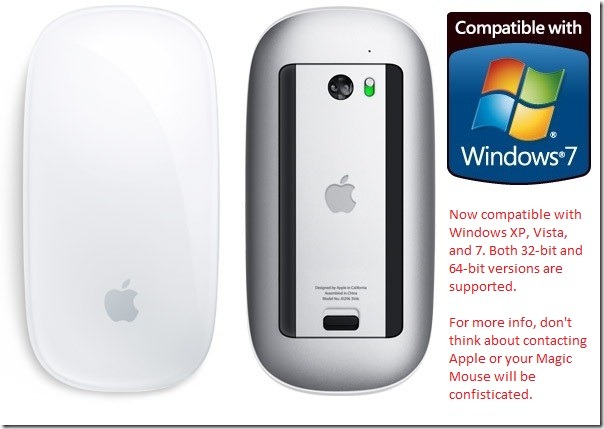
For Mac users: These drivers are not meant for those who are running Windows on Macbook using Bootcamp because if installed correctly, your Magic Mouse should automatically connect. This is because Apple installs the necessary drivers required for your Magic Mouse to work on Windows. However, if you are using Hackintosh or have installed Windows without Bootcamp, then you will need these drivers to make the Magic Mouse work. Again, it should be noted that it only activates the basic functionality of the Magic Mouse in Windows.
Download Apple Magic Mouse Driver (32-bit)
Download Apple Magic Mouse Driver (64-bit)

how do you uninstall this
Does this work in Windows 8? If yes, how do you make it work in Windows 8? Is it also possible to do the procedure without having a mouse? (Regular mouse, that is)
Thank you for these links.
gets disconnected after sometime 🙁
These links don’t download anything. They take me to some other website with no information about a Magic Mouse.
cannot download 32bit driver. site that opens gives out 404 alert
Yeah the link has changed!
here’s the new one! it’s the same website!
http://uneasysilence.com/2009/11/get-apples-multitouch-magic-mouse-to-play-nice-on-windows/
Good one guys! Thanks!
Hi,
For the ones who do not have the scrolling working, try to delete the Bluetooth drivers of your computer and install the default ones. It worked for me on my HP Elitebook. Just had to uninstall the Bluetooth drivers HP supplies) and then go to control panel -> find new hardware -> automatic install, and windows will install the stock Bluetooth drivers. Then the scrolling worked for me.
Good luck.
But it’s too bad, I cannot take advantage of the touch surface to use the multitouch gestures…
Thanks. Default driver of windows 7 doest not recognize movement on the mouse’ touch-panel. After installing your driver, everything works great.
Windows 7 32-bit on HP computer.
perfect driver works great with HP EliteBook and Win 7!!!
thanks so much for the driver! i ordered a mbp and will be receiving it in a few days, but until then i’m rockin it on windows 7 x64!
p.s. the scrolling works too! easy install and easy connect after install. thanks so much! 😀
Thanks its works well on Dell Vostro with Windows 7 32Bit
Thnk all of you for interesting post i love that
i had already installed apple magic mouse driver (32-bit) on my windows 7 but my mouse couldn’t scroll up/down. help me please..
thank you sir…
anyone able to get the middle click function to work on the magic mouse? i am not using apple macbook pro and do not use bootcamp. have installed the latest bluetooth driver extracted from apple bootcamp in a windows enterprise 64bit environment. the scrolling works, left and right click works but no middle click.
i am using dell inspiron 1564 with dell 365 wireless bluetooth module.
thank you
The Shaheel drivers worked great to make scrolling work, and remove lagging issues. Thanks!
However, for me the left and right mouse button taps does not work at all, with or without these drivers. I’m on a Dell E6500 laptop running Windows 7 32bit.
Any tips greatly appreciated!
-Ken
Works great. Thanks heaps for putting into this article 🙂
GREAT JOB!!!!!…..It works for me…….thankx a lot………
This is awesome!!!..i gt ol the answers i wanted….love u ol
works fine on mine.. But way better on mac.. especially with the gestures and whatnot 😉
VAIO – WIN 7
Very nice, thank you!!
Nice one, I’ve been trying to get this working for ages. You rock!
I was terrified when thought that mouse is losing pairing after reboot/standby/hibernation. After hours of searching I found that after each windows logon YOU NEED TO CLICK BOTH LEFT AND RIGHT BUTTONS – THIS TURNES MAGIC MOUSE “ON”, now I’m happy!)
Although horizontal scroll does not works, but I’m never used it. Zoom does not works as well, but I prefer 100% in 99.9% of cases, in the last 0.01% I’m using CTRL+scroll.
respect thanks …..
I have tried Uneasy, and am about to try this link above. I have also tried going into the control panel and updating my drivers but it says that there is an error and the device is incompatible. I am really stuck, since i don’t know enough about computers to go much further, is there a step by step process rookies (me) can use?
Thanks.
Hello,
Do you know if every funktion is working? I heard that Win7 doesn´t support multi touch inputs.?
Great help, love this!
I love you guys for sharing the love. Awesome!!
I have installed pack for 32 bit OS, add device fuction can see the Magic mouse but can not connect to the device. It display: CONNECTING TO DEVICE for along time….
Please help me solve this problem! Tks.
Awesome thanks!!!!!!!
what a nice bloke…
Thank you for the great infomation. It is great pleasure to read this. At first I was a little on installing this apprehensive on my new laptop. but after I installed it, and told the computer to reconnect to the mouse, it works a treat, all functions of the mouse works fine on my PC. thank you!
http://www.pcartisan.com/
Good to have found this before buying the magic mouse itself!
Many thanks!!
i installed the software according to the author, and it works well on my windows 7 32bit, and scroll well
I installed the driver and mouse seems to work with vertical scrolling, however, it does not work with a horizontal scrolling and with a swipes. Is there a way to fix it?
I have Windows 7 Pro 64bit working on PC. I installed the driver nothing happend, no scrolling.
What you suggest?
I bought the mouse, and have installed almost every driver I could find for it, I even extracted the driver myself from the bootcamp update on apple’s site. I have windows 7 64bit, and all the mouse does is point and click, no scrolling. I looked at the mouse properties and it isn’t using the drivers I installed, it’s running some generic HID compliant ones and if I tell it to use the ones I extracted, it says to make sure they are made for windows and 64bit, which it is. Anyone got any ideas?
works perfect precise and scrolls awesome
what driver did you use? how did you install it? for me doesn’t work any driver, somthing about compatibility message it’s pop-up when I try to force the driver install, after that mouse dosen’t work at all, works only when I rollback, but not scrolling, I have windows xp sp3, lenovo t400.
Have you any ideea?
Anyone has succeded to install on windows XP?
I mean, to be able to scroll and everything….
Is there a way to read the battery percentage on the Magic Mouse under windows 7 64bit? Everything is working great except that when the battery is low, the mouse just stop suddenly and there is no sign the mouse is low on battery. It is not like intermittently pause but you can still use for about 30mins or anything like that. It is kind of annoying when it is used with a laptop and outside suddenly you mouse stop when you needed the most and wish you change out the battery when you left home.
thank you! thank you work @ 32bit windows 7 ultimate . p.i
Guys, I have one problem. Every time I am starting my Windows 7 (32 bit) I have to delete from Bluetooth the mouse and to add it again in order to make it work. Is it another procedure to make automatically this process? I have tried to power off and on the mouse in the same time with PC but same result. Please help!
Alex, has anyone as yet answered this “newest” Magic Mouse problem you’ve addressed?
Thank you,
Steve G
Legend. Thanks a million for this!!
you guys are simply rocking……..
I am working on win7 64bit. I am able to use left&right click and scrool. But tapping doesnt work. I used Samuel Hurley middleclick.exe and i see that it is working.
Is there any application that configs tapping on windows 7?
Thanks
One word “Beautiful”.
Thank you very much!
working great with windows 7.But what i found is it works with windows better then Mac.
I am using windows on Imac.Scrolling is much mare softer the mac and even cursor move much faster in windows
Worked really well, thank you!
3.1 Drivers for 64bit Windows 7 here,
http://www.megaupload.com/?d=HMSZSXBX
I ripped them from the latest Bootcamp update myself. Just run the DPInst.exe (don’t know if its needed but i made sure to run as administrator). If you don’t want to download this file the tutorial on how to rip Mac drivers for Windows (and for future updates to the drivers) can be found here!
http://georgetasioulis.com/how-to-use-the-apple-magic-mouse-on-your-windows-pc/
When you run the DPInst.exe file it will SAY 2.1 on the setup somewhere (I noticed this and went HRMM….after ripping the driver from the latest version of 64bit Bootcamp), but unlike the driver in Nakodari’s original post, this will install as 3.0.0.6 as opposed to 3.0.0.5 if you go into the control panel and look for the drivers under uninstall a program you can check this, I’ve tried both and the updated drivers from Bootcamp 3.1 are AWESOME! NO MORE RANDOM LAG EVERY 6 MINUTES!!!
You probably don’t need to, but I went as far as to uninstall the drivers Nakodari provided in his post, and then remove my Magic Mouse from devices, reboot, and then install the new drivers and pair the mouse again. Worked like a charm.
Hope this helped someone!
Yaar its too good
Thanks for uploading this driver ……..
The link is broken, here is the correct link:
http://uneasysilence.com/archive/2009/11/14588/
How to make windows 7×64 find the magic mouse on startup ?
Yes Shaheel, do you know of a 64-bit Windows Bootcamp driver release for this mouse?
Shaheel. Is there a 64bit version of 3.1?
To those of you who are having lags, disconnection, and scrolling problems, use the following link:
http://shaheel.net/upload/tmp/AppleWirelessMouseUpdate2010.exe
I’ve repackaged the bootcamp 3.1 Wireless Mouse Update that corrects all these.
Enjoy!++
Can you extract/convert the 64 bit drivers as well?
lags, disconnection, and scrolling problems are so far, (unly used mouse for 3 minutes but, it appears the lag problems are ALL fixed
Thanks to you!
Steve
why dont apple computers use windows.
you’re special aren’t you
you HAVE to be special 🙂
Funny question…in fact JOKE OF THE CENTURY!!!!
These drivers do NOT solve the whole issue. It seems that only a superficial layer of drivers has been provided by Apple and no-one is looking for a full solution.
While the Apple drivers do add multi-touch support, this is pointless as it also makes the standard mouse functions almost unusable. Unless you are careful to place the correct combination of fingers on the mouse at all times, the cursor movements are jittery and frustrating.
I can reproduce this type of behavior simply by resting the edge of my palm on the mouse and attempting to move the cursor. The movement becomes erratic until I place my index and middle finger in the “right” spots.
To further complicate things, it seems that if you do attempt to use the scroll features the mouse commands quickly become “overloaded” and the mouse cursor freezes for a few seconds and then spits out the commands as they were input.
What seems to be lacking are proper drivers to fine tune the device and prevent accidental input. Perhaps the Apple bluetooth drivers sorts this out on Mac hardware, but any Windows user will find themselves very disappointed.
You have addressed the exact “REAL” problem specifically! And, Im certain you already know that the driver from Shahell fixes “lag and jitters” very well. Only experimented for several minutes but so far, it appears to be resolved, thanks to Shaheel
It works..click on the bluetooth icon (down right of your screen) then click add device. Apple magic mouse will be appeared. But it won’t be connected directly (keep spinning around). Right click on the mouse image and Tick on the HID bluetooth box and bingoooo it will be connected smoothly.
However scrolling function not yet work. If you want your magic mouse work, go to
http://support.apple.com/kb/DL996
and download update drive boot camp 3.1. It’s preety big (380MB)….so sit nicely while you’re downloading….try this and your expensive magic mouse will be worked perfectly..if dont just let me know and I’ll be happily to help you…
hey i am very interested in the magic mouse i have a windows 7 ultimate 32 bit pc. with an external blue tooth usb thing. lol if i go buy the magic mouse and it dosnt work smoothly, can u help me try to get it smoother?
Hi there…. I tried that but when I right click nothing happens… I am using a Lenovo T61
I don’t know why you guys are crowing about this. I bought it, installed it and it’s great except that it’s unusable because it locks up every so often for about 3-4 secs. I’ve tried it with two machines, a laptop with built-in bluetooth and a PC with a bluetooth dongle, both on 32bit Windows 7 and they both have the same problem. I tried several work arounds from different forum suggestions and none of them help. I’ll reluctantly have to return it…
Greg, I had the exact same problem but was ableto solve it by replacing my Microsoft dongle Bluetooth dongle with a generic Hama model and that part worked out well. Now that I replaced the dongle however, I somehow lost the scroll feature that worked B4. Once I figure that piece out, it will be golden.
My story… windows xp sp3.
No problem installing Bluetooth. Other windows product are harder to install.
Then the UnEasySilence drive. But windows do not allow me to use the modified aple drive…
Now I have installed the sidwinder drives… but still not able to scroll….
The only functionality I felt was missing was middle click. I compiled an AutoHotKey script (Win7 64 bit, although it probably works on 32 also) to emulate middle click.
You must right click, then tap on the left side of the mouse. It takes some finesse (to avoid right-clicking also), but it works fairly well.
Here is the script: http://dl.dropbox.com/u/5131732/MiddleClick.exe
Enjoy!
-Sam
hello,
I downloaded your programm but theres one problem. Everytime I shut down my computer and start it up again I have to re-install it. Could someone help me out here
keep the exe file “MiddleClick” on your desktop, drag it into “startup” in your programs folder. the script should start everytime you start your computer
Does this mouse only work on apple computer? Dose this work on any computer in any system or only works on apple?
After Installing a USB Bluetooth Receiver And the 32 Bit Apple Drivers. I turned on the Magic Mouse and everything worked like a dream. The only thing is that the mouse takes few seconds to activate when windows 7 starts. It takes a bit of getting use to not having a wheel. but other then that 2 thumbs Up.
well..it’s nice to have it work, but…using a Mac Mini running Windows 7 64 bit, the mouse use is sporatic at best. It’s not consistent in flow across the screen when moving the arrow, in fact it will stop and my hand is still moving, which is not good. but the zoom does work with control key in web browsers that support that like chrome, and the mouse does function a little bit. Hope there’s a tuneup at some point. Thanks for the effort.
it works but have to download by using firefox. so scrolling up down work well, but cannot zoom in and out or left or right scrolling don't work
Thanks My Dear, this mouse I thought I had wasted my money…But wow, now it works…Mannnnnnnnnnnnnnnnnnnnnnnnnnnnnnnnnny thanks to that gentelman who wrote this driver….Thannnnnnnnnnnnnnnnnnnnnnnnnnnnnnnnks my buddy 🙂
Hello,
I have installed the driver a few times and nothing seems to happen.
I am running Windows 7 Ultimate on a Macbook using BootCamp 3.2.
When i try to add a new Bluetooth device, Windows sees my Magic Mouse and when i click Next, it says CONNECTING TO DEVICE, and it stays like that for hours.
Any help would be much appreciated.
Thanks!
You have to pair it first before you can connect it. btw, if it asks you for a pass key, the pass key is 0000.