Excel 2010: Convert Number Values Into Time
There are many ways in which you can enter time into cell, but Excel has an built-in function which facilitates users to convert values into time format, by using this function you can convert data in hrs:mm format, and hrs:mm:sec format. It automatically shows military time format against the suitable values in the cell. This post covers how to change values into time format.
Launch Excel 2010, open a datasheet in which you want to convert values to time format.
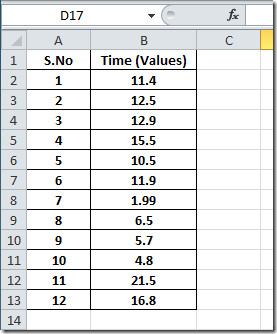
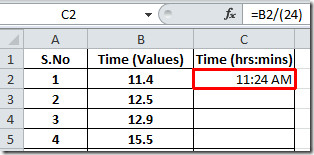
We are intending to convert values in the Time (Values) field into hh:mm, now we will be adding another field with a label Time (hrs:mins). We will be writing a simple formula in the first row.
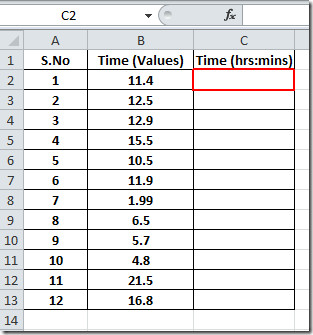
Now lets add the formula;
=B2/(24)
In formula, we are dividing time by 24 (24 hrs sums up a day). This will yield value in decimal.
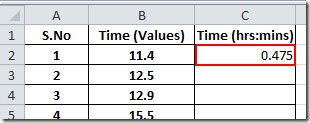
Now select the cell that contain result, and right-click to select Format Cells.
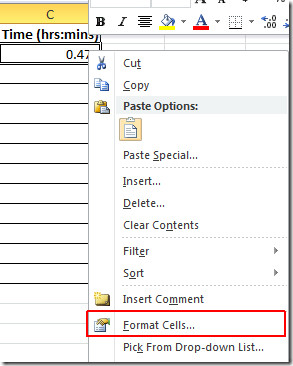
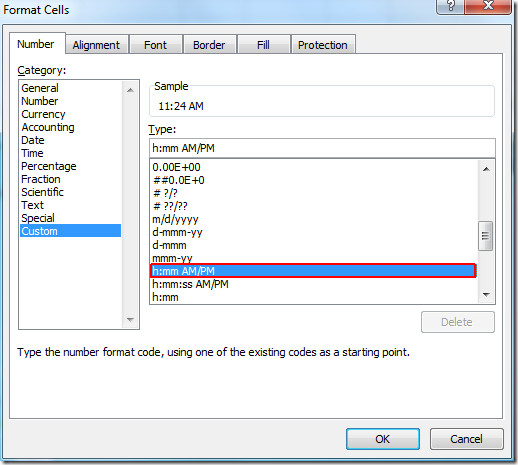
Format Cells dialog will appear, from the left pane select Custom, and from the right pane under Type, look for h:mm AM/PM, and click OK.
Here you can see in the screenshot below, that the value is now converted into Time format.
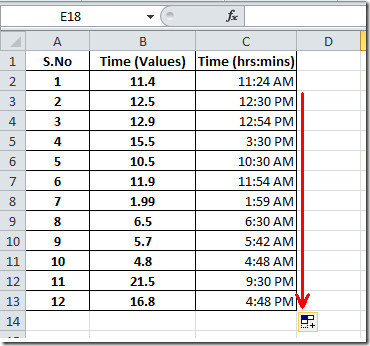
Now drag the plus sign at the end of the cell towards the end of the column, to apply it over the whole field.
You can also check out previously reviewed guides on SmartArt in Excel 2010 & Data Bars in Excel 2010.

Hi, i have one issue in my biometric attendance machine report xlsheet timings comes in general catagory example ( 9.57 it showes if i try convert this it will show as 9.36 ) there is a difference of 21 minutes, anyway if i get this 9.57with text to time , i cant use this for calculation purpose, please help regarding this
how would i convert 1.05 into 1:05 in time format
I need to get all this into one cell
(=24-G4+H4)
AND
(=HOUR(K4) + MINUTE(K4) / 60 + SECOND(K4) / 3600)
G4 – 06:25
H4 – 19:15
K4 – Cell where time is calculated
Please advise.
in short, convert your cell to DAYS and then use the h:mm or hh:mm:ss format.
I have a table of 10 digit numbers from a time clock app in my iphone. I took it to be repaired and forgot to export the file to excel. The tech exported it into some other type of file and the closest I can get is these 10 digit numbers. I was able to subtract one column from the other and divide by 60 twice and came up with what would be the time worked. Is there a way to convert that 10 digit number to a date and time? Here is an example that should probably be March 1st –
1361297220
hey I want to know how to convert a numeric (non-decimal/value) entry to minutes and seconds, for example: in a single entry of numbers 4520 into 45:20, that will be so helpful in a project I’m doing from work, pleaseee
use a formula in a new column. If your value is in cell a1 then type =left(a1,2)&”:”&right(a1,2) Then drag down the entire row.
That doesn’t help. There should be a FORMAT style (not a formula) that automatically converts a numeric entry in a formatted cell into a TIME.
For example: In Cell A1, enter “800”.
If A1 is formatted using this new format style, you would get: “8:00”, or “08:00”, or “8:00 AM” when you hit Return.
If you enter, “1134”, you would get, “11:34” or “11:34 AM”
If you enter, “1400”, you would get, “2:00 PM” (using military time conversion).
If you enter, “1670” (are you sitting down?), you would get: “5:10 PM” as it would take the time over 60 and add it to the current hour (16 = 4pm). Cool, huh?! Or, I suppose it could just default to “VALUE?” (but that’s too easy and boring!)
A formula is one way of doing it, but it requires a separate entry and output address. I want to be able to enter a numeric value and have the cell format automatically convert the value to a time.
Here is the problem. Excel thinks of dates as a number from 1/1/1900. So when you convert your time 1115. It thinks you mean day 1115 past 1900. So time is just a fraction of the date.
11:15 on 1/1/1900 would be 0.46875 (because you are almost half way through the day). 1/2/1900 would be 1.46875 etc..
So Here is the issue with just changing the “format” excel thinks you mean something else when a time is 1115. For excel mind date 11:15 = general 0.46875
general 1115 does not equal date 11:15
You’re not actually just changing the number to a time you are recalculating the value to a time/date formula that excel understands. This is why you need a formula.
Maybe you could do this with a visual basic script, but are you willing to take on that kind of project? I don’t think there are any options out of the box (in the GUI) that are going to reformat this without a formula or script. We had this same project at my office, but just decided it was easier to type in the colon than spend the programming time messing with it.
I know this doesnt solve the problem, but I hope it helps explain the nature of why it’s not just a simple transformation without some programming.
#”:”00″
type as following
=TEXT(A1,”o:oo”)
and here A1 is cell that contain 4520
What about minutes to hour:minutes:secs?
I see your formula converts decimals to secs, then how can I conver 189.25 minutes into 3:09:15 (H:M:S) ?
thanks!
hh:mm:ss with will have 2 digits for the hrs