Goal Seek In Excel 2010
Excel 2010 includes different techniques of Data Analysis, Goal Seek is a technique used to find out the ambiguous number, or which you are not sure of. This technique is very useful especially when you are dealing with big numbers in datasheet, as the name implies it will seek the goal for you in complex situations. This feature allows you to alter the data used in a formula in order to find out what the results will be. The different results can then be compared to find out which one best suits your requirements.
For demonstration purpose, we have included brief datasheet just to elaborate the usage of Goal Seek. We have three row labels; Number, Multiplied by, and Result.
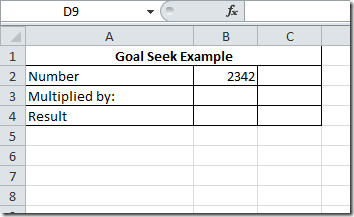
Now we want to find out the number which when multiplied with Number data (2342), shows desired result lets say;
2342 * ? = 60,000
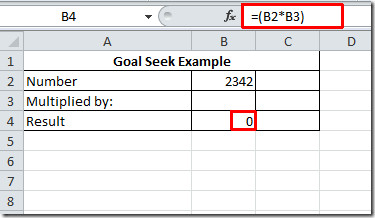
For that we need to write simple Multiplication formula in Result adjacent cell.
=(B2*B3)
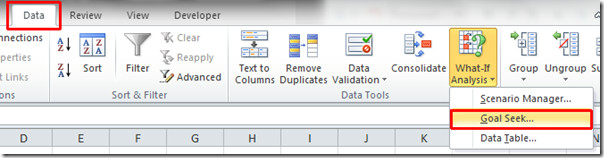
Now we will find out number that when multiplied with B2 (2342) gives us 60,000, for that switch to Data tab, from What-if Analysis drop-down options click Goal Seek.
You will see dialog asking for select cells, in Set cell we need to select the cell which contains the formula, in To value we need to enter desired number and in By Changing Cell we need to select the cell which will be changed.
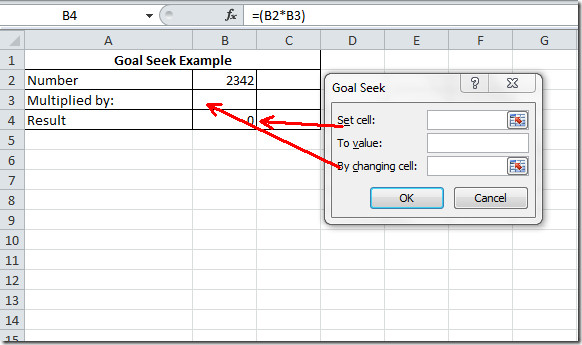
In our case, we will select B4 cell for Set Cell that actually contains formula. In To Value we enter value 60000, and in By Changing cell we select B3 where result will be placed. Click OK to continue.
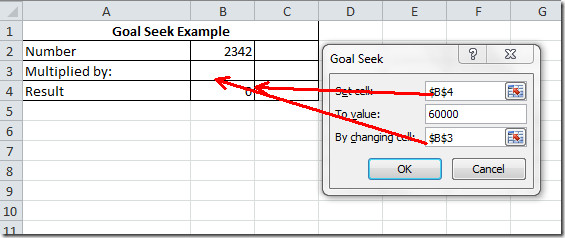
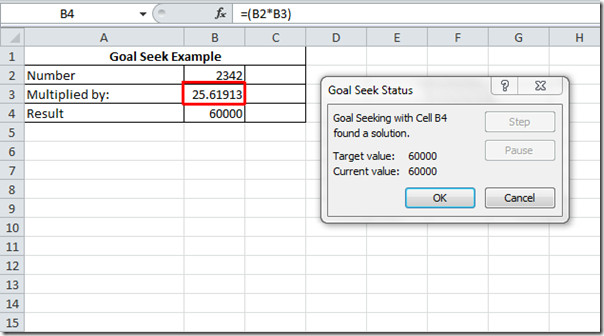
Goal Seek Status will appear showing the Target and Current value, along with that Excel shows the result in cell B3 (Multiplied by) that we required.

thank you
Thank You, I needed it for my homework
this was shit
1) You have a company producing units of Product A. Your fixed costs for a year are €100,000. The cost of making one unit is €3.40. You can sell a unit for €5.00. Assume you can sell as many units as you produce. If you make 100,000 units per year how much profit will you make? Create a worksheet to answer this question. Have the total cost and the total sales (and the difference – the profit) included.
Use Goal Seek to determine how many units you need to produce in order to break even (i.e. to have zero profit).
Use Goal Seek to determine what the lowest selling price is for you to break even if you sell 100,000 units per year.
YOU NEED TO BRING DOWN THE COST IN ORDER TO MAKE EVEN. OR YOU WILL ALWAYS LOSE,AND IT’S NOT WORTHY OF MAKING.
thanks but i don’t appear to have a “DATA” tab!!!
It you are using Mac, Goal Seek is under tools.
easy and simple example, realy realy good.