How To Root Nexus S With A Single Click Using Superboot
Famous Android hacker and developer Paul O’ Brien has just released Superboot for Nexus S on Modaco Forum, which allows anyone to root their device in a single click. Superboot is a boot.img that needs to be flashed to gain full root access on your Nexus S device. The benefit of this procedure is that even novice users can root their Nexus S without having to flash the system partition, using ADB, messing up with contents of data partition, overwriting the shipped ROM on your device, and so on.
The procedure to root your Nexus S using Superboot is dead simple. The first step is to download the Superboot.zip file from the bottom of this post. Now connect your device and put it in bootloader mode. To put you device in bootloader mode, turn off the phone and then turn on by pressing and holding both ‘power’ and ‘volume up’ button.
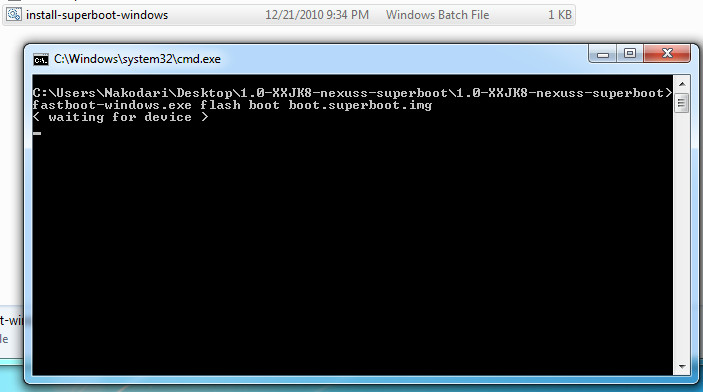
Once done, simply extract Superboot.zip and double-click ‘install-superboot-windows.bat’ as shown in the above screenshot. Congratulations, you just rooted your Nexus S device. Wasn’t it easy?
Important Note: If you are using retail version of Nexus S, you will need to first unlock the bootloader using ‘./fastboot-windows-oem unlock’. If this does not unlock your bootloader, follow the guide posted here. Keep in mind that OEM unlock wipes your device (including the SD storage).
Mac users: Open a terminal window and navigate to the directory containing the extracted files, and type ‘chmod +x install-superboot-mac.sh’ followed by ‘./install-superboot-mac.sh’
Linux users: Open a terminal window and navigate to the directory containing the extracted files, and type ‘chmod +x install-superboot-linux.sh’ followed by ‘./install-superboot-linux.sh’
(https://loadbalancing.modaco.com/download.php?url=paul/herring/1.0-XXJK8-nexuss-superboot.zip) Download Superboot.zip ((https://www.addictivetips.com/app/uploads/2010/12/1.0-XXJK8-nexuss-superboot.zip) AddictiveTips Mirror)
Disclaimer: Please follow this guide at your own risk. AddictiveTips will not be liable if your device gets damaged or bricked during the process.

anyone find the solution ? I’ve locked the screen too. lock screen and phone bricked.
I remember that the recovery screen in 4.0.3 rom is totaly black !
PLEASE HELP !
Yes, it is the best way how to brick your phone. Thank you
please my phone got bricked i need help it is stuck at the lock screen and i can’t pay 200 $ to fix it. please help
i have the same problem !! please help !!
Oops. Missed the mirror link. The file is available from the mirror. But it doesn’t seem to work anymore — it just sits and says ‘waiting for device’.
The download link is no longer valid.
thanks
just nice share NEXUS S rooting and unlock
http://download-apk.blogspot.com/2011/05/tutorial-rooting-unlock-bootloader-for.html
this happened to me not to long ago, Best Buy wouldn’t give me a new phone cause i rooted my phone so they told me i void my insurance and warranty, they told me they’ll fix it for $200 and would take more than a day to fix i decided to fix it on my own
heres what i did, its so easy doesn’t even take too long
http://theunlockr.com/2011/01/20/how-to-unroot-the-nexus-s/
I have tried my new nexus s according to your instructions. I can done all the steps without any errors. When I reboot my phone, it is stopped at google on screen and showing unlock icon and hang at there. I can’t do anything. Any of yours advice will be greatly appreciated. Thanks.
Hey there Mahar. I am also stuck with the locked screen. Did you figure out a way to get your phone back to stock?
my phone stopped the google boot screen too. i think the problem’s reason is updated android. i tried to flash a different boot image and problem solved. the different boot image that i used is cyarogen boot image. you can download form cyarogen web site.
Link to doing that?
Can’t you please make a video/guide to how? I am really stuck here 🙁
Can’t you please make a video/guide to how? I am really stuck here 🙁