How To Root Samsung Infuse 4G On Android 2.2 With SuperOneClick
If you’re wondering why or if you need to root your device, see our guide on the top 10 reasons to root your Android device.
If you’re an avid Android user, you’d be familiar with how simple SuperOneClick actually is, if not, you’re about to find out. So on with some rooting!
Disclaimer: Please follow this guide at your own risk. AddictiveTips will not be liable if your device gets damaged or bricked during the process.
Requirements:
- (https://www.addictivetips.com/app/uploads/2011/04/SuperOneClickv1.9.1-ShortFuse.zip) SuperOneClick
Instructions:
- To begin, download SuperOneClick from the link above and extract it anywhere on your PC.
- On your phone, make sure USB debugging is enabled in Settings > Applications > Development > USB Debugging.
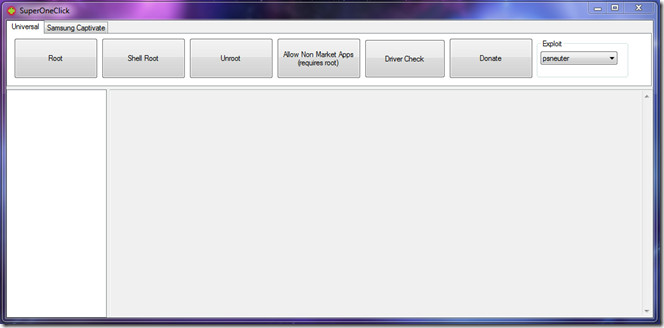
- Now connect your phone to the computer and run SuperOneClick.exe and hit the Root button.
That’s it! Once the Root button is clicked, the rooting process will begin and once done, you should have a rooted Infuse 4G. Having rooted the device, head over to our guide on installing a modified 3e recovery if you wish to install unsigned ROMs and zip files via recovery.
[via droidlife]

hi pals,,i just wiped cache partition on my infuse 4G and now it does not boot to the home page..it stays at the “rethink possible” page..any help please?
Look People if u want root tel me ur email and ill send u the file all u have to do is open it run and root it try dat it may work PS.; write emails THNX 😉
If your phone wouldnt root, download kies program from samsung. install it, then rerun the prog. that’s how it worked for me on my samsung infuse.
super one click not responding help please
Goes through the whole process, including the test, says success, but when I try a program (Titanium Backup) that requires root, it says device not rooted.
If I have a zip app installed on my phone, can I just download Super one Click directly to my phone?
For all of you that get to waitin for device….. use original or oem usb then go to samsung and download device drivers for your phone, then run program… install busybox when prompted and t will work.
Thanks alot, works for me the first time, this is the easiest root I have ever used again thanks for sharing…. Using a AT&T samsung infuse 4G
Worked fine the first go around for me on my Samsung Infuse
Worked fine the first go around for me on my Samsung Infuse
when i click on the download for superoneclick says the error file corrupt
d0esnt work
It wont run! .
Piece of shit.
I cant download superoneclick. it comes up as a media file
Decided to root my Samsung Infuse today. I had a Samsung Captivate before my Infuse – when I went to root that device, I used Z4Root – which worked with one click, so I went and found a version for my Infuse – and I couldn’t get it to work. So I did some searching and found SuperOneClick. Here’s what happened to me and how I got it to work.
1. Download SuperOneClick – used WinZip and ran the .exe.
2. Enabled USB debugging on phone. 3. Plugged in phone (make sure you use the stock cable)4. Ran ‘Root’ on SuperOneClick 5. Failed – got stuck on “Getting mount path”6. Went to Samsung’s website and installed the drivers. – Verified driver install in system tray.(Btw – still have not disconnected or restarted. I did close SuperOneClick)7. Reinstalled SuperOneClick8. Ran ‘Root’ again – looked like it was going to get stuck on “Getting mount path.”
9. Asked me if I wanted to install BusyBox. I said “yes”
10. SuperOneClick says “:Running a SU test… Success!Don’t forget to reboot!”
Hope this helps someone out there.
Thanks Dan it worked just like you said Saludos from Puerto Rico! Very Grateful & appreciate the mini guide! Happy Holidays
Glad it worked!! Just had to do a Factory Reset on my phone, I used my steps again and it worked – glad I posted here. The drivers are absolutely critical.
Thanks Dan, installing the phone device from samsung website worked
Thanks Dan, installing the phone device from samsung website worked
Thanks Dan, installing the phone device from samsung website worked
Yes DL the Drivers did the Trick!!
THIS WORKED!!! THANKS DUDE!
Mine gets to root #5 and stops…never roots what do I do?
Installed keis and everything…nothing is working
I’ve tried everything listed here so far, and I’m STILL getting the “waiting for device” hangup… WTH? What do I need to do!?
now that I have rooted the device where do I find the unlock code?
Superoneclick always freezes and Doesn’t respond after it gets to Step 6. What am I doing wrong?!!
same here mine stops and stops responding after step 6
Getting mount path…
rootfs / rootfs ro,relatime 0 0
tmpfs /dev tmpfs rw,relatime,mode=755 0 0
devpts /dev/pts devpts rw,relatime,mode=600 0 0
proc /proc proc rw,relatime 0 0
sysfs /sys sysfs rw,relatime 0 0
none /acct cgroup rw,relatime,cpuacct 0 0
/dev/block/stl6 /mnt/.lfs j4fs rw,relatime 0 0
FAILED
Not sure what’s going on…
I had better success with a DIFFERENT micro-to-normal USB cable than the one that came with my Infuse 4G. LoL, the $0.95 one from monoprice did the trick! Man, I was pulling my hair out getting “device disconnected” in adb…
to those who were having problems. my phone would freeze on the waiting for device but i unpluged my phone turned on alloy mock locations. and allow unknown sources and turned the debugging back on. it worked like a charm.
Worked perfect for me on Samsung Infuse. Just followed the directions and it worked.
Thank you to the people that made this, I tried using z4root cause it worked on my DroidX, but it failed on the Infuse.
Good Luck to those that are not getting it to work.
~J
Did your phone has any problems once it was installed
Yes, sure did, lost my data connections. 4 bars, but couldn’t surf internet, chat via yahoo, fb, etc. No data connections after rooting
Put USB into Debugging and select ‘ask on connection’ for USB settings. Should run fine after that if you have the drivers loaded.
It gets to “Waiting for device…” and freezes.
If i root my infuse can i connect to the ps3 and xbox360
When I turn on USB debugging under applications, the computer no longer recognizes the phone as a valid USB device. The phone doesn’t show the USB connection selection window.
OK Found the issue. Download Samsung Kies at http://j.mp/lOx2CB Run the installation package for Keis and it will install the phone drivers. Then the root process will work.
George, this is wrong. After running the Samsung Kies software, there is a red X pop-up that says: “Object reference not set to an instance of an object”. Therefore, nothing still works.
Saying “this is wrong” is wrong. Maybe it didn’t work for you, but it worked for him. I tried it, and it worked for me too.
That said, the link above does not work. I would follow that link that type Kies into the search box to download Kies.
Saying “this is wrong” is wrong. Maybe it didn’t work for you, but it worked for him. I tried it, and it worked for me too.
That said, the link above does not work. I would follow that link that type Kies into the search box to download Kies.
Same experience as Joey
It gets to “Waiting for device…” and freezes.
what kind of phone you using?
SuperOneClick v1.9.5.0
Checking drivers…
Killing ADB Server…
* server not running *
OK
Starting ADB Server…
* daemon not running. starting it now on port 5037 *
* daemon started successfully *
OK
Waiting for device…
OK
Getting OS Version…
Pushing psneuter…
error: device not found
FAILED
HELP WANNA ROOT MY PHONE THIS IS ALL IT SAYS
my windows laptop will not unzip the samsung infuse zip file? any help?
7 ZIP will unzip the package. There was a link to it at the top of this window, but it’s gone now. After I got that done, I still couldn’t root the phone. See my comments below.