How To: Flash Samsung Galaxy i5700 To Firmware 2.1
This is a step-by-step guide to flashing Samsung’s budget Android device, Galaxy Spica i5700, to the current 2.1 firmware. Samsung has official announced and launched support for firmware 2.1 in various regions, and if it is available in yours, you can update through the Samsung PC Studio. And here is the catch.
We all know that Samsung loves their PC Studio, but it seems their love for Android-based devices has lessened. Samsung has two official software that can connect your PC with the device, New PC Studio (NPS) and Kies. Unfortunately, neither of these actually connect to the device, especially not on Firmware 1.5 anyway. So here is the unofficial way to get to the delicious Eclair firmware.
This guide has been tested only on Windows 7. However, it should theoretically work on other versions as well. 64-bit Windows is not supported.
Note: Please use this guide at your own risk. While it worked perfectly for me and a friend, it may not for you. Hence I or AddictiveTips are not responsible for any bricked/damaged devices.
You will need:
- The firmware.
- Odin Multiloader for Android and Spica OPS file. Download here.
- Please note that you need to use spica_jc3.ops file for firmwares upwards of I5700XXJBA.
- Drivers for i5700: These will be installed automatically via the Kies application.
- Samsung USB Cable
- One Samsung Galaxy Spica i5700
Before starting, make sure that you have:
- Backed up your data
- Removed any SIM lock
- Extracted all the files listed above in some convenient location (do not extract the .tar files inside the firmware)
- Fully charged battery on your phone
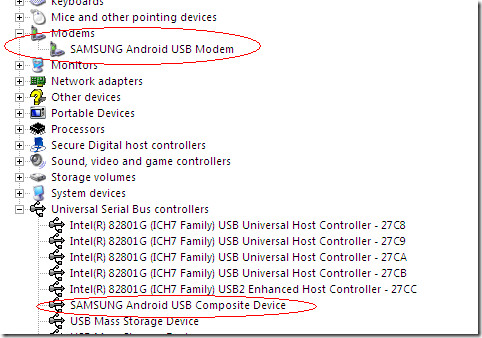
The steps ahead assume that you have successfully installed Kies from Samsung, and that your drivers are in place as shown below.
Close any services that are using the USB port for Samsung, including Kies and NPS. Make sure no background connection monitor is running either.
Do a hard-reset of your device by entering *2767*3855# on the virtual dialpad.
Now you’re set for the flashing process.
Flashing the Device
Turn off the phone, remove SIM and SD Card.
Turn on the phone again by pressing and holding the Volume Down key, the Camera button and the Power button. This will put the phone in Download Mode.
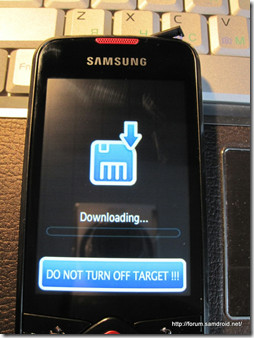
Image credit: Samdroid
Now connect the phone with PC using USB cable. It will begin installing drivers. If Kies had been installed properly, the driver installation should go smoothly and you should get working Samsung USB Modem and Samsung USB Composite Device in your device manager.
Ensure that the drivers have actually been correctly installed.
In the next step, I would recommend unplugging the device from the USB cable. Now launch Odin Multi Downloader v4.03.exe with administrative privileges. Connect back the device. You should see a COM port number with yellow background, and the message box showing ‘Detected’.
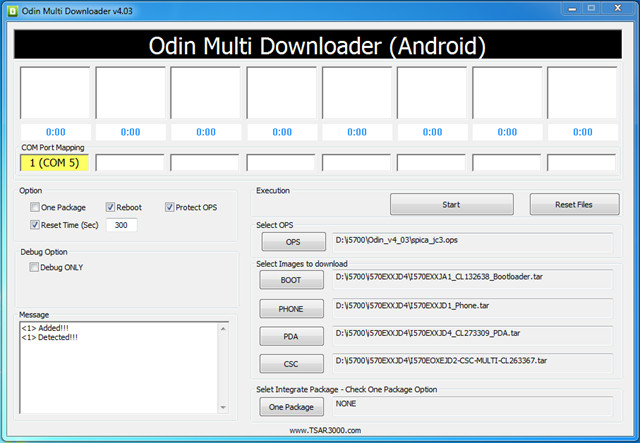
If all has been well, click Start and the download process will begin. The phone MUST NOT BE DISCONNECTED during this.
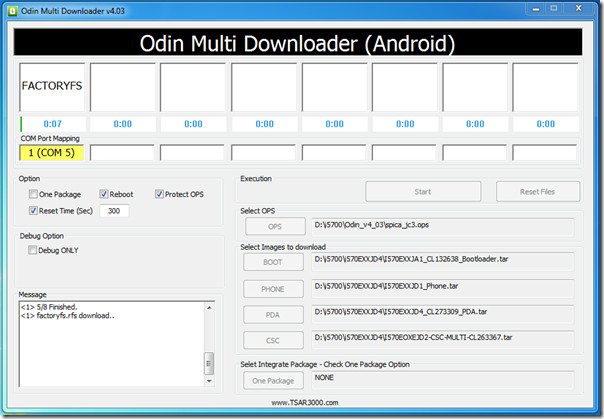
In almost 2-3 minutes, the message window will prompt <1> Close serial port and wait until rebooting. This is the signal that flashing is complete, and the device will automatically reboot.
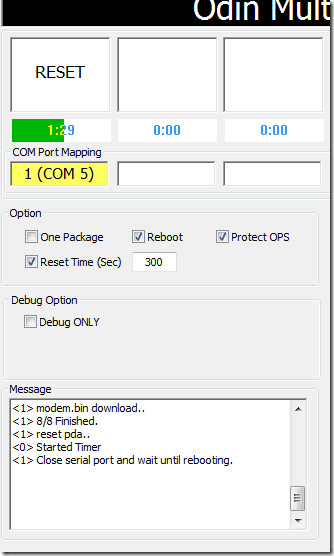
Wait for the process to finish, although the actual part has been done. The window shown below will appear.
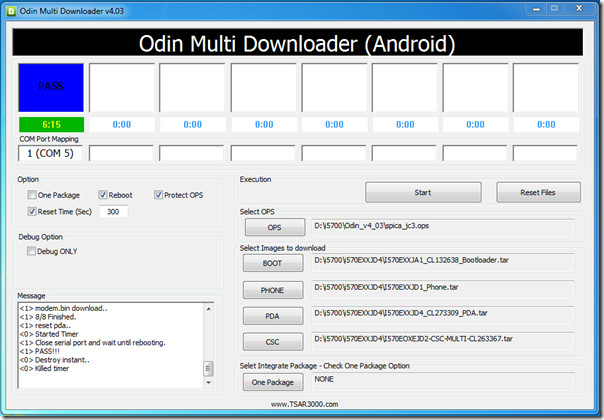
That’s it. You’re done. Unplug the device and cherish the tastiness of Android OS 2.1 Eclair.
Questions/Concerns/Feedback is eagerly appreciated.
UPDATE: If you are looking to root your Spica, check out our rooting guide here.

If i upgrade my samsung spica according to your guide,so does it mean that my phone will work faster then before? because the current version is very slow.
my phone is attempt too many passwords and i lost the software of this phone when i went to service centre, they r saying they don’t have the software… wat to do now/?
at the flashing mode, my device is not connecting with pc now, what i have to do
how cam i fix my fone?? cant access my android market because when i acess it,, it shows that i have to sign in my google account,, but i sad to say i cant access my google account.. coz my frend used it and she forgot the password,, hope some one can help me.. you can email me tru this email add,, gaze02@ymail:disqus .com.. thanksss.
guyzzzzzz wil u plz tel me,is it safe to use upgrade guide for spica i5700?
cant find the COM PORT man, wtf!
Just my luck, now all the links are dead. I think fate doesn’t WANT me to update my phone
I have a question: Wi-Fi, Bluetooth, GPS, stone ring will function normally?
Working, Great!!
will Wi-Fi, Bluetooth, GPS, ring tone, operate normally?
If your odin gives you only the startup text, you have to remove the first soiva.ops from the directory and only leave the jc3.ops, it worked for me.
when i start the process in odin after all the conditions r okay ……..after 2 seconds windows encouter the problem all times …..whats the problem plz help ….thnks in advance
Hi!! I was wondering if i update the phone to android 2.2 will i lose the warranty?? Will the phone unlock??
Hi,
My problem is i have the clockwork model runing fine till i restarted recently..Now it just stays on the loading screen (the samdroid logo and the grey bar runs full) and nuthing beyond that..I can access the recovery mode and have tried formating it but to no real effect..It is still stuck..Also when i try flashing it, it reaches the recovery mode and says “busy box not instaled..or sumthing and installating aborded…..PLEASE HELP!!!!!!!!
Odin I run as administrator but I do not see anything in the image, that the com port, I have to do?
As u mentioned, New PC studio is not able to detect my phone(galaxy spica i5700) which is running on Andriod 1.5.
So I tried out the above ways and after I finished all the steps well, I see the this mark ” ! ” and a handset on my ph screen. Then it is freeze. I tried to restart my ph and it stopped after loading.
So could you give me some advice how to troubleshoot this problem ?
i done all that it finished i unpluged my phone then i reset my phone and it just done nothing it came up with the loading bar finished loading then done nothing at all. i tryed installing it again and again and again but it just done nothing
Now I got the solution from somewhere.
http://www.londatiga.net/it/samsung-i5700-galaxy-spica-android-2-1-flashing-guide/
@joshwaaa1 , check it out. It worked well for me . 🙂
The guy’s at samsung india service were scratching their ball’s at this one for 2 week’s when i gave it to them for an upgrade…i told them i’ll do it myself as long as they do don’t void my warranty….and it’s fucking working in 20 minutes….WOOOW…THANKS
thank you, i got it.
Really thanks for this guide!
I tried another guide before, but after that guide I couldn’t start up my phone anymore….
Now I can finaly use it again and have the new version!
where does the setting off masss storage comes tell me quick
done done done thnkssss a lot
worked grat but all in russian kanguage how can i turn it to english
i coudnt find the firmware version 2.1
i couldnt find the samsung firmware for my spica
i’m doing it right now nut it doens’t work… it is taking almost 15 minutes lol i’m soooo worried –
Hello Android fans,
I’ve got problem w/ upgrade to 2.1. Got the same problem as guys described above. Let me add one more. After many attempts my OM downloader crashed down. Error message: odin multi downloader has encountered a problem and needs to close. Anyone observed this issue? Please help.
thanks a lot,
Arabic language is not supported in this version can anyone help me in with an update which support the Arabic language and Arabic keyboard.
thanks a lot again
I have flashed my i5700 to I570EXXJD1.
It worked great, except for the lock/unlock slider behavior.
In some condition, the keyboard does not return to locked state after I answer a call or after I make phone calls.
Is it a bug? Is there a fix?
I just bought this phone in India, came with 2.1
I find all this stuff very confusing.
The phone says:
Baseband version: i570EDXJC2
Build no : ECLAIR.DXJC4
So now how am i supposed to root.
I am a complete noob so be very detailed about the process.
Thanks a lot.
i tried the guide, but the problem now is the whole market application is gone, i can’t install any application now, is there any way to return the market application ?
my phone is dead-stck in loading screen-it will load to end then nothing more-tryd to flasch again but odin craches
my baseband version is i5700xxik2…is mine newer???
THANK YOU!!! YOU dont know how happy you made me. This how to just saved my phone from flying through the window from six floor. I spent many MANY hours to bring back my phone to life, and with this, MAGNIFICENT.
THANKS AGAIN
YOU have a drink from me when you come to Serbia 🙂
hello
after instalation aplication in my i5700
phone know hang in samsung logo
and a cant flash the phone i5700 cant flash périphérique que inconnu in flash mode
I did reflashing for my phone and now the 3g doesn’t work, the icon doesn’t even show in the bar. I didn’t do the hard reset step, does that relate anyhow ?
and if no, can anybody help me on that please
Does this void my warranty if I manage to brick the phone due to flashing? I know rooting voids it, but don’t know about this.
Hello every one, im really interested in flashing my new samsung spicia, but i have a really kind of noob problem, im trying to download the files require to flash the device but when i hit the link a obtian a message from webs.com that says “We are sorry, this site is unavailable because it has used up its monthly bandwidth. Please try back another time.”, i registered myself on the webside but i cant still access the website to download the firmware. if someone haves any idea of what is happening it will be great, than you (sorry for my english)
FOR EVERYONE HANGING AT CONNECTION SETUP:
1) As said above, make sure you are using the right .ops file for newer firmwares (jc3)
2) Try removing the CSC file. As in, reset your files and then DON’T place the CSC file. Just go with the PDA, Phone and Boot.
This worked for me when I thought I was toast. Also, here are APN settings for those without data:
https://code.google.com/p/cyanogenmod/wiki/APNlist
Hope that helps.
Help me please. i got the message like this
Download Start…
Create File…
StartThread Detected : 1
StartThread Detected : 0
StartThread Detected : 0
StartThread Detected : 0
StartThread Detected : 0
StartThread Detected : 0
StartThread Detected : 0
StartThread Detected : 0
and after 20 min. i try to do the same ting on another PC. after that i’am not been ably to connect to the first PC or the second one. HELP.
Blaze, if you get the same problem again, ensure that you are running the Odin multiloader with administrator privileges. Secondly, after you encounter that problem, run the “install.bat” that is packaged with the multiloader and try again. That worked for me, and I toiled like you guys, but good to be on 2.1 =)
Help me please.The link with the 2.1 firmware is broken
Can you please relink it or something ? Thanks a lot.
Tiek, if the link is broken, search for the page in Google, and click on the “Cached” page. That should fix your problem. The files are hosted externally so you just need working links.
Went ahead and did it for you: http://tinyurl.com/36a68fm Hope it works out
Er, so no talk about the password required to open the I570EXXJH6.rar archive? I mean, what the heck?! I really think I’m not being a n00b and this is the website’s fail.
I’ve done everything, all message are the same as the screenshot, but now my phone dosent start and stay with the samsung Logo and a grey statusbar?!?! HELPPP
Just use spica_jc3.ops with the I5700XXJH6 firmware
bye
Yes plese i have the exact same issue
whit language being russian i ment
used update and followed all instructions worked a treat except my phone is now 2.1 firmware with russian language any help would be appreciated
lambo
my phone is stuck at the load up bar as soon as the phone loads up, its been like this for half an hour, is my phone bricked?
Hi all. I tried the steps, all went well until I pluged the phone back into the PC after holding down Vol-Down, Camera and power, my PC didn’t recognise my phone via USB. BUT I did forget to do the *2767*3855# beforehand. So, I’m not surprised it didn’t work but I am concerned that if I had have done the *2767*3855# then my phone would be screwed and I wouldn’t be able to get back? Any thoughts? It’s Windows XP and all the drivers were fine before I tried the update.
Cheers,
Drew
Does this work with an unlocked T-mobile device? I don’t want to risk bricking my phone since I bought it second hand unlocked.
WORKS GREAT! thanks hope to hear from you more sir more power
my mobile never reboot after i upgrade android 2.1 please help
I also had the problem that Odin got stuck in “setting up connection”.. to solve this, I entered in msconfig and removed from startup all NewPcStudio and Kies processes and also removed a service called fsusbex (or something) thats from samsung pc studio. Then rebooted and everything worked OK
I was stuck at it, too. Did exactly the same, removed that fsusbxxx process from memory and only then Odin reacted… Thanks Heaven! The rest of the process went flawlessly
@ Everyone with flashing ! sign
I think i got it. The problem is not with the Odin, but the drivers itself. When in download mode, the drivers get automatically installed and under Modems, it shows “SAMSUNG Mobile Modem” in place of “SAMSUNG Android Mobile Modem”. Similarly, under Universal Serial Bus controllers, it shows “SAMSUNG USB Composite Device” in place of “SAMSUNG Android USB Composite Device”. On the other hand if u boot normally with 1.5, the devices those get listed are exactly what we want. I also tried unblocking .sys files from properties and update drivers, still no luck. Omitting CSC as well didn’t work for me.
BTW, if you get stuck at the screen with “!” mark, deattach the usb cable remove phone battery, replace it and then again plug-in the cable. It’ll show as charging, and at this point press power-on button. It should boot normally
Thank you for this post! Thought I was bricked!
Hey!!!Thank for your help, but I dont have any internal memory in my i5700.so can you help me
!!!!!!!!
* network
no notwork connection!!
my phone is GT i5700
firmware 2.1 update 1
baseband i570edajd1
kernel 2.6 29 chad.lee@se-s604 #2
build # eclair.dajd2
I cannot get online although Wi-Fi works ok.
Has this been rooted already? Can I root it?
Graham
Thank you for my 2.1 I can’t see getting any other way here in the Uk.
same prblm with me i tried everything even changed the ports also but facing the same prblm i unistall all drivers n installed it many time but facing the same prblm wat to do is there any other method to rid this thing ??? 🙁 🙁
Download Start…
Create File…
StartThread Detected : 1
StartThread Detected : 0
StartThread Detected : 0
StartThread Detected : 0
StartThread Detected : 0
StartThread Detected : 0
StartThread Detected : 0
StartThread Detected : 0
Befor run the Odin, you must shutdown samsung pc suite program, then run Odin Multi Downloader v4.03, start and wait for 5-6 minutes.
after shown
i’m removed d data cable n try to turn on,but stuck in boot screen.i try to reflash but always setup connection…..can somebody help me?
My GALAXY SPICA GT-I5700 has got screen locked and does not accept my gmail account information. How can I hard reset it. Tried safe mode and other setting but didn’t work.
I have encountered this problem before. For you gmail account information, type your email id and “null” as password (without double quotes). It will unlock the screen.
Thank You!!! Every things are working just fine. But I don´t have an internet access… what can I do?
Hello! If I´m in Guatemala (Central America) which firmware do I have to download?
64-bit Windows is not supported.
Are you sure? It seems to me that Odin Multi Downloader v4.03 works fine, what exactly is not supported in Win 64bit?
Drivers. :p
Anyone got working Samsung USB & modem drivers for Win7 64 bit ?
Thanks a lot for the guide. It realy works! 🙂
Somebody pls help me…
Initially i first tried to flash it with JPJC1….everything went well till the point it became stuck at the bar under the samsung logo.. I then downloaded other firmwares(JPJA3,JPJD5) and tried re-flashing,but then this appears
Download Start…
Create File…
StartThread Detected : 1
StartThread Detected : 0
StartThread Detected : 0
StartThread Detected : 0
StartThread Detected : 0
StartThread Detected : 0
StartThread Detected : 0
StartThread Detected : 0
setup connection…
then i downloaded the Easy tether for samsung but it doesnt seem to be working.. i also re-installed the PC studio(Windows XP),changed ports,charged full battery…but nothing happens…
Pls help me…
I tried this, with in Odin, I hit the reset files button, and then I was able to flash.
I’m waiting for it to boot up now though…
For people with problem that the following is displayed:
Download Start…
Create File…
StartThread Detected : 1
StartThread Detected : 0
StartThread Detected : 0
StartThread Detected : 0
StartThread Detected : 0
StartThread Detected : 0
StartThread Detected : 0
StartThread Detected : 0
setup connection…
Maybe try putting all files in a folder without spaces and with short names.
If you had a failed flash, be sure that you are using spica_jc3.ops next time!
@muaddib
THANK YOU!!! THANK YOU THANK YOU X100000000! I had tried everything (switched pcs), but your little solution of putting everything in one folder with short names worked LIKE A CHARM…I had tried everything…went from a 64 bit windows 7, to a 32 bit xp…still didn’t work…now it works.!!! CAN’T THANK YOU ENOUGH!!!
@muaddib
THANKS A LOT!!! Same problem, your solution works perfectly.
Thanks so much for this guide. It worked really well and I have 2.1 installed. Only problem is that my phone now has no internet connection (except with wireless)! I’ve factory reset, rebooted, taken out the battery but nothing works. In Phone Status it says ‘Mobile network state:Disconnected’.
Any help appreciated!
I have encountered the same problem, please anyone have any ideas.
You need to set the access point, it is in Settings>Wireless & Networks>Mobile Networks>Access point names then press the menu button and press New APN. Then put in your providers information. (Can be found online in most cases)
Hope that helps.
I tried all solutions given above but my system hang like this…
Download Start…
Create File…
StartThread Detected : 1
StartThread Detected : 0
StartThread Detected : 0
StartThread Detected : 0
StartThread Detected : 0
StartThread Detected : 0
StartThread Detected : 0
StartThread Detected : 0
setup connection…
Now I am without mobile, plz help me out…
It happened to me also. the progress bar wouldn’t move, only the timer was counting. Then I realized I forgot to close NPS and my anti-virus. I re-started the whole procedure and voila! It worked on me. I am now enjoying my Spica with Eclair 2.1 with Helix Launcher. The live wallpaper though makes the menu transition laggy.
i hope you could help me.
i tried flashing my spica with firmware i5700XXIL2
i use odin for flashing and i use the firmware i5700DXJB3.
all went fine until odin displayed [I]PASS[/I] and my phone reboot.
the screen displayed a [I][/I]MONITOR with ![/I]
after a couple of seconds, thinking all went fine. i saw a traingle and a “!”.i unplugged the phone, take took out the batter and replaced it again.
no im stuck at the boot screen.
i tried re-flashing it with I570EDXJC4 and i5700DXJB3, but im always get stuck at
Download Start…
Create File…
StartThread Detected : 1
StartThread Detected : 0
StartThread Detected : 0
StartThread Detected : 0
StartThread Detected : 0
StartThread Detected : 0
StartThread Detected : 0
StartThread Detected : 0
setup connection…
can you help me? im desperate.
i hope you could help me.
i tried flashing my spica with firmware i5700XXIL2
i use odin for flashing and i use the firmware i5700DXJB3.
all went fine until odin displayed [I]PASS[/I] and my phone reboot.
the screen displayed a [I][/I]MONITOR with ![/I]
after a couple of seconds, thinking all went fine. i saw a traingle and a “!”.i unplugged the phone, take took out the batter and replaced it again.
no im stuck at the boot screen. can you help me? im desperate.
Hi,
I am not able to fine the exact firmware details for my model..i just checked the version details on my spica by tapping *#1234# and shows as this PHONE-i5700DDIK2 and CSC-00DDIJ4, So what firmware should i download..i want to upgrade it from 1.5 (cup cake) to 2.1
PLS HELP
can i use the JC5 firmware do the update. and do i have to use only asian firmwares?
– thanks
Im from India so will the mentioned firmware work for me?
And do the drivers and the software(ODNI) work on Win7 X64?
is the app2sd tutorial out ?
Im gonna be joining the rooted spica family in a few days from now.
i have to get rid of my nokia 5800 first.
I have one question if my phone is already runing on 2.1 then can i go ahead with https://www.addictivetips.com/mobile/root-samsung-galaxy-spica-i5700-with-leshaks-kernel/
– Thanks.
keep rocking \m/_
sir.. i am having a problem downloading the firmware i chose. it says in the mega upload:
Your IP address 125.60.241.51 is currently downloading a 578305479 byte MP4 file.
Please finish this download before starting another one. If you have just recently canceled this download, try again in a few minutes, as the download connection may not have terminated yet. If 125.60.241.51 is not your IP address, you may be sharing a proxy or NAT gateway with other users. If you have configured an HTTP proxy in your browser, disable it and try again. If you don’t have a proxy configured, using a different download port may bypass your ISP’s proxy. If you see your real IP address listed below, please select it, then try your download again:
what will i do? my current IP ADDRESS IS: 192.168.0.103..
pls.. help me sir.. tnx!
I m not sure which firmware to download… Can anyone guide me?
Version
PDA: I5700JPJA2
Phone: I5700JXIL3
CSC: I5700PAKIL1
since my phone is bought from vodafone, it has a network lock, vodaphone won’t give me the code. Did anybody upgrade to 2.1 with network lock on? does it work? should i try it or will i destroy the phone?
thank you
i do phone but I do like to see him ODIN had to stick to a code you put on the modem … the code was something like * # 7248 # I finally resolved with a firmware i570Exxje4 … and now everything will go Thank root after next topic
http://www.mobile-stream.com/easytether/drivers.html here is link to download samsung drivers instal them agin run kies and do as u did earlier , you can repeat the same process again again untill sucessfull…
iohh.ODIN DON`T..see a COM port number with yellow background, and the message box showing ‘Detected’…..”check under Device Manager to make sure that you have Samsung Android USB modem and Samsung Android USB Composite Device” working….but..odin…NO….why?
hi after 10 min..Download Start…
Create File…
StartThread Detected : 1
StartThread Detected : 0
StartThread Detected : 0
StartThread Detected : 0
StartThread Detected : 0
StartThread Detected : 0
StartThread Detected : 0
StartThread Detected : 0
setup connection…
..why…? i did everythink like above . but multiloader shows this…….LIKE PETER… 🙁
Hi,
Many thanks for this wonderful guide. Got my Spica flashed and routed successfully 🙂
Now, want to really start playing around with the Android Market and all the apps.
Have you managed to create your guide on installing Aps2SD yet ?
Eagerly awaiting for this guide.
Cheers,
Thanks @aatif for the guidence I got 2.1 on my spica after trying 13 days and 50 times Than rooted it as u said with Leshak after trying 20 times in 2 days But in end i got andriod 2.1 . Main problum encountered are the samsung mobile drivers ,either they are not sucessfully installed via kies ,or windows block them due to some incompatibility.I got way to install them – just go for application like Pda-Net or Easy Tether in andriod market and install samsung drivers from Easy Tether for PC sites like http://www.mobile-stream.com/easytether/drivers.html.Just go fr your upgrade as said by aatif -just have patience -BEST OF LUCK…
13th June 2010
Hi
I searched a number of websites for upgrading my Samsung i5700 from Android 1.5 to Android 2.1. For all those of you in India reading this post – please call the Samsung Customer Care they will do it for you for free if your phone’s still under warranty. You cannot upgrade your phone yourself.
Manoj
initialy i also call samsung people they adviced me to submit my phone at teir service center but even after three days they cannot upgrade my spica making excuses like server is down,etc after that i followed the steps as guided by aatif and got the eclair version.samsung service center experts just dont have the knowledge to handle andriod phone.
my spica dont stop booting please help.
wow it is working caesar. follow the link caesar said it is working if u failed with steps here defined.
DISASTER
I tried to flash according to guide, but the process stopped midway with Odin crashing (odin: step 3, phone: half upload stalling)!
Took the battery off and the phone fortunately still working with old firmware version BUT there is no space left in the phone memory and I can’t install any application…
Is there a way to regain the lost space, maybe a way to restore-install default/another firmware via micro-sd card??
Any help welcome of course… at least cry with me!
Aatif GREAT WORK…… followed you steps, after a headache of research to up grade, your page did the job…..thanx boss…
Hi,
Just a quick question, I upgraded my spica from 1.5 to 2.1 today with the I570EDXJC4 file. I can’t seem to find the speech to text function, and voice search, is there any guide available where i can install these apps? I’m quite curious how good the speech to text recognizer is.
Aatif can you please suggest me or provide me the link for the new firmware… My old firmware is PDA: I5700DDIL1 Phone: I5700DDIK2 CSC: I5700DDIJ4
Samsung PC studio is the the worst software in the world…. Here is what I think about it…
http://www.serveradminblog.com/2010/05/the-worst-software-i-ever-used-was/
Hi,
I had done the upgradation of the firmware, but after Flash Samsung Galaxy i5700 To Firmware 2.1 by using I570EDDJC5.tar, the ringtone is always silent mode and no other options are displayed to even choose. Can you please tell me what went wrong in the settings.
Thanks
SK
Even for me ringtone is always silent..Added few mp3 files and set them as ringtone
Is it mandatory to do a factory-reset? Since my phone is stuck at booting image and I want to flash it, I can’t do a factory-reset at this stage.
Can I proceed without a factory-reset?
hello, i have problem. installed samsung new pc studio, connected i5700, when drivers was installed, ok. launched studio, it finds i5700, seems everything ok. in device manager shows samsung (everything that is needed). i put i5700 in download mode, connect to pc (win xp professional sp3) but windows drops table – “The USB device you are using has malfuntioned. Please correct the problem or replace the device” (not exact words…but basically that’s what it said). and in device manager it shows unknown device…. dont know what to do…reinstaled studio, restarted pc many times, reinstaled samsung drivers….it makes me insane…cant find issue, please help, very need, thanks
have the same FU*** poplem
maybe, but i cant find how to fix, tried in device manager to remove all usb controllers, restart pc, then they was installed as new…but it not helped. i have one idea, read somewhere in forums, to absolutely unplug pc also and monitor from rossete (where electricity comes, dont know if that word is ok) for about 30 minutes, and try again. i will do this later today, and will post if helped
someone? please help with my problem, its impossible to fix ;/ dont have any more minds…
I managed to install the drivers. Here’s how it worked out.
-Install New PC Studio from Samsung CD (USB Driver installer did not run without this)
-Remove the just installed New PC Studio from Windows Control Panel, it for whatever reason messes up the connections at least on my computer
-Drivers should still appear in installed applications list
-Change phone to USB Debugging state and connect the phone
-Phone drivers are installed and ADB now see the device
Ty proteus, the drivers from CD were the corrects ones after all
I get the same Problem, The process stops at setup connection…
Nothing happens and I have to remove the battery to turn the phone on again.
What exactly is the solution to this problem?
pleeeeease somebody tell me if i upgrade this way
is this well remove the warranty ?
and is this Illegal??
hi caesar,
did you download your region firmware or did you followed the exact guide of the link which you gave, are you running windows 7 32 bit?, did you install kies?
i am from india, and i m stuck the same way you were when i turn on my phone it shows me two icons mobile phone and a computer and a exclamation mark. could you help?
thank you
I did use Windows 7 64-bit and it worked fine.
Cool, it seems to have worked here (Windows XP SP3 (fr)). I only have to play with it now… thanks
thnx buddy
but if i make this steps is these will cancel my warranty ?
@aison: Lol,,could you give some more detail?
@islam: just tick “one package” in option
i download my own firmware form
http://samsung-firmware.webs.com/WEBPROTECT-samsungandroidi5700.htm
when i extract it i get
I570EJPJD5.tar
SS_DL.dll
then i open odin and select the I570EJPJD5.tar in the one package
and choose the .ops
and when i press start it tell me u must choose image file
any help
my samsung galaxy spica gt-i5700 is turn into brick… T_T
@kay: horray!!..hehehe
@aatif: yup..my phone is fine now,,,and i just rooted it using your simplified guide of LeshaK..though, i’m having a bit problem on my notification alert. It keeps on going back to default and i can’t see my added alert tones in notification alert settings ( i already added it to media/audio/notications)..and my maps (gps) is not working anymore,,keep on having “data connection lost,,retrying…”…it worked before..
@kay: i found a solution for our problem…here CLICK CLICK CLICK
Wow caesar, what do you know, it works! w00t!!!
A nice elaborate link that you shared, Caesar… Did it work out for both of you?
I have the same problem as caesar. Got to the PASSED screen but the phone had the same ! on its screen. Windows also asked me to install a new hardware GT-I5700 which I do not have drivers for.
So I simply unplugged the USB cable from the phone and now it cannot boot. It gets stuck at the SAMSUNG screen after the loading bar fills up.
I tried reflashing it with both I570EDDJC5 and I570EXXJE1 firmwares using the spicia_jc3.ops found here. Any solutions? Or should I try more firmwares?
Oh btw, the very first time I tried flashing, I used the other spica.ops file and Odin got stuck at setup connection, as what peter reported.
Unable to abort anything, I unplugged the phone and took out the battery to reset it since nothing else worked.
i think it was I5700….JC3(something..i’m not sure) and i was installing I570EDDJC5..
i can still go to download mode, and i just noticed that the MODEM driver installed is “SAMSUNG MOBILE MODEM” without the ANDROID word,,,and the USB controller driver installed is “SAMSUNG USB COMPOSITE DEVICE” still without the ANDROID word..
i almost forgot,,,yup..i used the spice_jc3.ops as stated in samsung-firmwares.com
hi, please help..where can i get the tar file in the “BOOT”, “PHONE”, “PDA”, “CSC” for my samsung i5700 spica baseband version i5700DXJA1?? i already downloaded all the said firmware at multidownloader website, dvr5700-which i cant install coz there is application its purely dll files and spica.ops mentioned but i cant i find where to locate those files.. 🙁 please help me..
pls help me…i think my phone is bricked…after i got the “PASS” my phone screen showed an EXCLAMATION MARK INSIDE A TRIANGLE..and my phone won;t start anymore..elp
Have you selected the correct OPS file? And also please tell me which firmware version did you use, and where you are located. If you can put your phone back in download mode (which hopefully you should be able to), try flashing a different firmware. But before that, I would like to know which firmware did you originally use.
Your phone will not hopefully get bricked. Usually, a simple re-flash can do the trick.
Hi,
I am having problem after the phone is put to download mode, it give a message that the dive has malfunction and Odin does not detect its com port. and when i connect the phone in normal mode all the drivers are listed in Device manager. Please solver this problem.
Please repeat the steps I highlighted above in my comment reply to the reader Naveen. Also try changing the USB port that you’re connecting the phone with.
Hi.
I’ve got the old samsung galaxy. does that mean i can’t update it? been looking around for a firmware update, but i can’t seem to find it. Tips would be greatly appreciated. Might be that i’m just not good enough at looking.
This guide is specifically for the Galaxy Spica i5700, and not any other model. I am not sure whether there is an update available for the original Galaxy; Samsung did not officially take it to Android 2.1 so there probably isn’t. You should check out some of the android forums for that; a mod may be available for your model.
alltight. thanks anyways
the phone boot correctly but i’m not able to use my simcard, then no calls/sms is possible…
still locked on ORANGE operator and mine is BOUYGTELECOM… 🙁
You may need to contact some service that unlocks phones, then. This may not be much of a problem but I guess the process cannot be done manually.
Hi,
I flashed my phone but still asking me the Network locked code…
My operator doesn’t want to give me that code….
are you not able to use your phone because of that? Or is it just asking for the code for no reason?
how can i upload/install executable jar file on my phone (samsung i5700 spica) i just upgraded my version due to bluetooth problems. pls help me.
any 2.1 firmware comes with a default Java ME Apps application that can handle your executable jar files. Just transfer them to your phone (place in your microSD card and access through a file manager like Astro) and install.
I did everythink like above . but multiloader shows this
Download Start…
Create File…
StartThread Detected : 1
StartThread Detected : 0
StartThread Detected : 0
StartThread Detected : 0
StartThread Detected : 0
StartThread Detected : 0
StartThread Detected : 0
StartThread Detected : 0
setup connection..
what now
can I disconect the phone
please read the response to Naveen’s comment above. Try changing the port or reinstall drivers. The actual log should be like this:
Download Start…
<0> Create File…
<1> StartThread Detected : 1
<2> StartThread Detected : 0
<3> StartThread Detected : 0
<4> StartThread Detected : 0
<5> StartThread Detected : 0
<6> StartThread Detected : 0
<7> StartThread Detected : 0
<8> StartThread Detected : 0
<1> setup connection…
<1> odin mode.. check plcatform verification.
<1> START!!!
<1> check download environment.
<1> zImage download..
<1> 1/5 Finished.
<1> datafs.rfs download..
<1> 2/5 Finished.
<1> factoryfs.rfs download..
<1> 3/5 Finished.
<1> cache.rfs download..
<1> 4/5 Finished.
<1> modem.bin download..
<1> 5/5 Finished.
<1> reset pda..
<0> Started Timer
<1> Close serial port and wait until rebooting.
<1> PASS!!!
<0> Destroy instant
<0> Killed timer
same prblm with me i tried everything even changed the ports also but facing the same prblm i unistall all drivers n installed it many time but facing the same prblm wat to do is there any other method to rid this thing ???
Download Start…
Create File…
StartThread Detected : 1
StartThread Detected : 0
StartThread Detected : 0
StartThread Detected : 0
StartThread Detected : 0
StartThread Detected : 0
StartThread Detected : 0
StartThread Detected : 0
Have patience try once again -set up conection means you are going to get it few more tries .i got mine after 50 times and with my sd card and network sim on .i just looking for a try it start downloanding after set up connection notice
Thanks and I need your help.
I tried *2767*3855# to set all the locks off. the network subset was turned off but the network is still on. Any idea how I can turn it off?
If the network lock is still on, you will need to obtain the network unlock code from your operator. What carrier is your phone branded with?
Pelephon in Israel.
Thanks!
if you are on this network already, you may not need to remove the network lock. This is due to the fact that flashing firmware does not modify locks in anyway.
However, you can still ask them for an unlock code, just to be safe
excuse me again for what may sound like a silly question. how do I know if my firmware is later then I5700XXJBA? mine is I5700LJJIL6.
Thanks again!
iharel7 im from israel too and i need your help please
my email is bar708@madaimas.org.il
Hi,
I tried to upgrade to 2.1. While using Odin and connecting properly to my mobile, it detects it, but the status does not change from setup connection.
Can you please tell what is wrong?
It appears that your drivers are not properly set up. Please uninstall all Samsung stuff from your PC (uninstall everything that even remotely hints Samsung from Add/Remove Programs, including Kies). Then install Kies again without connecting your device (run it as administrator just to be safe). Once Kies is installed, plug in your Spica and let the drivers install automatically. When that is done, check under Device Manager to make sure that you have Samsung Android USB modem and Samsung Android USB Composite Device shown and working properly. Disconnect phone, put it in download mode, connect it back and let the drivers install again. This time you should have both the devices without the word Android in them in Device Manager.
Disconnect phone again, run Odin as administrator, and now connect your phone back (it should still be in Download Mode). It should work fine then. Follow the rest of the steps from there.
By the way, if you are sure that your drivers are properly installed, instead of repeating the whole process, just run Odin first and then connect your phone (not before). I had the same problem flashing mine for the first time, and doing this did the trick.
Good luck, and let us know if this worked.
Thanks for your reply!
The problem seemed to be in the port to which I connected my mobile. When I connected to another one, it worked perfectly and now I am using 2.1.
Thanks again.
Hi I installed Kies But the drivers don’t show in device manager, any help?
Starting Odin first before plugging my phone in download mode did the trick! Thanks mate!
by the way, is there any way to disable the auto screen lock? I am not able to find in settings.
Thanks a lot for this amazing guide. I upgraded my unbranded i5700 successfully from Android 1.5 to 2.1 😀
Glad to know that, Robert. I will soon come up with a guide on rooting the device as well as using apps2sd. Stay tuned. 🙂
what do you mean with Removed any SIM lock? My phone is from t-mobile uk and has a sim locl, does that mean it will probably not work?
Jo,
You can check your simlock status by typing in the following code on your dialer application
*#7465625#
If by entering this code the screen shows all locks as ‘off’ (especially the network and network subset locks) you’re good to go. Otherwise the hard reset code *2767*3855# should also remove the simlock, but you still need to verify this before you proceed with flashing.
Hope this helps.
hi friend i m afridi
thanks for beautiful guide
i have done i5700 in your step by step solution 2
thanks brother
Hi Aatif,
I’ve input the command *#7465625# and it shows the following:
Network lock: on
Network subset lock: off
SP lock: off
CP lock: off
A hard reset does not change the network lock to “off”. Am I good to go? will I brick the phone if I flash?
Hey, i have just recently upgraded to 2.1, and noticed that the video player does not support wmv files. I think it has to do something with the codec? is there any way i can fix this?