Live Locker – Sleek, Shortcut-Filled Lock Screen Replacement [Android]
Custom lock screen replacement apps are dime a dozen in the Android Market, each trying to impress you with it’s own unique set of features, and presenting you with much more than just the conventional (and monotonous) 3-way lock screen mechanism that your Android’s stock firmware has on offer. Admittedly, we have come across numerous alternatives that add plenty of flair and eye candy to your Android’s lock screen, but rarely we see a solution that injects some purpose to the cause. One such app happens to be Live Locker for Android – a free (ad-supported) lock screen replacement app with a unique, attractive interface featuring shortcuts to the Dialer/Phone, Messaging, Camera and Gallery applications, favorite contacts and sound profile toggles. Unlike older, more popular Android lock screen replacement apps the likes of Widget Locker and GOTO Lockscreen, Live Locker isn’t customizable (as of yet). However, the app makes up for this with a design that provides a good balance between looks and practically.
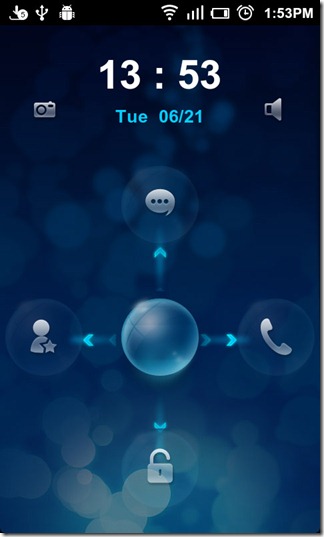
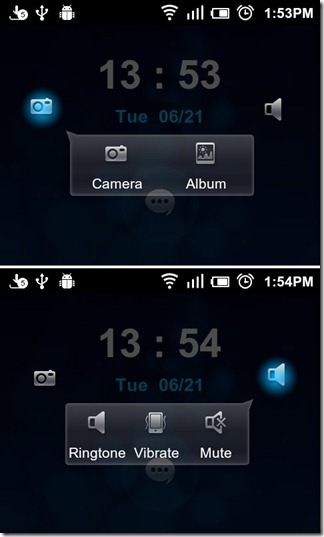
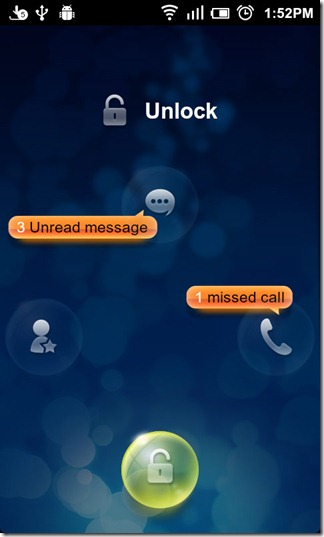
Live Locker’s unique interface, in addition to being a treat for the eyes, is smooth and efficient. As can be seen from the above screenshots, the UI of the lock screen in crammed with plenty of controls and direct unlocking options. In fact, there’s a button in there for almost everything ranging from camera to sound profiles, and messaging app to the dialer. The sphere in the center can be dragged four ways to unlock to the home screen, Dialer/Phone and Messaging applications and a list of favorite contacts that sports additional shortcuts to the Phone and Contacts applications. The lock screen displays unread messages and missed call counts on the Messaging and Phone unlock switches respectively.
The two shortcuts on either side of the clock allow you to access the Camera and Gallery (Album) apps and switch between Mute, Vibrate and Ringtone profiles, repsectively. Accessing the Camera or Gallery app from the lock screen does not unlock your device. Backing out of either app will return you to the lock screen.
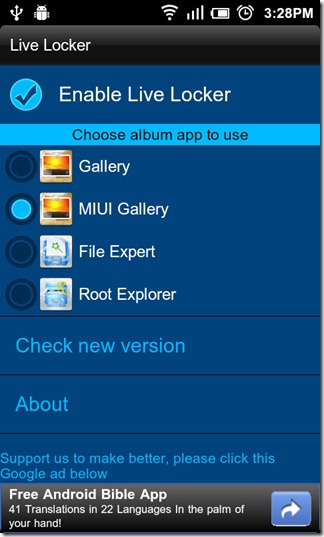
To have Live Locker replace the native lock screen, launch the app and check the Enable Live Locker option in the settings screen that appears. From the same screen, you can choose/change the photo viewing application that the Album shortcut points to. As of this writing, that is the only thing that the app allows you to change. However, it is relatively new to the Android Market and future updates might bring additional customization.
Download Live Locker For Android
