Root Sony Ericsson Xperia X8 With SuperOneClick
One click rooting apps have proved to be a blessing for most of the Android owners. These type of rooting applications give you root access of your device in the most pain-free way you can imagine. One particular hard nut to crack was Sony Ericsson Xperia X8, which was rootable, but required the user to have good grip of ADB and command line methods.
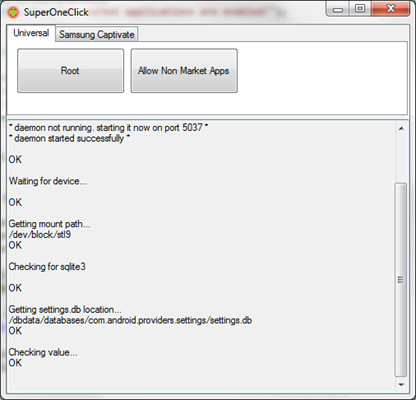
Follow these instructions to root your Xperia X8 with SuperOneClick root.
- The first step is to download SuperOneClick.Zip file from here and save it on your desktop.
- Once done, connect your phone to the computer.
- Now enable USB Debugging mode on your computer by launching Settings > Applications > Development. Checkmark the first option that is “USB Debugging”.
- Once you have enabled USB debugging, Unmount SD Card. Go to Settings > SD Card, USB Mass Storage And Phone Storage and checkmark Unmount SD Card.
- Now extract the exe file from SuperOneClick folder that we downloaded in Step 1.
- Once extracted, double click the file to execute.
- Now simply press root and wait for the procedure to finish. It will take around 5 to 10 minutes to root you phone so hang in there.
And there you go! You now have root excess of your phone meaning that you can install all those apps which require you to have root, along with flashing custom ROMS and planting recovery images etc.
Disclaimer: Please attempt this guide at your own risk. AddictiveTips won’t be responsible in case your device bricks or any other damage occurs due to this method.

san b ung i da download dyn..?? para sa sony ericsson x8..?? plz repz….
bei meinem pc steht immer ob ich eine 2.0 oder höher habe ich click auf ja und nichts passiert
How do i root my sony ericsson WT19i android 4.0 ics??
guys omg 🙁 i have x8 2.1andro and it stops at Running rageagainstthecage… 🙁 can you help me ?
can i transfer files to sd after rooting ???
plz quick
Will it work for w8
Damn it!!! Finally rooted after one week of trying, that’s what i call “step by step guide”! tons of tnx man!.
can it be used for os 2.3?Gingerbread..?
I already rooted my phone. but when I tried to open Root Explorer. It got some issues with superuser. I need help!
Will this work for the sony xperia play 4g running gingerbread 2.3.3 plz reply or message me facebook smalls christopher salome
,0819590416
It doesnt works for me i have T-mobile xperia x8 i mean my isp is t-mobile , and it says:
SuperOneClick v2.1.1.0
Checking drivers…
Killing ADB Server…
OK 0,02s
Starting ADB Server…
* daemon not running. starting it now on port 5037 *
* daemon started successfully *
OK 4,06s
Waiting for device…
OK 0,02s
Getting manufacturer…
OK 0,01s
Getting model…
OK 0,01s
Getting version…
OK 0,01s
Checking if rooted…
False
OK 0,03s
Installing BusyBox (temporary)… – Step #1
1789 KB/s (1062992 bytes in 0.580s)
OK 0,64s
Installing BusyBox (temporary)… – Step #2
OK 0,01s
Rooting device… – Step #1
1273 KB/s (585731 bytes in 0.449s)
OK 0,47s
Rooting device… – Step #2
OK 0,01s
Rooting device… – Step #3
OK 0,00s
Rooting device… – Step #4
mmap() failed. Operation not permitted
FAILED
i cant unmount SD card. please someone help me
I have rooted my xperia x8 this way but when I execute link2sd I get a message “link2sd could not gain root access. if you have root access make sure you respond allow to superuser prompt”. somebody knows what that means?
SuperOneClick says ” Unhandled exception has occured n your application. If you click continue, the application will ignore this error and attempt to continue. if you click quit, the aplication will close inmediately”
the system cannot find the file specified…
buhuu…
when connect the phone it asks if charge, copy files… whic one to choose?
I tried that but still I am stucked on waiting for devices… any other suggestions?
For someone who has a problem Waiting for devices
you gotta install the AndroidSDK tools whick can be found here
http://developer.android.com/sdk/index.html
your computer do est have the necessary driver file
i hope this will help anyone with this problem ^^
i hav downloaded androidsdk after that what should i do?/
I think you need your battery at 100% b4 doing any of this
u mean i need to charge 100% my battery before i install the rom Floyo (2.2.5)??? why? please help me guys.. thanks
helo guys… my x8 is already rooted, my question is how to know if my x8 have flash, because I tried to install Floyo (2.2.5) by ratch its working but the wifi does not work..
he show waiting for device… so long time… how to do pls,
why i can use super one click..anybody help me…i already did the way like u told
install the driver corretly
Thanks, works great
Tried on eclair with latest superoneclick
Worked 🙂
Thanks this install superuser on my phone..is it jailbreak my phone???? how can i recover my phone for custom themes?????
Excuse me, I can’t get my SD card unmounted. The button went grey and I can’t press it. Why?
You have to take the cord out of your phone and then unmount it.. That worked for me 🙂
but its dont
it is on waiting for device and i think it has froze what should i do ?
yes it ca be done to 2.1 i have my xperia x8 rooted
Can this be done on Xperia X8 android 2.1 version as well? please reply soon! :)xx
Yepp
Do you have solution for Eclair (2.1) root?