Z4Root Is One Click Root App For Samsung Galaxy S And Other Android Phones
Z4root is another one click rooting application for Android phones that can, as per the author of this app, virtually root any Android geared device. Currently, the testing APK of this root has been posted to XDA thread and mixed reponses have been observed among app testers. The z4root has been confirmed working for Samsung Galaxy S, Samsung Galaxy Tab, HTC Wildfire, Xperia X10 Mini [Eclair], Xperia X10 / X10i, and many other Android phones.
You can navigate to the official thread on XDA here to skim through board messages and check whether your device is compatible or has been tested as “working” with Z4root. We have seen plenty of other one click rooting apps like SuperOneClick, Universal Androot etc, but with Z4root, you won’t be needing a desktop application to root your device. The app is under going rigorous testing by many users and will soon be available in Market as well.
Disclaimer: AddictiveTips will not be responsible in case you brick or incur any other damage to your devicefollowing this guide.
Here are the step by step instructions to root your Android device with Z4root:
- The first step is to download Z4root file (https://www.addictivetips.com/app/uploads/android/z4root.zip) from here, unzip the APK and save it on your desktop.
- Once done, connect your phone to the computer, mount SD card and copy the APK file to SD card root.
- Now launch Market on your phone and download a file manager of your choice. We recommend going with Astro File Manager.
- Once you are done downloading the file manager, launch it and follow onscreen instruction to install Z4root APK file you earlier copied to SD card root.
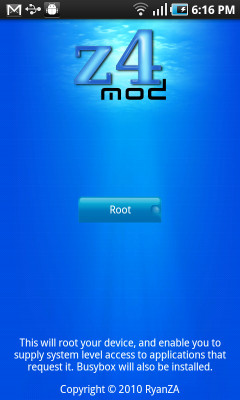
- Once the app is installed on your phone, launch and tap on the root button in application.
- Wait for the process to finish and reboot your device once it is done.
There you go! Please note that as this app is still in a testing mode, so you can expect some devices to not to get rooted with this. The common error that we have noticed with devices that failed to root is absence of Super User as well as busybox. Samsung Galaxy S with stock JPO Android 2.2 Froyo firmware has a 99 % success rate with this app. According to RyanZ, the creator of Z4root, this is the safest one click rooting app around that allegedly doesn’t messes anything up on your Android phone.
EDIT: If this method does not work for you, give SuperOneClick a shot. See https://www.addictivetips.com/mobile/root-any-android-device-and-samsung-captivate-with-super-one-click-app/

great article admin.
5 Instant Approval Site (DoFollow Backlink)
Sony xperia e4g, didn’t work. “Z4root application is stopped”
So, has this been tested on the Samsung galaxy avant? Also, does this require any twrp backup?
Can it support the latest series of Xperia? I have a Xperia Z2 and I want it rooted. Does the Z4root can root it?
if you started to root your device, is there any changes might happens in my tablet? like restart other games..
how long do you have to wait whilst it is ‘running exploit in order to obtain root access’ ? This message comes up after depressing the start button, and so far i’ve waited 2 ours and no seen any change from this. I strongly emphasise that this has to be on the ext SD card, and for any antivirus software t be disabled. My next attempt if I give up at this stage will be to turn back on the WiFi…I presumed you don’t need this one to root my Galaxy GT-P1000 with Froyo. But I might be run..
thanks for your help but can you help me how can i exactly root my galaxy young 2.3.6 thanks
For the ones that is having problems with installing the app-
Enable installing non-market apps in your settings.
Will it works with Samsung Galaxy Mini GT-S5570?
Work on samsung galaxy s 2.2
keumah keuhh…
Both sites (this and its referred link) are a waste of time. Zip file is USELESS. Just a ploy to get you to sign up to file server. HOW STUPID ARE THEY? You’d think the first file you get from the site would be intact and usable.
Would u guys know if it would work on sony eircsson xpeira play
didnt work on my galaxy s froyo 2,2
great it worksssss
How long does this take?
It says its a virus
and can i download it straight to my phone
Tried the process on my Dual sim based Android phone Spice Mi 270. Dint worked 🙁
So I installed Astro File Manager and then had to tick USB debugger (not mentioned in the help above) and found Z4root. Installed it (after ticking “Unknown sources” in the “Applications” settings, again not stated above). It appears to install since it asked me whether I want temporary or permanent. So now how do I confirm my android is actually ROOTED?
It doesnt work on haipad M701!
Don’t work for me.
SAMSUNG Galaxy 551 (i5510)
hello,
i’ve tried this on my galaxy gio, but it stuck and when i tried to reboot nothing happened?
every time i try to start up my phone, it does nothing more than vibrating en showing the samsung logo
is there anyone who knows what i can do to get my phone rebooted again?
please?
marc
It sounds like You bricked your phone youtube has good videos on it good luck
Does not work… Samsung Galaxy SL (i9003) 🙁
Does this work on Sony Ericsson W8? Eclair 2.1 :O
does it work with galaxy GT I5503?
I got a virus wile trying to install universal one click. Cost me $250 to fix. Not saying it’s universal one click, just beware.
I try to uodate the z4root on my galaxy s for at&t and i cant instal cause the instaletion is blocked
does it work on Galaxy 5 (I5503) 2.1?
It worked with my one but app list in superuser is empty…
That’s becs on SU it only shows app manipulation type apps such as luckypatcher etc. To give them superuser abilities.
Does this work with an LG Optimus S for anybody? I’ve tried downloading this app soo much but it never works. I’ve tried the 1.1.0 version and the 1.3.0 vesion. Neither work. If someone has information on how to help me with this, please post it. Thanks.
Does it work with HTC Wildfire? Thanks
My tablet is not responding it completed the process but then went to a black screen!!! PLEASE HELP!!!!!!
Will it work without a computer on a samsung behold 2
I can not install z4root on my HTC Hero 2.1
I followed the instructions and when I click Open App Manager using Astro it gets stuck. By clicking Details it says “Could not open /sdcard/z4root.1.3.0.apk as APK file
What could be the problem?!
Please help!
how long does it aproximately take
Warning this DOESN’T work on 2.2.1 firmware for Galaxy S!
thanks man it works great om my Samsung Galaxy S i9000:)
Was going to download.. virus detected. no thanks
Retard. It detects it as a “Virus”. It’s totally safe to use!
after multiple attempts i havent had any success using this on my galaxy s using froyo 2.2.1
okay it seems astro is a peice of crap or im doing somthing wrong because i cant find the z4 file on my phone if someone could e-mail me somthing a little more specific for getting this to work on the acclaim i will owe you one.
Unplug the phone from the computer, and then you can see the files in Astro.
Get es explorer paid from 4shared On playstore. I had Astor at first
Does Z4 work on Incredible??
z4root is detected as malware by F-Secure…
I am not saying it IS, just that it’s detected as such.
Every time I try to download the z4, my puter says it contains a virus!
What gives?
Nice job! Well done!
Samsung galaxy 3 works fine!
Thank you, I could not storage apps to sd without using this first.
If i root my samsung galaxy froyo 2.2 can a use the phone as normal and download aps from android market as usual as i dit before rooting it?
Try SuperOneClick: https://www.addictivetips.com/mobile/root-any-android-device-and-samsung-captivate-with-super-one-click-app/
it seems doesn’t work on my samsung 5830, from the dialog box of super one click said the root process was success, but my superuser application list is empty. Any suggestions..??
I9000XXJPY 2.2.1 firmware – somehow, I don’t think this is going to work for me given that it’s been showing ‘Attempting to apply root…’ for 2.5 hrs…
tnks for this. samsung galaxy i5500.
superuser was installed st8 away. by far the fastes root to date.
but i was woundering what do i do with superuser?
You don’t do anything with it – it gets called by other apps when they require root access. You then see it as a prompt asking you to confirm or deny root access to the app in question.
I have a Samsung Galaxy 550 (galaxy 5 / galaxy gt-i5500 / europa) with Froyo, and for some reason the z4root doesn’t work. There was no way to install apk files even with an installing app. But Superoneclick did work to root my phone. Here’s the instructions how to root:
http://theunlockr.com/2010/10/11/how-to-root-your-android-phone-superoneclick-method/
and to get froyo (android 2.2) use this link:
http://ankurtechblog.blogspot.com/2011/01/how-to-install-android-22-froyo-samsung.html?showComment=1297363882980#c2440493733084672437
Cheers!
i succesfully download z4root and astro file but it rooted but it wont work, its says no apps , then i try download on the market then it went to the phone memory, i dont know whats wrong.
please help
Give SuperOneClick a shot: https://www.addictivetips.com/mobile/root-any-android-device-and-samsung-captivate-with-super-one-click-app/
Will this also unroot??
I purchased my LG Optimus M (690) from MetroPCS (my first android phone) this week. I updated the software from Froyo 2.2 to Froyo 2.21 yesterday. I just installed Z4Root into the phone using the Z4Root.1.3.0.apk with absolutely no problem whatsoever. I downloaded the Astro File Manager (Free) and the phone seems to be working like a charm. Thanks, so much for the great work!
i cant get my phone to root no matter what i do… one way it says failed… no fu goo and the other it says attempting to apply root and will just continue saying that for hours if i dont close it on my own…. is there any way to root the lg ally????
i used the temporary root on samsung transform, and the tether app tells me something about kernel and then it asked me if my device is rooted? should i permanet root it?
i looked everywhere for help to root my samsung galaxy europa android but couldnt find any, it was inpossible, untill i saw this page…
did everything it said to do and now my phone is rooted and workes great…
when doing this remember that it does take a while to actually root so be patient…
thanks very much, great help
OH good Lord,thanks god i read this post, rooting my two phones now, and its like forever, it freaks me out…ill just wait then, hope it works well.
I am using galaxy S 2.2 Froyo.zsjpe.
Is it true that the APK file MUST be copied to external SD card?
Will it still work if I don’t have external SD card and just copy it to the internal 16G memory?
I would like to use the One Click Lag Fix after rooting. Anything I should pay attention to?
Yup you can copy it to the internal SD card.
Oh and regarding the lagfix…I’m the HTC and general Android guy here and haven’t played around with Samsung-specific stuff like lagfixes etc…our Samsung writer is on a break and once he’s back, he’ll be able to make a good suggestion on this one. In the meantime, XDA-Developers forums can help.
doesn’t work on my xperia mini 2.1, it’s start but never end! Please help me
Forget that last post, I did an app store search on “root” and found a root level uninstaller. That app ran and with it I was able to uninstall some of that pesky crapware.
I ran 1.3 on my DroidX and it says it did its thing, but when I go to the settings/applications, I still can’t delete things like CityID. Am I missing something? Isn’t this what rooting should allow?
dont use it it contains malware exploit.ooter.g that will install a backdoor
That’s not malware – that is the exploit it NEEDS to use the security loophole in the phone for rooting it.
Ey I gotta question. What Aos does this root? I have the x10 running 1.6 and I want to manually update to 2.1 because I hppened to choose att. Any help?
It *should* work for OS up to 2.2. or at least 2.1…if you have 1.6, it is most likely supported. Feel free to try it out as even if it doesn’t work, just trying it out isn’t likely to harm your phone.
got a swedish Galaxy S running official froyo 2.2 updated with Kies (samsung software)
Worked great to use this guide and software!
Used root explorer though to install APK-file and copy the EFS-folder to my external SD that is recomended when you are about to try something like “pre6lagfix”
Tested noumerous softwares and other ways before this, without sucsess. TY !!!!!
Hi guys can I ask does it work on 2.6.32.9 root@SE-S604 #1 kernel. cause I installed it but super user doesnt appear. Thanks if it can’t how can i go by downgrade it? I have odin tools but can’t find the older 2.2 firmware with older kernel
Note that the link to download Z4root here is to version 1.1.0 of Z4root – while (as for now) it’s already up to 1.3.0
You can always get the latest version of Z4root from here :
http://forum.xda-developers.com/showthread.php?t=833953
I was not able to root my HaiPad M701, until I download the latest version.
Hope it helps someone.
It didnt worked on my haipad! It does nothing, pls help me.
Works great on the Droid X.
You should realize that this script, as well as the other script by xda, contains a trojan call rageagainstthecage – a linux exploit. When you use it you are installing a backdoor on your phone.
You really dont know what you talking about a linux exploit installing a backdoor on your phone to do what get your contacts? 90% of all apps on the market do that and sent premium sms that cost you money and getting data from you. XDA is a great place to get help with rooting your phone (android, windows mobile) and the crappie iphone. so dont tell people something you do know (or making up). z4root works on my htc hero with 2.1
And that’s the truth — Z4root utilize rageagainstthecage (RATC) exploit to enable easy rooting of your Android device.
So, no worries in this case. Z4root is safe.
FRF91 LG Vortex didn’t work as well
frf91 lg vortex. does not work. :{