What Is TWRP Recovery & How To Install & Use It On Android Devices [Guide]

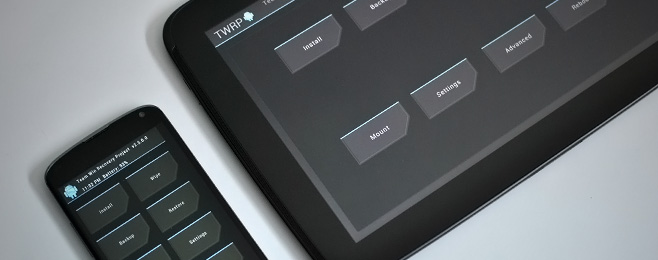
Till just over a year back, ClockworkMod (aka CWM) was the go-to custom recovery for pretty much every mainstream Android device. Things have changed a lot since, with a newer player entering the game and gaining a lot of critical acclaim, as well as a huge user base. TeamWin Recovery Project – or TWRP for short – is a fully touch-based custom recovery that was initially developed for Nexus devices, but has since been made available for countless other smartphones and tablets as well, in form of both official and third-party builds. Just like we took you through a very detailed tour of ClockworkMod recovery and its features, we’re going to guide you through all the features of TWRP right after the jump. Read More

How To Install HTC Sense 5 ROM On DROID DNA [Guide]

Running Sense 5 UI on the HTC Droid DNA is something not many users would've been expecting, or at least not this quickly. Having been ported from HTC One, this Sense 5 ROM is proof that third-party development for the DROID DNA has started to pick up pace. Sense 5 made its debut with the HTC ONE and offers a fresh redesigned interface to the UI that most HTC users are familiar with. A fancy but slightly complicated app drawer, HTC BlinkFeed and HTC Zoe are some of the key new features of Sense 5, with a focus on minimalism and content this time rather than on heavy graphics - a design philosophy pioneered by Metro design language of Windows Phone OS. The port comes in from XDA Recognized Developer newtoroot in the form of a functional ROM. Installing it on your DROID DNA is a breeze, especially if the bootloader of your device is already unlocked. If not, don't fret as I will walk you through the procedure step-by-step to get this Sense 5 based ROM up and running on your DROID DNA! Read More

HTC One M7 Toolkit: Unlock Bootloader, Install Recovery, Root & More

The HTC One is becoming HTC’s biggest hit to date, and rightly so since the phone is not only amazingly beautiful to look at, but also packs quite a punch when it comes to specs and features. The device was rooted soon after getting released, and we brought you our rooting guide for the device as always, though it required you to do everything manually. If you are looking for an easier way to unlock your HTC One’s bootloader, flash ClockworkMod, TWRP or any custom recovery to it, root the device or any combination of the above, there’s now an all-in-one toolkit available to help you with the process. Read More

How To Root HTC One M7 Using Custom Recovery

HTC One rooted! The device that currently sits on the throne of the Android world has gained root access while the hype from its announcement is still fresh. With its off-the-charts specs and prowess, root access is only going to add to the already-popular device’s appeal. If you are one of those lucky few who somehow managed to grab this device, or are planning on getting one soon, you are in luck. The rooting procedure is fairly easy, though the recoveries needed are not fully functional yet and there have been complaints regarding users failing to boot into a certain recovery. The idea is to flash a recovery, boot into it and install the SuperUser package from within. Not sure whether you should root? Our guide on the top 10 reasons to root an Android device might help you out with your decision. Read More

Install Ubuntu Touch Preview On Nexus Devices The Easy Way From Recovery [Complete Guide]

The announcement of Ubuntu for Phones and the more recent one of Ubuntu for Tablets had sparked huge interest in the entire smartphone enthusiast community and kept countless Nexus device owners waiting to get their hands on the Ubuntu Touch experience.  Finally, the wait is over, as Ubuntu Touch Developer Preview has landed on the Nexus series of devices including Nexus 10, Nexus 7, Nexus 4 and Galaxy Nexus, just as Canonical promised it would.  Though if you have rushed to the original installation method provided by Canonical at the official Ubuntu Wiki, many of you must have been disappointed at learning that the method required you to be running Ubuntu on your PC in order to install it. A Linux based OS running PC is not everyone's cup of tea and it’s hardly fair to install or even dual boot a new OS only to be able to install a new one on your mobile device – and one that is already highly experimental at this point. Luckily, there is an easier and much more more familiar way to get Ubuntu Touch up and running on your Nexus devices, irrespective of the OS on your PC. That's right - we are talking about the usual flashing from a custom recovery. So let's get on with it. Read More

Install Leaked Android 4.1.2 Jelly Bean ROM On Sony Xperia S

The Xperia S was Sony’s flagship device in its NXT series and while one would have expected Jelly Bean to have hit the device way back, it's still been a seemingly endless wait so far. However, there's finally some good news in this regard, albeit not from Sony itself. You can now install the leaked 6.2.B.0.68 Android 4.1.2 Jelly Bean firmware on your Sony Xperia S, thanks to XDA Recognized Developer DoomLoRD. While this firmware was originally meant for developer (brown) devices, DoomLoRD was able to successfully modify it to boot on productions devices. However, being a leak, you shouldn't expect everything to work flawlessly. If you still wish to given it a shot, you can install it right away. Read More

How To Root HTC Butterfly X920D & Install TWRP Recovery

HTC became the first smartphone manufacturer to release a phone with a screen resolution at 1920x1080 pixels, starting a trend among all major manufacturers who are following suit with their latest flagships. In addition to the Droid DNA, HTC's other flagship featuring this full HD resolution is the recently released HTC Butterfly, and if you've already got your hands on one of these beasts, we've got great news for you! The device has already been rooted, and as it turns out, rooting it is actually just a walk in the park. So if you want to root your HTC Butterfly and install TWRP recovery on it, let's show you how.

Read More

Overclock HTC DROID DNA To 1.8GHz With Beastmode Kernel

HTC finally released the source code for the DROID DNA, while Verizon decided to locked down the bootloader. However, that didn't keep the developer community from doing something about it, and the bootloader was shortly unlocked, paving the way for custom kernel development. In the latest development on the kernel side, ‘Team blackout’ has just released the aptly named  Beastmode kernel that will rev up the DNA’s CPU frequency to 1.8GHz, with added overclocking for the GPU and FSB! You wonder if 1.5GHz is insufficient on Quad Core, and no it is not. Though the way things go in the developer community, if it can be done, why not? More on the kernel and how you can flash it on your DROID DNA after the jump. Read More

Android 4.2 Based Paranoid Android Brings Hybrid UI To Nexus 4 & Nexus 10

Phablet mode hits the Nexus 4 and the Nexus 10! The latest version of  Paranoid Android ROM based on Android 4.2 is one of the most exciting developments headed the Nexus 4 and Nexus 10’s way since the devices got rooted. In case you're wondering why I seem so excited, this custom ROM offers a hybrid interface - a perfect mix of both phone and tablet UI that works wonderfully phones with large screens as well as tablets. Considering Paranoid Android looked good on the Galaxy Nexus, we can already tell it'll look stunning on the new HD IPS display of its successor. As for the Nexus 10, a customizable tablet UI will only add to the pleasure of using it. The ROM is based on the new Android 4.2 AOSP so don’t be surprised if you run across some bugs or issues on the Nexus 4, since full AOSP source code for it hasn't been published yet. More on the ROM and installation instructions for both the Nexus 4 and Nexus 10 after the jump. Read More

Overclock Google Nexus 4 To 1.8GHz On Android 4.2 Jelly Bean

A wolf in a sheep’s clothing? Many of you might not agree, but looking at the simplistic design of the Nexus 4, it doesn’t exactly scream out the mighty specs it has on paper. At 1.5GHz, a quad-core CPU coupled with 2GB of RAM is more than enough to take whatever the world of Android throws at it. So how does overclocking to 1.8GHz and upping the GPU to 487MHz sound? All this courtesy of recognized developer ‘faux123’, who has just released a custom kernel for the Nexus 4, compatible with all stock (rooted) and custom ROMs based on Android 4.2. Some of you are probably wondering if there’s any need for this, but that’s for you to decide. I’m telling you it can be done, and just showing you how. Read More

HTC One X+ AIO Toolkit Offers Easy Root, Bootloader Unlock & Recovery Flashing

One click bootloader unlock and root for the HTC One X+ is not entirely the newest development for the device. Earlier, we covered a guide on rooting the One X+, and while it was as simple as a root can get, there's more to modding an Android device than just gaining root access. This is where the HTC One X+ All-In-One Toolkit  comes in. From recognized developer and XDA-Developers forum member ‘hasoon2000’ – responsible for a major number of HTC Android toolkits – this toolkit lets you easily root the device, flash custom recoveries, flash kernels, backup data and more. Unfortunately, it is meant for Windows only, and the developer has stated that there will be no Mac and Linux variants. Read More

RecoverX: Flash Major Custom Recoveries On Almost All Android Devices

Few things in Android modding are as easy as sitting back, clicking one or two buttons on the computer and watching it do all your work for you. But it seems that is quickly changing. There are now several automated or one-click solutions not just for Android, but other mobile platforms as well. However, with well over a thousand different Android devices produced by different manufacturers, different rules apply to each device, and not everything can be centralized – dare I say – like the iPhone. XDA-Developers forum member ‘LEDelete’ believes otherwise and has pushed me to believe that, to some extent, essential Android hacks can, in fact, be centralized. With his tool, RecoverX, the developer has managed to centralize custom recoveries for “more than 18 devices”. I see a lot more device froma  total of 19 manufacturers. The tool serves the very simple purpose of downloading and flashing custom recoveries meant for your device – nothing less, nothing more. What makes it special? Find out after the jump. Read More

Nexus 4 Toolkit: One-Click Root, Unlock, Recovery, Drivers & More

One click root for the Google Nexus 4 is now available! Earlier we brought to you an extensive guide on rooting and installing ClockworkMod recovery on Nexus 4, and it was no walk in the park, to be honest. However, thanks to the hard work and efforts of XDA-Developers forum member and recognized developer “mskip”, we now have a truly all-in-one Google Nexus 4 Toolkit. Now, what makes this deal even sweeter is the addition of more than just a one-click bootloader unlock and root. Automatic driver installation, backup, flashing, mods, recovery booting and more. The Toolkit is strictly available for the Windows platform for now. Normally, the paradigm of Android development related to specific devices is always unpredictable, but I’m looking at a Nexus here, so no surprises at how fast this has come our way. Read More

How To Root Google Nexus 4 & Install ClockworkMod Recovery

And just like that, we have rooted the Nexus 4! Running Android 4.2 Jelly Bean, Google’s latest Nexus device by LG has started hitting the shelves in the US and UK, but the remaining parts of the world still hold eager fans who have yet to get there hands on this device. Luckily – as is the case with all that is Nexus – expectant users can now not only root their Nexus 4, but install ClockworkMod recovery on it as well just as soon as they get their hands on it. Having already brought to you an overview of the new features of Android 4.2 Jelly Bean, gaining root access will throw even more fun your way. Wondering why you should root? View our guide on the top 10 reasons to root your Android device. Ready to root and install ClockworkMod? Read on for the detailed instructions. Read More

Manage Your Android Device, Flash & Mod ROMs From Your PC Using UniFlash

Do you flash custom ROMs and mods on your Android device frequently? Do you also modify your current ROM to customize it to your taste? Are you always doing this on the command prompt, transferring files using ADB and flashing using fastboot or recovery? Now there’s a way for you to do all of that and more right from your PC without having to meddle with command line tools directly, thanks to free tool UniFlash. In what follows, we will guide you on using UniFlash to flash, mod, hack and manage your Android device. Read More

Install Android 4.1 Jelly Bean Port On HTC HD2

The HTC HD2 gets Android 4.1 Jelly Bean! Surprised? Guess not, and after all, why should you be given the feats this device has achieved. From Windows Mobile to Android 2.2 Froyo, Gingerbread, ICS, and now, Jelly Bean. The truest veteran of the Android world, the HD2 has received its first taste of Jelly Bean courtesy of Smokin901 over at XDA-Developers, who has ported the ROM from a Pre Alpha version of a Jelly Bean custom ROM for the Nexus One developed by Evervolv. So when I say port, it means the ROM is not intended to be used as a daily ROM for reasons that will be made clear after the break, and then we’ll tell you how you can get this ROM on your device if you really want to take your HD2 for a spin in the Jelly Bean world. Read More

Install Android 4.1 Jelly Bean On Samsung Galaxy S3

The Galaxy Nexus may be Google’s flagship device that gets all the Android updates before any other device does, but with the mass Galaxy S3 fan following and the fast paced development by users, I can confirm that Android 4.1 Jelly Bean has found its way onto the SGS 3. Just a day back, we covered a detailed guide on how to install Android 4.1 Jelly Bean custom ROMs on Galaxy Nexus, and today, we bring you a guide on getting Jelly Bean running on the SGS3. The ROM is in fact a port from the very first OTA release that was ripped from the Galaxy Nexus GSM device, and therefore, there are quite a few things that will be missing from the ROM. Credit for releasing this ROM goes to XDA-Developers forum member Faryaab. The ROM is definitely not suitable as a daily driver if you’re wondering, and I’ll go across those reasons as I take you through the installation instructions after the break. Read More

How To Install Android 4.1 Jelly Bean On HTC One X

The HTC One X gets Android 4.1 Jelly Bean! The Galaxy Nexus GSM (the tajku model) received an official OTA update, the HTC One X gets a ported ROM, and the Samsung Galaxy S3 soon followed with its own ported ROM. The top of the line Android devices seem to be going hard at this Jelly Bean craze and why not, this is what Android is all about! The ROM comes in from XDA-Developers forum member tgascoigne and it is important to note that this ROM like most early ports, is a work in progress, so yes it does contain missing features and you may encounter some issues. We’ll walk you through the installation, but first we take a look at what the ROM has to offer for now, after the break. Read More

Install Android 4.1 Jelly Bean ROM On Galaxy Nexus GSM

The Galaxy Nexus GSM fixates itself on some Android 4.1 Jelly Bean goodness! Just a while back Google released an OTA for the GSM based Tajku Galaxy Nexus that were handed to the conference attendees at Google I/O. Well, the idea was to keep the release exclusive, but we’re talking Android, and that fact alone, is enough to guarantee that Jelly Bean will be ripped out of one of those devices and released onto the internet. Well, guess what? XDA-Developers forum member PTzero has made that happen and the release went viral on the internet in no time. However, not to undermine PTzero’s effort, the release was actually an update to the Tajku devices running the IMM30B build and only a handful of people actually had that going for them. That said, those who did have that build, had to flash the update via Fastboot and some users were looking to flash the IMM30B build just so they can flash this update on their phone. However, all of this was too complicated and too sketchy where you were almost shooting in the dark. So while some dismayed and some eagerly awaited for a proper zip package they could flash, it has finally happened and that too, at quite some speed. Galaxy Nexus GSM users are now looking at not one, but three Android 4.1 Jelly Bean based custom ROMs, including a stock ROM, ready to be flashed on any Galaxy Nexus GSM device, without the worry about the current build you’re on. Read More

Install ClockworkMod Touch Recovery On Samsung Galaxy S3 GSM

The Galaxy S III gets its due share of the touch based ClockworkMod recovery! Development for this device is just beginning and the pace, is testament to the popularity the Galaxy S, S2 and S3 have garnered for themselves. Earlier we covered a tutorial on how to install, what was an unofficial port of the basic ClockworkMod recovery, but finallt the real deal has arrived on the SGS3 thanks to the efforts of XDA-Developers forum member mskip who also brought us the all in one Galaxy S3 toolkit. The ClockworkMod Touch Recovery is official and has been repacked by mskip into a tar file do that it can be easily flashed via Odin or Mobile Odin. Installation is a breeze, head on after the break for the instructions. Read More