View A Real-Time Log Of TCP Connections On Windows With TcpLogView

Nirsoft is known for creating single-purpose Windows utilities that boast minimalism and simplicity as their defining characteristics. Nir Sofer, the founder of the company, is seemingly smitten by simple user interface, which we think is a great strategy as it makes the programs very light on system resources and at the same time fairly easy to use by anyone. The developer has released many network-related tools in the past including NetBScannerWirelessKeyView and NetworkInterfacesView, all of which help users extract key information from various network-related sections of Windows. TcpLogView is yet another industrious effort by the developer. It’s a Windows program that monitors all TCP connections on your computer. The application monitors everything in real-time and displays a new log entry the moment a new connection is opened or closed. This feature makes it stand out from other similar tools that usually display just a history log of the connections. Read More

UrlMonitor Is A Tiny, Portable Website & Page Content Monitoring Tool

If you have used applications like Growl Site Monitor, Monitey or StatusCake, you must be aware of how handy they can be to monitor a website's activity or downtime. These apps are designed to automatically notify you if the specified URL returns an unusual response or hits a 404. UrlMonitor is a similar Windows app with a clean design and minimal interface. It’s quite simple to use and allows you to monitor any kind of website for content changes such as missing links, file unavailability or deleted content, and alerts you by flashing its system tray icon, as well as displaying a 404 error in its response log. It quietly sits in the system tray without disrupting your workflow. Read More

Monitey Monitors A Website’s Status & Notifies You When It’s Down

Have you ever wondered if your website is up and running as it should be, and everyone from around the world can access it perfectly? It’s a waste of time and effort if you put a lot of content on your site but it remains inaccessible to your visitors. Even though you can employ web services like DownForEveryOneOrJustMe (yeah, that’s a long name, I know) and other such tools for the purpose, they're only good for manually checking the status of a website. In case you want to constantly monitor a website and get instantly notified upon any outage, Monitey might be just what you're looking for. This free Windows application monitors any URL in the background, keeping a detailed log of its status and in addition, it notifies you whenever the URL goes offline. The application can be quite useful for all website owners who want to continuously monitor the online status of their web server. Let’s see how it works! Read More

NetStalker Is A Rule-Based Firewall For Easy Internet Monitoring & Filtering

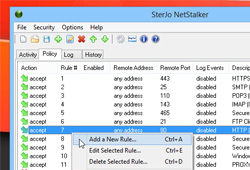
A lot of the applications we use nowadays have something to do with the internet in one way or the other. For instance, Dropbox requires constant internet connectivity to sync files between your local Dropbox folder to the one on the cloud, apps like Google Talk need internet connectivity to let you communicate with others, and even tools for offline use need internet access every now and then to update their data. In the most severe cases however, a malicious program sitting in some deep corner of your PC might be silently sending confidential information to someone, without you even knowing. This is where SterJo NetStalker comes to the rescue. This simple application acts as a firewall between your PC and the internet to keep an eye on all TCP and UDP connection established by currently running services and applications. It’s designed to constantly monitor your network traffic, and lets you block any processes from Internet access by creating rule-based policies. Read More

NetMeter: Monitor Your iPhone’s Data Usage From Notification Center

It might not be entirely wrong to say that mobile data gained more popularity among users with the advent of smartphones. There’s no denying the fact that the world was no stranger to capable mobile devices even before 2007, but one cannot argue with the fact (either) that Apple’s iPhone shaped the smartphone industry into what it is today, and introduced the layman to the world of easy-to-use and humane on-the-go computing. We’ve come a long way since then, and high-speed data protocols in the form of 3G and 4G LTE are the new buzz. However, mobile data doesn’t come cheap, and one thing that continues to haunt all smartphone owners are excessive data costs, should they not be on an unlimited data plan. Natively, iOS does let you monitor cellular data usage, but with a couple of caveats. One, you have to dig deep within settings to pull up the data usage stats your for device, and two, there’s really no easy way to monitor WiFi usage. True that the App Store boasts a few quite capable apps for that, again, you have to rely on an app for a reporting that should otherwise have been available at a single touch. Luckily for jailbreak users, NetMeter Widget for iOS Notification Center is a Cydia tweak that goes hand in hand with the NetMeter app, and lets you glance at your iPhone’s mobile data usage from the notification center, along with a few other useful statistics. Read More

JD’s Auto Speed Tester: Visually Analyze Your Internet Connection

Ever wondered why your internet speed fluctuates frequently? You might’ve guessed the problem or used a web service like Speedtest.net to check upload/download speeds before contacting your internet service provider, but with JD’s Auto Speed Tester, an automated application for Windows meant to better analyze and depict results both graphically and in tabular format, you can accurately point out the missing dots in the internet speed variations story. Furthermore, it lets you perform numerous internet speed-related tests, generate an average-value based analysis report, save the result sheet in CSV format, and schedule internet performance checks. Read More

Cucusoft Net Guard: Internet Usage Monitor That Identifies Bandwidth-Hogging Malware

Most internet broadband plans are data capped, which means you are only able to use the amount of bandwidth that has been allocated to your account. Ideally, you shouldn’t pass this data limit and end up paying extra bills, but streaming videos on Youtube, online music stations like Grooveshark, Spotify, Pandora, and even surfing 9gag can easily cause the data bandwidth limit to be exceeded. It's worth pointing that internet content has been seen to become overly sized within the past few years, and experts claim it will keep on rising, as it evolves and brings in more features to the people. The main thing however is how do you cope with the problem of not stepping beyond your data limit? Well, a simple solution is provided by Cucosoft Net Guard. It’s a free application that is designed to not only monitor your internet bandwidth usage, but also eliminate any malware that might be secretly sucking at your internet juice. The application includes a bandwidth meter to track native and third-party programs that are consuming too much of internet bandwidth. Read More

Monitor & Receive Email Notifications Of Internet Activity With Gold Monitor

The internet is full of distractions that make you lose focus while working. A lot of websites exist just for the sole purpose of wasting your time when you have nothing else to do. It is important to keep a check on yourself when you are working, since there is a lot of chance that you will lose focus for a minute and end up wasting hours on such websites. Today, we have an application that allows you to monitor internet usage and browsing patterns to find out where is all that time wasted. Gold Monitor is an internet monitoring application that lets you monitor the web browser activity, allowing you to receive daily, weekly and monthly reports of browser activity. You can get reports according to Top 10 most visited websites, All visited websites, Websites visited today etc. Parents can use this application to monitor internet activity of their kids, companies can use it for monitoring employee activity, and individuals can use it for checking time-wasting websites to increase their productivity. Read More

Set Transfer Rate Priority Of Each Application And Boost Up Internet Speed With NetBalancer

NetBalancer is one powerful application which does exactly what its name implies. It is built solely to balance the internet usage and transfer rate priorities. The reason behind its built is when net connection is established, there are lot of applications, programs and instances start accessing internet connection and downloading/uploading data, which eventually slow down the overall speed while consuming bandwidth. To cope up with this, you can try out this application. Read More