YouTube For WP8 Gets Revamped With Better Live Tiles & Playlists

Just like Microsoft pleasantly surprised WP8 users with a revamped Facebook app last week, they have shown that the state of the rather dismal YouTube client for the mobile platform hasn’t slipped their mind either. The YouTube app just got a major update for WP8 a few hours back, adding a lot of improvements and new features to the mix. For one thing, the app is now ready to be pinned to the Kid’s Corner, thanks to the new content control options. Also, the interface of playlists has been overhauled to make it convenient for users to scroll through them and get to their favorite videos with ease. All major WP8 apps support live tiles, but YouTube 3.0 shows the full potential of the feature, as it lets you pin individual videos, search queries and channels to the Start screen. Read More

LinkedIn For Windows Phone Gets Live Tiles, Voice Controls & Dynamic Lock Screen Support

A month shy of its first release anniversary, LinkedIn for Windows Phone has received a major update. Windows Phone has native integration with the world’s largest professional network since WP7, but you do need to have a decent app if you want to properly go through your updates, message someone or explore new jobs. The previous version of the official LinkedIn client for Windows Phone was pretty decent, but it did not take full advantage of all the awesome new possibilities added to the mix by WP8. With LinkedIn 1.5 however, you get to control many aspects of the app using WP8’s native voice commands; resizable live tiles are supported now, and it is possible to configure your lock screen to automatically cycle through images taken from the LinkedIn Today section of the app. Read More

Experience Windows Phone 8 Start Screen On WP7 With W Phone 8 Simulator

Mango users might not have recovered just yet from the blow Microsoft dealt them by announcing that Windows Phone 7 devices won’t be getting the Apollo update, but apparently the Windows Phone developer community still has enough passion left to come up with an app like W Phone 8. If you followed our coverage of the Windows Phone 8 event held last month, you might already know that one of the best changes expected to be released in the Apollo update is the revamped Start screen. Users will be able to resize live tiles to three levels (small, medium and large) and most of the tiles will be made double-sided. So, what has the W Phone 8 app got to do with all that? In fact, it has got everything to do with the WP8 Start screen! The app is a simulator of sorts that comes with a secondary Start screen having semi-functional tiles. Not only that, you can adjust the size and positions of all the pinned tiles just the way it will work in WP8, and there’s even a nice collection of accent colors to go with it. Read More

Get SMS Preview & Badge Count On The Messaging Live Tile In WP7

Rooting your Windows Phone 7 might reduce the overall stability of the device, but most people aren’t likely to notice that, thanks to the awesomeness Homebrew apps can bring to your Mango phone. You can get a lot of cosmetic and productive customizations for your WP7 if you have an interop unlock. Developed by Windows Phone Hacker, SMS Tile is a new homebrew that changes the overall behavior of the Messaging live tile in WP7. By default, the live tile only shows the total count of unread messages, and the smiley changes its mood with respect to the amount of messages in your inbox (winking on a new text, amazed at a lot of new texts and sad when a delivery fails). SMS Tile takes away the emoticon from the Messaging tile, and replaces it with a preview of your last unread message, while revamping the badge as well. The app doesn’t affect the banner text notifications, and you can learn all about SMS Tile by heading past the break. Read More

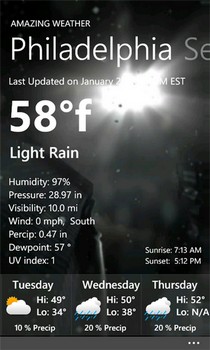
Amazing Weather Has Live Tile Support & A Beautiful Interface [WP7]

A weather app can not be very different from its competitors, no matter to which platform it belongs to. So, only a few areas remain where an app can excel and bring something new to the mix. Although Windows Phone 7 has no shortage of weather apps, Amazing Weather is an app which is sure to attract many people, owing to the fact that the interface and graphics it boasts of, are unparalleled, and you are sure to be sucked in by the brilliance of this app. The live tile sported by Amazing Weather is pretty awesome as well, and you can learn about more of its features by heading past the break. Read More

Wiz Tiles For WP7: Customize The Text, Color & Icons Of Live Tiles

It seems the trend of Live Tile customization apps for Windows Phone 7 is growing. Just recently, we covered two apps from said genre, namely Skinery (which offers custom themes for tiles of stock apps only) and Themes For WP7 (offers better theming options, but for unlocked WP7 devices only). New to the Windows Phone Marketplace, Wiz Tiles makes some nice new additions to the genre. Like Skinery, it only lets you customize the tiles for stock apps, but in addition to selecting a background image of your choice for each tile, the app lets you set custom icons, titles and text. More after the break. Read More

Themes for WP7: Create & Apply Custom Skins To Unlocked Windows Phone 7

Although the idea might seem laughable for now, but looks like Windows Phone 7 is slowly striding towards getting everything iOS has. Barely two days ago, we got WP7’s version of Cydia (dubbed Bazaar) and today, the folks over at Windows Phone Hacker have launched the first ever comprehensive theming platform for the metro OS. Themes for WP7 is a desktop application using which you can create custom themes for your Mango phone, incorporating any image and color of your choice. Read More

Skinery For WP7: Create & Apply Custom Skins To Start Screen Tiles

A lot of people who have shifted to Windows Phone 7 from Android (or jailbroken iOS), complain that among the main features they miss on the platform, one is the option to apply customizable themes. Even I was quick to notice that some of the Live Tiles on my Start screen do look a bit dull because of the single, solid color which serves as their background color. HTC HD7 owners can enjoy customizable skins by flashing currently available custom WP7 ROMs for their devices. as a huge bonus point. Now, however, anyone using a WP7 device can have a tastefully customized Start screen using a free app named Skinery. Read More

Pin A Website Logo To WP7 Start Screen With Web2Tile [How To]

One good thing about Windows Phone 7 is the metro interface, and among the things that distinguish this interface from its competitors are Live Tiles. Where all other mobile platforms just have the same old stagnant icons, the tiles on WP7 can give the user quite a lot of information at a glance. The home to these Live Tiles is the Start screen in Windows Phone. On the Start screen, you can pin just about anything, ranging from apps to shortcuts, and even webpages. If you have ever pinned a webpage to your phone’s Start screen, you must have noticed that doing so puts a miniature screenshot of the opened page on the said screen. This seems out of convention with the metro interface that focuses on not wasting even an inch of space on your phone's main screen. Fortunately, you can take matter into your own hands and with a simple bookmarklet, it is possible to pin any webpage’s favicon or logo to the Start screen instead of a small image of the page. Read More

Battery Status: Live Tile For Battery Percentage & History [WP7 Homebrew]

Since Nodo, Windows Phone 7 users have looked for ways to view the exact remaining battery percentage of their devices. Before Mango, that was only possible via the Diagnostics Menu, but WP7’s fruity update brought that functionality to the OS and now you can view the battery status in the battery saver menu in Settings. However, if you're still looking for something more, try Battery Status, a homebrew app available for all unlocked Mango devices. It can be a little annoying having to go deep into the Settings menu just to see the remaining battery of your phone, and it is not as convenient as being able to see the percentage on your Start screen. This app shows the current and past battery status of your device and comes with live tile support. Read More

Smart Note 2: Create Colorful Text And Freehand Notes On Windows Phone

There might be a lot of note-taking apps available for Windows Phone 7 that make use of live tiles (we have even covered a few, like Sticky Tiles and Live Tile Now), but none as colorful and eye-catching as Smart Note 2. Not only can you create notes with this free app, you can pin them to the start screen of your Mango phone in the color of your choice. And if you are in a hurry, or just in the mood for doodling, you can do that, too, with Smart Note 2. The app can serve the dual purpose of letting users create new notes, and managing reminders or to-do lists. Read More

WP Shortcut Tiles: Add Settings Tiles To WP7 Mango Start Screen

After months of anticipation and speculation, the release of Windows Phone 7’s latest update (Mango) has finally been confirmed. It is slated to be released within two weeks, with the AT&T roll-out expected on 27th September (just 3 days away!). WP Shortcut Tiles is a useful little Mango app which takes advantage of the new functionalities the latest update of the metro OS has to offer. Most of the apps we have seen in the past weeks have been based upon two major improvements - the ability to allow third party apps to run in the background, and the privilege to customize live tiles. This handy little app (which is pretty similar to ConnectivityShortcuts) deals with the latter. To improve the user experience and make the OS more efficient, you can pin system shortcuts, settings toggle and a bunch of other really useful tiles to the Start screen of your device. Read More

Live Tile Now – Create Your Own Live Tiles For WP7 Mango Start Screen

One of the few things that sets Windows Phone 7 apart from its competitors (iOS and Android) is its unique metro interface. And what’s so different about metro? Well, it all boils down to one thing - Live Tiles. It is an extremely lovable, user-friendly concept but, unfortunately, on very rare occasions does any third party app get it right. Most self-proclaimed “live” tiles turn out to be mere tiles, clearly dead as a doornail. Even if they update, the process is so laggy that it nullifies the whole purpose of this feature. But there is good news on that front. Looks like with Mango, this issue has finally been resolved, as demoed by the StickyTiles app we covered yesterday. And to further reinforce this theory, Live Tile Now has been launched for Mango phones, which lets you create your own two-sided live tile complete with text and a picture of your choice.

Read More

StickyTiles: Pin Up Two-Sided Sticky Notes To WP Mango Home Screen

It is pretty ironic that some of the features that bring Windows to your mind as soon as you hear their name, are absent in Windows Phone 7. The Sticky Notes feature gained popularity through Windows 7, but it’s a third party app which finally brings it to WP7. Sure, you can pin Office’s OneNote to your Start menu but that does not show its contents on the live tile, just the note’s name. StickyTiles for Mango does the trick by attaching a whole note to your start screen so that you can view what you wrote at a glance. Of course you can only write a small amount of text on such a note, but that is the whole point of the app. StickyTiles is equally useful for reminders, small notes and to-do lists. Read More

How To Improve The Quality Of Your Contact’s Live Tile Picture

One of the best features that Windows Phone 7 offers is Live Tiles. You can pin up any of your contacts to your home screen and stay connected with them with just one touch. Every time you see Windows Phone 7 depicted somewhere, it is the image of Live Tiles that is mostly used. They are a trademark of sorts for WP7. But it is a major turn off that in real life, the picture quality on a live tile is not as good as the original picture you used. There is a reason for it, and the issue has been tracked down to Google compressing your photos while syncing, thereby reducing the quality and resolution. So here’s the workaround for this little problem. Read More

How To Fix Stuck Live Tiles On Your Windows Phone 7 Device

One of the features that set apart Windows Phone 7 from other mobile platforms is the availability of Live Tiles. Their ability to update automatically with the passage of time, and easy, one-touch access makes them perfect for use in apps that are used frequently. But currently you are allowed to have only 15 active live tiles on your home screen. And at times even staying in this limit isn’t safe enough and some of your live tiles get stuck. By that we mean that the tile remains, just the “live” part of it becomes non-functional. This can be quite an annoyance for some users, and here’s what you have to do to fix it. Read More