[Giveaway] MacKeeper Is An All-In-One System Maintenance & Security Tool For OS X

We’ve covered a lot of small tools that help you clean up your Mac, make it run smoother, securely delete files, recover deleted file, or search for them. Though OS X does most - if not all - of these things natively, it doesn't offer as many customization options, or work as well as several third-party offerings. You can always look for apps that are meant to solve individual problems, or you could invest in an app that does everything for the right price. MacKeeper is a very famous app that acts as an antivirus and anti-theft app for your Mac. It also lets you encrypt data, recover deleted files, securely shred files, create backups, remove junk files, find duplicates, estimate the disk usage and break it down for you, uninstall apps and the many files they can sometimes leave behind, help you optimize start-up apps, and edit the default apps for different file extensions. Read More

Securely Delete Individual Items From OS X Trash With Supercan

If you've ever found yourself in the middle of the OS X vs Windows features debate, you might have noticed how Trash can or Recycle Bin are rarely ever compared. While this might be because a delete operation doesn't sound like a big deal but lets face it, Trash in OS X has a major shortcoming compared to Windows’ Recycle Bin: you can’t delete the items in it one by one, and even if you want to permanently remove a single file from Trash, you have to empty it all. Supercan is a free Mac app that solves this problem. It syncs with Trash and lists each file that you've sent to it, allowing you to permanently remove individual items. In addition to deleting files the normal way, Supercan also supports secure deletion (file shredding), which overwrites sectors your disk to ensure deleted data can’t be recovered by file recovery apps. Read More

Secure-Erase Data From Multiple Drives At Once Using Active KillDisk

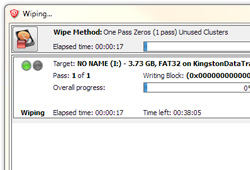
Deleting a file simply from the hard drive does not completely erase it. Instead, it is sent to the Recycle Bin and can be restored using its built-in Restore functionality. Even if you delete the files from the Recycle Bin, they are still not completely removed from the system. Permanent deletion simply removes the links to these files, allowing new data to be written over the data sectors where they resided. A file is truly removed only when new data overwrites its residues. Deleting personal or sensitive files and folders, even from the Recycle Bin is not enough, as anyone with the proper knowledge and tools, such as previously covered Recuva, can easily recover the deleted data.  In order to prevent private information from being compromised, it’s always advisable to use data shredding tools to securely erase data off the hard disk. Active@ KillDisk is an application for Windows that allows you to securely remove data from local hard drives, USB drives and other removable media storage. You can wipe multiple drives at a time using one of several shredding methods, including One Pass Zeroes, US Army, Peter Gutmann and User Defined. Read More

Shred Files From Windows Context Menu Using Secure Eraser

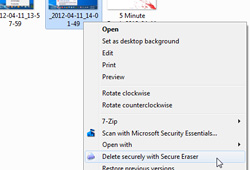
The default Windows method for deleting files and folders sends them to the Recycle Bin and anyone can restore the data back. In order to completely remove the files from your system, you need to use the Empty Recycle Bin option. Deleting personal or sensitive files and folders, even from the Recycle Bin is not enough, as anyone with the proper knowledge and tools, such as the previously covered Recuva, can recover the deleted files. Unless you use a file shredder for deleting your files, the data remains recoverable unless new data is written in its place. Secure Eraser is a file and folder shredding tool that lets you wipe all traces of the selected data from your computer by using various shredding methods, including German Standard, Peter Gutmann Standard, US DoD, etc. Other than securely deleting files and folders from your system, you can delete whole partitions, perform secure deletion of already deleted files, clean your system, and delete redundant registry entries. Read More

A+ Folder Locker: Powerful Data Encryption, Steganography & File Shredding Tool

Massive changes in information technology over the past few years, have almost doubled (or maybe tripled) the amount of data proliferation on our computers. This has also led to some major security concerns, that is, as more and more information is being available digitally, companies are trying to employ various security techniques to keep such delicate information safe. One of the most proficient ways to keep your files confidential - which include videos, picture, documents, credit card information etc - is to encrypt them using some security software. Folder lockers and other file handling tools come in handy to perform the said operation. Back in June, I covered a data encryption software labeled Toolwiz BSafe, which let you create file Safes and mount them as virtual drives. A+ Folder Locker is more or less a similar application, but with much more robust security elements. Akin to safes in BSafe, the application lets you create encrypted Lockers. These lockers can be password protected or pattern protected, whichever seems feasible to you. What’s more, it also packs steganography and file shredding features. Another benefit it has over other similar tools is that it lets you input encryption password using an integrated virtual keyboard, making it harder to crack. Read More

Permanently Delete Files With More Than 15 Secure Overwrites

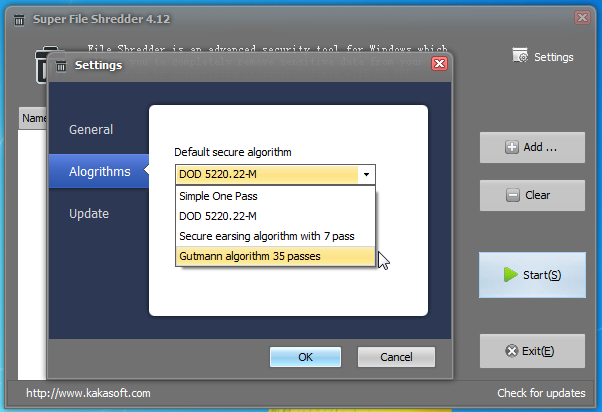
Unwanted documents of a confidential nature should be destroyed permanently to avoid any misuse or a ‘leak-out’ whistle-blower scenario. The Windows delete feature does not sufficiently protect data against recovery and instead, and this loophole is being exploited by file recovery utilities to reverse the deletion process. Specialized data recovery techniques can be used to recover information, which may cause embarrassment and compromise of both the right to privacy and security. Super File Shredder quickly shreds files by overwriting random bits, 15 times using advanced algorithms, making recovery literally impossible. With multi-language support, features like virtual Recycle bin-like shell icon, integration with Windows Explorer and Drop Target Window etc., make this utility extremely useful. Read More

PrivaZer Is Arguably The Best System Cleaning Tool For Windows

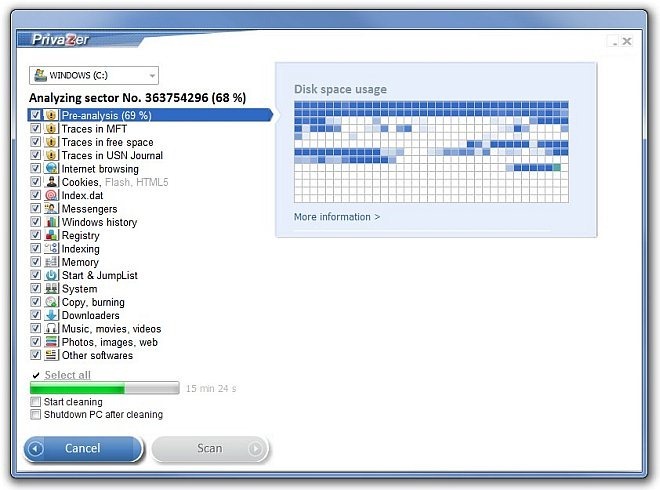
System cleaners literally add a new life to your PC, as various unwanted file traces, registry keys, invalid programs, browser history and other objects gradually deteriorate your system’s overall performance. Whilst the integrated Disk Cleanup utility comes in handy to get rid of those traces, third-party tools simply provide you with a lot more; for instance, the recently covered Clean Temporary Files, an open source system cleaning tool with myriad of features and top-notch performance, exceeded our expectations. If you somehow didn’t find Clean Temporary Files much useful, or simply were looking for another alternative, try PrivaZer, which definitely won’t disappoint you. The features we found on PrivaZer are unique, powerful and perform as they are being promoted. The In Depth scan is simply amazing, performing a complete system clean up within a few steps. Then you have cleaning options for secondary storage, external drives, USB flash drives, iPod, MP3 Player, SD memory card and NAS, which makes this tool a lot better than other counterparts. What’s more, there’s an integrated file shredder and file recovery option, too. Read More

Eassos PartitionGuru: Create & Manage Partitions, Recover Files, Shred Disk Sectors & More

With every new iteration of Windows, Microsoft opts for many new enhancements to existing tools. Same holds true for the integrated Disk Management utility, which has seen a lot of improvement with every new release. Creating new partitions via Disk Management works like a breeze, and anyone can create a new drive partition within a few clicks. However, various third-party tools go far beyond than what Disk Management has to offer, by throwing in plethora of additional goodies. If you’re looking for a feature-rich disk management tool, then you have probably hopped onto the right place. Meet Eassos PartitionGuru, a partition management application that does the job it’s supposed to do, and does it surprising well. Apart from creating (or deleting existing) partitions, of course, the application emphasizes on a number of additional features that are not to be found on other free tools, such as Partition recovery, Partition cloning, file shredding, file recovery, building USB bootable disk, verifying and repairing bad tracks, and much more. We all know that how RAID improves data read/write speeds, but this comes at the cost of higher risk of data loss (in case of power failure). Folks who run their hard drives on RAID would be pleased to know that this application also offers RAID support, and thus provides recovery from your RAID drives. Read More

EraserDrop: File Shredder That Adds A Desktop Icon For Drag & Drop Shredding

Erasing files and folders using the Delete function only sends them to the Recycle Bin. To permanently delete the data, you have to empty your Recycle Bin, but emptying the Reclye Bin only removes the pointer to files and folders, allowing users to overwrite data on the sectors where the deleted files were stored. For this reason, one can easily recover deleted files using a powerful data recovery application like previously featured Recuva. This is why it's always advisable to use data shredding tools to securely remove data off the hard disk in order to prevent private information from being compromised. In the past, we have covered quite a few data shredders, such as xShredder (reviewed here) and TurboShredder (reviewed here). Today, we came across a portable data shredding software called EraserDrop, which places a shell icon on your desktop, and allows you to delete files and folders just by dragging them over it. It is, effectively, an alternative to the Recycle Bin for files that you plan to shred. Additionally, it supports a total of 5 file shredding techniques including Gutmann, DoD 8-306 E-C and E, Schneier’s Method, DoD 8-306 E and Pseudorandom. Each technique uses a different number of data deletion passes to ensure secure deletion of the selected files. Read More

xShredder: Overwrite Free Space & MFT, Wipe Disk, Shred Folders & Files

When you delete a file, it goes to the Recycle Bin. To remove it completely from your hard drive, you have to delete it from the Recycle Bin as well. However, even after you have completely removed it from your hard disk, one can easily recover the deleted file using a powerful data recovery utility, such as previously reviewed Recuva. Although data recovery software come useful in situations where you delete something by mistake, anyone with malicious intentions and the right set of tools can easily recover and access deleted sensitive information from your hard drive. xShredder is an open source application for Windows that allows you to protect your privacy by overwriting free space as well as shredding confidential files using powerful permanent data removal techniques. The program provides multiple shredding methods including British HMG IS5 Base Line, US Army AR380 19, German VSITR, and Peter Gutmann. Further details after the break. Read More

TurboShredder: Quickly & Securely Shred Sensitive Files With Zero Pass

When you delete files from your computer using the default Windows delete function, they go to the Recycle Bin. To completely remove them from your computer, you either have to empty the recycle bin in order to ensure that they are not consuming the much-needed space on your hard drive, or press Shift + Delete in the first place, to skip the entire recycle bin process. However, even after being removed from the Recycle Bin, these files can still be recovered using any data recovery program. If working in a sensitive environment, anyone with malicious intentions who has access to your computer can recover the deleted files and use the information against you. Moreover, if you're working with a highly classified data, the effects of harm can even be more adverse. This is where file shredders come in handy. What file shredders do, is they eliminate any chance of recovering the file from your hard drive by completely wiping off the data. They use overwriting techniques for data destruction, so it becomes completely unrecoverable for unintended personnel. Today, we have a file shredding utility for you, simply labelled as TurboShredder. This is an open source application for Windows that allows you to quickly shred files, leaving them completely unrecoverable. Read More

Encrypt Data, Generate File Hash, Securely Delete Files & Encode Text Using WinAES

Encrypting files to prevent unauthorized access and external data theft attacks can be achieved using a number of file encryption software, which allow users to choose an encryption algorithm and encrypt  key to secure the specified files. Like Mac OS X, Windows 7 also enables you to encrypt files across the disk partitions to ensure data safety, and also to restrict others from reading/writing the data. BitLocker and TrueCrypt are probably the best tools available for this very purpose. Although one can create encrypted containers for holding specified files and folders using Truecrypt, it requires following quite a lengthy wizard and configuring complex settings to encrypt a set of files. Simialrly, Windows 7 built-in BitLocker allows encrypting the entire disk, but if you’re encrypting a large disk volume, it may take hours to complete the encryption process. If you’re looking for a super powerful data encryption tool that can encrypt and decrypt specified files with a click, WinAES is a solid pick. Read past the jump for details. Read More

Quickly Shred Large Files In Windows via Drag And Drop With Zer0

For many users, it becomes necessary to not just delete confidential files permanently, but to shred them to avoid file recovery. While there are a number of handy file shredding applications for Windows, Zer0 is perhaps the most minimalist of them all. It is a user friendly file shredder, which can delete files securely to make them unrecoverable. It provides a convenient drag and drop utility and allows instantly shredding files in a single click. Zer0's high level security algorithm makes it impossible to recover deleted files by conventional recovery tools, and the deletion process itself is lightning fast. During testing, we spcified a 573MB file for deletion with Zer0, and it was deleted in a split second. The tool makes use of multiple system cores, and hence, provides maximum efficiency, without hanging the application. Read More

FileWing: Recover Deleted Files & Shred Data For Complete Removal

In every computer, there are some sensitive files that are not meant for everyone to see. When those files have a purpose to serve, we keep them buried deep inside our hard drives, encrypted and hidden from plain sight, but what to do with them once their use is complete and need to feasible disposal way? Sensitive information always remains sensitive, even if it gets old and you no longer need it. Almost everyone knows that simply deleting a file doesn’t ensure the complete removal of it from the computer; it leaves some traces behind, which can have disastrous effects if wrong people get their hands on it. For example, if you're working in a bank, sensitive information leak such as your clientele's credential, can be the worst possible situation one can imagine. That’s where file shredders come in, to eliminate any chance of file recovery. File shredders completely eliminate the data from your hard drive. Such data can not be used again. I discovered a very neat file shredding tool known as FileWing . The application not only lets you recover files, but as well as shred them using different file deletion algorithms, such as GOST, DoD (ECE), Bruce Schneider, Peter Gutmann etc. Read on to find out more about FileWing. Read More

Shred Files In Ubuntu From Context Menu To Make Them Unrecoverable

Sometimes it becomes necessary to not just delete confidential files permanently, but to shred them to avoid file recovery. While there are many file shredding applications for Windows (such as Moo0 File Shredder and Universal Shredder), there is a shortage of reliable file shredding methods in Linux. Shred File Script is a Linux script, which allows shredding files in Ubuntu via right-click context menu. Read More

Easily Wipe & Clean Files, Folders And Hard Drives With Hardwipe

Deleting personal files and folders via the simple delete option in Windows isn't enough. Every time you delete data, it still remains in the hard disk and can be easily recovered using various third party software solutions. If you have an old hard drive, which you don't find any use and thinking to recycle it, its better to use some file shredders or disk wiping utility, before you dispose it off. There is one such software we found called Hardwipe. It is a file wiper and drive cleaner utility that can be used to erase file and folder contents permanently, wipe hard disk contents and clean unused hard-disk space. It is a document shredder that completely removes any traces of your data, preventing theft or accidental distribution of personal and business information. The software is also quite useful to quickly rid any confidential data, in case you're resigning from your job and don't want any traces of your personal information to be left behind. Hardwipe integrates with Windows Explorer, enabling you to wipe files from the right-click context menu. It works very efficiently when wiping large disks, as its cleaning process is very fast and it can shutdown your PC when finished deleting, allowing you to leave lengthy, time taking jobs running. Read More

SHREDroid For Android Wipes Traces Of Deleted Files From Internal Memory & SD Card

Deleted files leave behind residues that can be used to recover or reconstruct them. They aren’t completely removed unless the memory sectors that contain said residual remains are overwritten. Which means that the bookmarks, contacts and other private data that you delete from your mobile device are merely brushed under the rug and very much recoverable. SHREDroid for Android is a free, easy-to-use app that allows you to either manually remove all traces of deleted files from your device’s internal memory and/or SD card or set it to do so automatically after set intervals of time. That’s right. It’s like a simpler version of CCleaner's Drive Wiper feature. The app basically overwrites sectors housing residues of deleted data to prevent its recovery. This can prove to be particularly useful for people who regularly find the need to do away with sensitive or confidential data stored on their phones. Read More

Remove Files And Folders Permanently With Free File Wiper

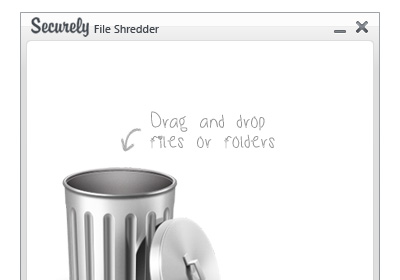
File shredding utilities are used to eliminate the chances of recovering data from storage mediums in order to ensure data confidentiality. Since many data recovery software are capable of recovering data by applying both track-wise and sector-wise recovery methods, you must use a powerful file shredding utility to delete classified information from your system. Free File Wiper is a tiny yet staunch file shredder which supports 4 file erasing algorithms to permanently remove files and folders. Just like previously featured Freeraser, which uses different file destruction methods, it features an on-screen trash can. When you want to delete files / folders permanently, drag them over to trash can and it will start shredding them right away. The provided shredding techniques are based on different numbers of deletion passes, which includes, Quick erase – 1 pass, Normal erase – 2 passes, Secure erase – 3 passes, Maniacal erase  - 7 passes. Read More

Fully Optimize And Repair Your System With Glary Utilities

Glary Utilities is a complete system optimization and repair utility that provides options for registry and disk clean up, privacy protection, performance acceleration, internet speed optimization, safeguard of confidential files and performance maintenance. The aforementioned features are available in its free version, whereas, it also has a paid version. It has an easy to use interface that can allow even a lay user to understand and use the available options for system maintenance and optimization. You can get a comprehensive list of categories and sub-categories for protecting, cleaning and optimizing your system in easy steps. For instance, its Cleanup and Repair module provides disk and registry cleanup, shortcut fixing and an uninstallation (for unwanted programs) options. Likewise, the Privacy and Security module provides file encryption, recovery, shredding and trace erasing features. In case you simply wish to perform system maintenance without going through the hassle of configuring advanced options, you can do so from the main interface in a few clicks, as explained below. Read More