How To Find Commands To Run Applications In Ubuntu Linux
Whenever you install any particular application in Ubuntu it’s launcher is placed in the appropriate category like Applications, Accessories, Places, or System. But if you are unable to locate any installed application there, then the best way to launch it is through the Run Application Dialogue box. You may open the Run Application dialogue box by pressing Alt + F2.
Here is the screenshot of the Run Application dialogue box, in the text box you will need to enter the command to run the particular application.
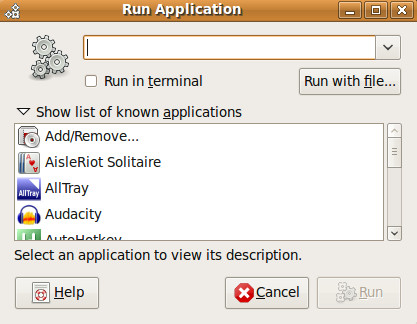
Now the question is how would you find out the command to launch your required application? Its very simple, Open the terminal and run the following command to determine the command which may be used to launch your required application.
whereis package_name
where package_name should be replaced with the name of the application that you want to launch, for example if you want to find out the launcher command Firefox then simply run the above mentioned command as :
whereis firefox
It will display the launcher command, which then you can use in the Run Application dialogue box to launch this application, here is the output displayed while searching for the firefox launcher command :
whereis firefox
firefox: /usr/bin/firefox
Now /usr/bin/firefox is the command you will enter in the Run Application dialogue box to launch the Firefox web browser.

hello, I started working on EPICS on Scientific linux but not getting material to learn about EPICS (how to use in linux ) if any one can help me , please provide me some material if you can.
How can anyone think Linux is even usable for ordinary users when you install an app from their own repository, supposedly the easiest method, and cnnot even find it. I am not the only one. Why are people so happy with something that hardly works?
Just what I needed to know.