How To Block Unwanted Website In Ubuntu Linux
“`html
If your Ubuntu computer is used by some one else besides yourself, specially children, then you might want to restrict some websites and make sure they do not open on your system. Here is a quick way to block such sites in Ubuntu. It is extremely simple doesn’t require any third party application, you just need to make a simple entry in the /etc/hosts file.
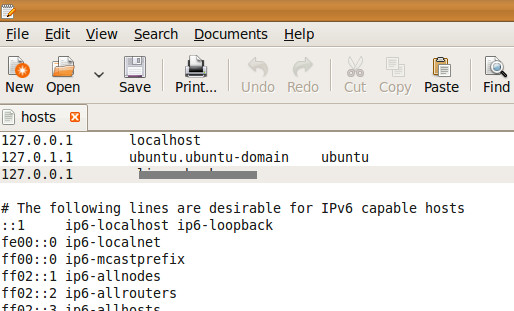
/etc/hosts is a very important file which handles DNS and internet handling on Linux based systems. In order to block some site from opening, open the /etc/hosts file by typing the following command on the terminal:
gedit /etc/hosts
and add the following line:
127.0.0.1 domain.com
Here replace domain.com with the name of the domain that you wish to block.
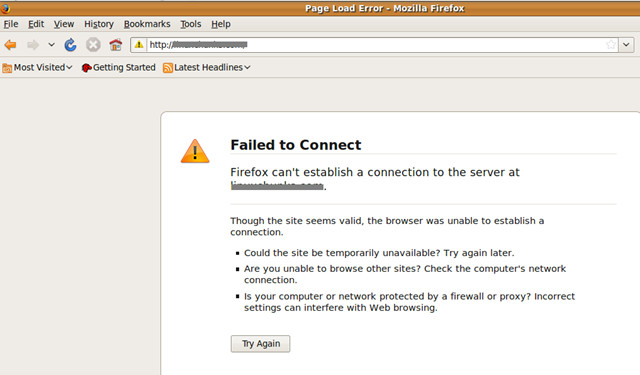
Now whenever there is an attempt to open the blocked website, the web browser will display the “Failed To Connect” message. If you’re looking for ways to bypass blocked sites instead, there are alternative methods available as well.
“`

This site doesn’t have much in recent anything..
Websites will not be blocked/unblocked until you logout and login after you remove/add and save.
Thank you very much. This solved my problem.
Thank you! Was wondering why websites still worked..
no such file exist .terminal response ,using ubuntu 3.2
Thank you so much ! I’ve been trying so hard to stop myself from entering porn sites, now this is the best way.
Thank you very much , i had another problem , But this details helped me a lot lot lot ……
Is it useful for an https:// address
Actually this is a question! Forgot the ? sign.
it doesn’t work for me, i am using ubuntu 13.10, any idea why?
how to block https version of facebook? please tell me
clean, simple, and effective.
you need to clear the history and restart the browser..
Thnx for the tip…
IMHO Its best to speak with your children, instead of trying to live in a bunker. /etc/hosts is not built for blocking access, there are several nanny tools that have community maintained lists. Long time ago IE 4 had parental controls, and being only 14 I was able to hack them in no time, and it was me who set the password in the first place. So if you are seriously considering taking advice from this post you are doing parenting wrong. And sysadmin worse, but that is just my humble opinion.
“IMHO Its best to speak with your children, instead of trying to live in a bunker.”
Speaking to your children and locking down your computer are both valid and complementary. You cannot say a person doing the latter and asking for help is not also doing the former.
“So if you are seriously considering taking advice from this post you are doing parenting wrong.”
Most parents would appreciate not being patronized by someone who presumably, going by clues in the post, may be too young or too inexperienced to be giving out parenting advice.
Your post otherwise was helpful. Please stick to being helpful without the patronizing tone.
not working in 11.10 either
I use TOR proxy. this is a way which isn’t effected by your way, what do u suggest?
i hav bloked facebook …nw plz tell me hw 2 unblock..
remove the entry from /etc/hosts and you can open it again…
it’s read only i can not edit it.
sudo gedit /etc/hosts
sudo, gives you access to files that only the administrator can access. It asks for your password
don’t blocked domain
ok i have tried to block sites and i did it i need now to unblock it please help
Ok, I deleted those lines but that particular site is still being blocked. Why?
A better way would use iptables. There are several frontends for iptables that make configuration simple. The problem with /etc/hosts is that too many entries can slow you down.
To unblock, simply delete those lines you have added.
i added mydomain.com to that list successfully, but still the site isn’t blocked…what to do?
you are really dumb…
How can I unblock this site now?
how to unblock?
www.opendns.com
i want to block all the sites in my computer which is related to porn stars,porn movies please help me
i undrstood how to block a website in single machine but how 2 block website for all users on same network.
you can use squid+squidguard for that
i can not save hosts file bcz it’s read only (unchangeable)… now how can i save hosts file??
now i found how it can be save.
I got the same trouble. How do you fix it?
you must be super user to modify the file since it is owned by root.
either get super user privileges first by typing “su” or “sudo su”
or do it at once with “sudo gedit /etc/hosts”
If you want to get to a site blocked using this method try using a free web proxy such as www.freedombyproxy.com
you must be superuser in order to make changes….log in as superuser and then try it again
how.?
Just type
sudo gedit /etc/hosts
then type your password as demanded and you will be able to edit and save the file.
Btw it is also answered three comments above..!
How do I unblock it now?
don’t be a dumass lol
Hehehe be serious
it doesn't work for me, i am using ubuntu 8.10, any idea why?
in terminal, type: sudo suenter your passwordthen type: gedit /etc/hostsadd the line127.0.0.1 siteyouwannablock.commake sure you exclude the “http://” and make sure you block all sub-domains of the site.hope this helped!example:127.0.0.1 siteyouwannablock.com127.0.0.1 www.siteyouwannablock.com127.0.0.1 ad-server.siteyouwannablock.com
i made it. write likes (must give same coloumn between 127.0.0.1 and www.facebook.com on above)
127.0.0.1 localhost
127.0.1.1 muhinboss-desktop
127.0.0.1 www.facebook.com
# The following lines are desirable for IPv6 capable hosts
::1 localhost ip6-localhost ip6-loopback
fe00::0 ip6-localnet
ff00::0 ip6-mcastprefix
ff02::1 ip6-allnodes
ff02::2 ip6-allrouters
ff02::3 ip6-allhosts