How To Change Priority Of A Process In Ubuntu Linux
As you all know that the process is an instance of a computer program and one process may consist of many threads. Process Management is one of the most important responsibility of the operating systems. Ubuntu start many processes with priority 0, which is the highest priority (as the rule of thumb is that the lower the number, the greater the priority). If you are running any resource hungry application then this priority mechanism causes some problems. In many cases you will need to tell Ubuntu, which process to run on which priority so that the resource allocation should be according to the respective needs. Lets explore how we can change the priority of any process in Ubuntu.
Method 1: Use System Monitor
You can use System Monitor to change the priority of the process. Launch System Monitor from System > Administration > System Monitor and go to the Processes tab as shown in the following screenshot.
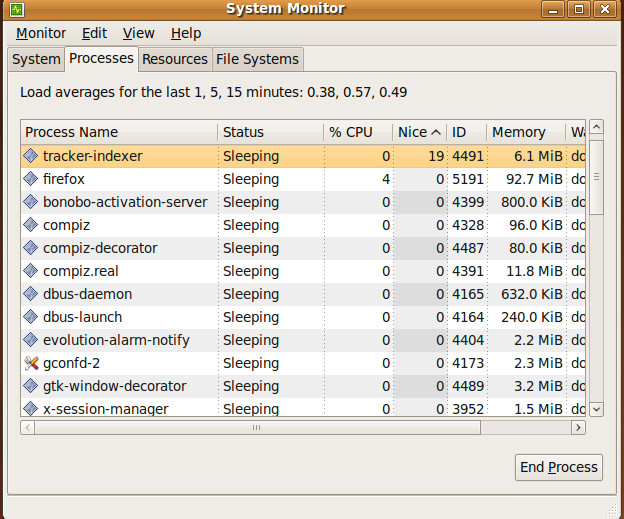
Now, you will be able to see the Nice column in front of every process. It basically specifies the priority value of the process. You can change priority of any process by right clicking the Nice column value and choosing Change Priority as shown in the following screenshot.
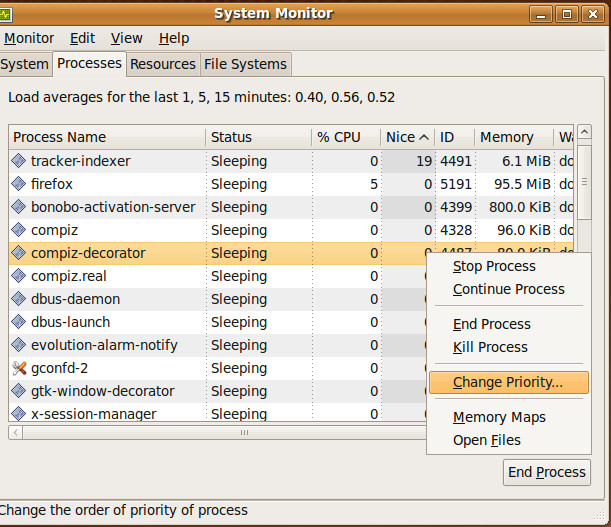
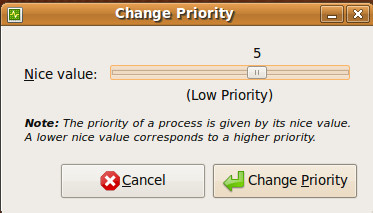
Thats all, adjust the new priority value and click Change Priority.
If you are looking for some details regarding System Monitor, you can find some here.
Method 2: Terminal Command
You can also set the priority of any particular process by running following command in the terminal.
nice firefox 5 &
According to the above command, Firefox will run with priority 5. You can replace “firefox” with the process name you wish to change priority. Command line method is quick and useful for those who work on remote Ubuntu servers. Enjoy!

None of these things have any effect. The CFS is so cocky, it thinks it knows better than you.
that was excellent please mail me process management & memory management in ubuntu
to change a priority from the commandline of a currently running process, you can use renice