Advanced Customizable Windows 7 Logon Editor
There are multiple tools that allow users to change the Windows 7 logon screen, from Logon Screen Changer, which provides dead-simple way to changing the background, to Logon Screen Editor , which provides additional useful options in Logon screen. There is also a dead-simple way of changing the logon screen by adding the option in the Windows right-click desktop context menu by using Logon Screen Tool.
One thing that is missing is that they all lack the option to customize the Logon screen. Yes, you can change the background but that is only half of the job.
Windows Logon Editor is an advanced portable (yes, portable!) Windows 7 Logon Screen Editor which addresses the need of users who want to fully customize the logon screen. Currently in beta, it works flawlessly in Windows 7.
Just run the executable to bring up the editor. It will open the logon screen which is currently in use. The tool bars have a set of options and numerous features to overhaul the logon screen. The best part is you can restore the logon screen if something goes wrong. The Preview menu refers to generic layout of the design from where you can change design size, toggle default/user picture, change user name, and interestingly change the Windows 7 branding names, such as, Windows 7 Ultimate, Windows 7 Starter, Windows 7 Home Basic, and Windows 7 Professional.
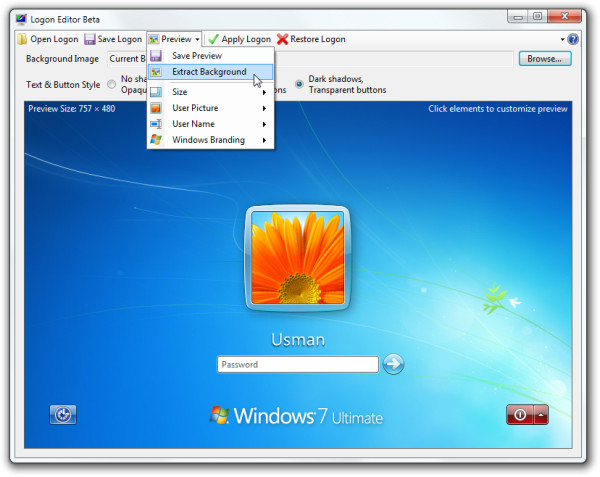
Apart from the menus, options including, changing background and three text & button styles with shadow and transparency variations are given on the main interface.
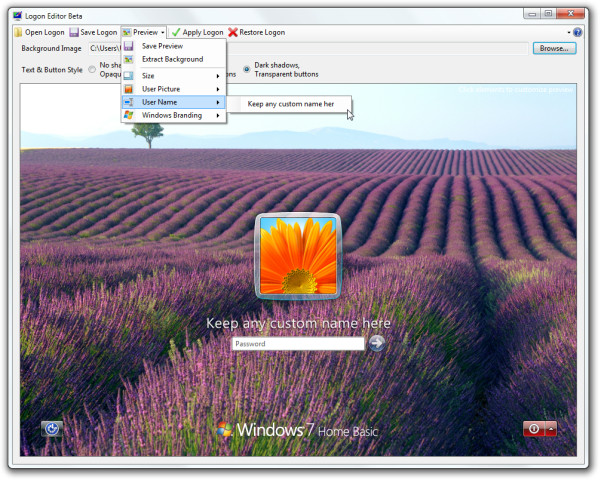
It is designed for Windows 7 only. We tested it on x86 system.

Do you know what’s the password to the zip file? I tried deviantart and deviantart.com as password, but does not work.
no offence. the software gets installed but when i try changing wallpaper it talks about getting elevated access or .net framework or some registry keys which are not even mentioned. now to give u little background i got .net 4 on my compter and i have taken ownership to all folders in c: still it doesnt help. is there somthing that i am doing wrong here.
logon screen changer,
I get bored with the same old stuff so this is great software and easy to use!!!!!
Great improvement for customization! Well done!