Cannot Start Outlook 2010? Use Safe Mode
If your Outlook 2010 is crashing due to a culprit add-in, then the only possible way is to start it in safe mode and remove the add-in. Apart from add-ins, there could be hundreds of other reasons why your Outlook is crashing. In all cases you will need to start Outlook 2010 in safe mode.
Before attempting any troubleshooting steps, it’s wise to backup Outlook before troubleshooting to prevent potential data loss.
So how would you start Outlook in safe mode? Go to Start Search, type Run, and hit Enter. Once the Run dialog window is open, you can type any one of the four switches.
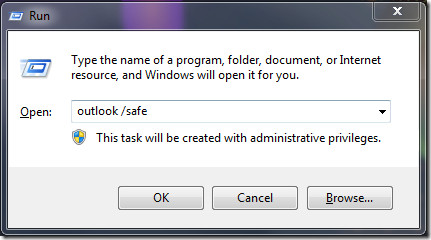
outlook /safe – Starts Outlook without Microsoft Exchange Client Extensions (ECE), the Reading Pane, or toolbar customizations. Component Object Model (COM) add-ins are turned off.
outlook /safe:1 – Starts Outlook with the Reading Pane off.
outlook /safe:3 – Starts Outlook with Microsoft Exchange Client Extensions (ECE) turned off, but listed in the Add-In Manager. Component Object Model (COM) add-ins are turned off.
outlook /safe:4 – Starts Outlook without loading outcmd.dat (customized toolbars).
For some reason, /safe:2 switch is not included so typing it will give you ‘wrong switch’ error.
These switches can also help us in pinpointing the exact problem. Suppose you can run Outlook in /safe and /safe:4 switch, but not in /safe:1 and /safe:3 switch, this means the problem is occurring in the customized toolbar.
Please note that these switches work for Outlook 2007 as well. For more, if you are using Firefox, we have a guide to launch it in Safe Mode too.

I had to change my preferences to open outlook as admin in order to open in safe mode
unable to run outlook in safe mode through Run Command outlook.exe/safe.
Erro message says Windows cannot find “outlook.exe/safe”.
I am using Windows 7………..somebody have any idead to troubleshoot this please??
In reply to Aslam Gilani
Put a space between exe and / so it would appear like this outlook.exe /safe instead of outlook.exe/safe. It does work.
Does not work for me , I have tried everything to get it to open , I can re-boot computer and it will open in safe mode but when I shut Outlook down I have to re-boot computer again .
I cannot even get the command to work – my computer just says Windows Outlook cannot find any of the variations above. I have disabled add-ins and am at my wit’s end. It won’t work even in safe mode ( by holding down the ctrl key) but hangs and then eventually springs into life.
Hi,
Thank YOU!
Cannot Start Outlook This should help you
wasted all day trying to get into outlook, then spent 2 minutes at this site and problem fixed – fantastic!!!
None of these worked. Outlook will flash open but then close right away.
In Windows 7, your Outlook may be force starting in safe-mode. If you want it to revert to starting in regular mode by default, you’d also need to uninstall any add-ons which may be creating a problem
Thanks, it works for me. I at least can read mail and dont need the Exchange mode.
My problem, i guess is that when installing a few days ago i told him to use the outlook 2010 files i had before reinstalling windows and office…
These troubles make me understand people moving to other options for mail.
I cannot even get the command to work – my computer just says Windows cannot find any of the variations above. I have disabled add-ins and am at my wit’s end. It won’t work even in safe mode ( by holding down the ctrl key) but hangs and then eventually springs into life.
Hi,
I tried all those switches and none of them worked (/safe:4 even asked me to verify the switch stating it was invalid).
I’m on Vista Ultimate and this was a clean install. The Outlook wizard, on installation, asked if I wanted to setup my email acct, to which I said ‘yes’ and it went away and did it. I then had what appeared to be two Outlook accts in the nav pane on the left: Outlook Data File and another named afetr my email address. The last thing I did before getting this problem was customising OL so that it always started in Outlook Today.
Any thoughts please because this has become a WTF time after spending the last three days cleaning my system and reinstalling the whole system!
Thanks and cheers.
I had the same problem. Type “outlook.exe /safe” in the run box and it should work.
Brilliant! i have tried everything, and this worked flawlessly. thank you very much
I can run Outlook in /safe and /safe:3 switch, but not in /safe:1 and /safe:4 switch
Same here! I know I’m a little late for this post, but how’d you fix it?? I have tried all kinds of things (deleting & recreating profile; totally uninstalling & wiping Office 2010, then re-installing; I tried the toolbar, etc. switch – still didn’t work) – – I’m still stuck by being forced to use Outlook 2010 in Safe Mode (since this hit me earlier today, after installing & using CCleaner)… MH
thanks