Clikka Lets Disabled People Use Mouse Effortlessly
The technological advancement of recent times has let disabled people perform normal functions, and lead a pretty regular life. These days, disabled people are climbing mountains and running in Olympic races with the help of different gizmos. Devices that help them perform tasks normally come under the title of assistive technology, or accessibility options in case of Windows. The accessibility options in Windows allow people with disabilities to use the operating system without needing the help of others. You can adjust settings for better display and readability, configure keyboard and mouse settings, and make the sounds produced by your computer easier to your and set up speech recognition for controlling the operating system through your voice. Other than the default Windows options, there are also a lot of third party applications available that help in enabling everyone to use the computer in a better, easier manner. Clikka Mouse is one such application that allows disabled users, in particular, people who can’t use or don’t have fingers, to use their computer in a normal way. The application is used to emulate mouse-click actions at the position of the cursor, without actually pressing the buttons. Read more about Clikka Mouse after the jump.
It provides users with new options for controlling the mouse without messing up with any default setting. The extended mouse options just enhance the current functionality of your mouse cursor. The application installs a toolbar on your desktop that is hidden by default, and can be accessed by moving mouse to the left of the screen. The toolbar allows you to choose different clicking modes, including No Click, Double Click, Single Click, Click and Drag, Right Click and Middle Click. Just hover your mouse over an option to enable the corresponding clicking mode.
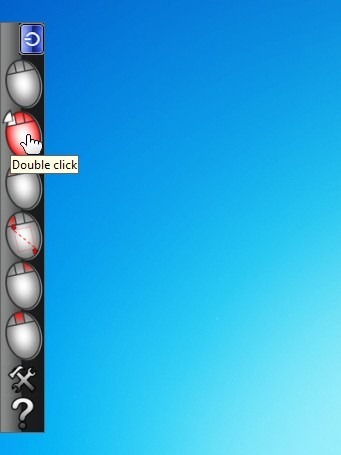
Click the Hammer and Spanner button at the bottom of the left side bar to access the Options window of Clikka Mouse. It has settings to increase and decrease Tolerance, and time to Wait before click. Other options include View Central click button and Beep to turn off sounds. You can also change application language, and add more languages by clicking their respective buttons.
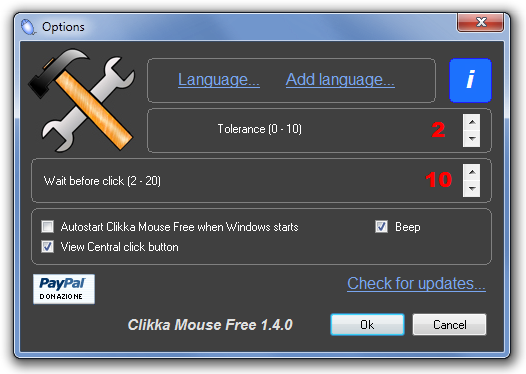
More options can be added to the software, such as a different sound for each type of click provided by the application, to make it more useful to the users. Clikka Mouse works with all 32-bit and 64-bit versions of Windows.

Congratulations excellent program!
Congratulations excellent program!
There are many useful apps/programs for windows based computers that can make life easier for people with disabilities (I work for an Assistive Technology service). There range from customizable onscreen keyboards, web-cam based mouse control, and literacy support software. It’s great to see one featured here and it might be nice to have a regular segment.