Clippy: Portable Clipboard Manager For Windows 7
Clippy is a portable clipboard manager. The application pops up from the system tray to display multiple items which were recently copied in its clipboard window. Any text that is copied will become visible in its semi-transparent application window. If you click an item in its clipboard, it will automatically save as copied text that can be pasted using hotkey Ctrl + V on any text editor. Other features are taking screenshots and quick Google search of any text in its clipboard.
It is a massive application, considering the miniature features it provides. The portable version occupies 46 KB of disk space. The interface is appealing, and you can alter it to add any background color from the Options sub-menu. You can also add your own background image.
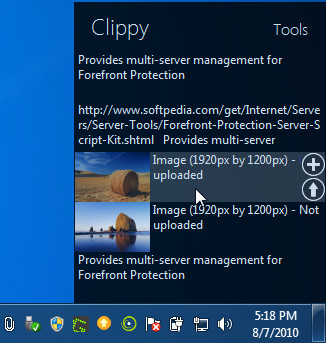
If you copy any text in a text-editor, it will become visible in the application’s clipboard (as shown above). To copy any text from the clipboard, you can just click it once. Then, if you hover to any text editor, such as Notepad, and press hotkey Ctrl + V, the selected text will be pasted.
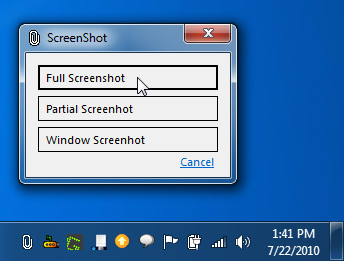
If you want to take screenshots, right-click the System Tray icon. You can choose from Full Screenshot, Partial Screenshot, and Window Screenshot. You can select the destination path for saved screenshots by clicking the Options submenu. The limit for items in clipboard can also be specified.
In all, the application serves multiple purposes, but we feel that it doesn’t fully deliver on its claims. It is also not without bugs, which can make it difficult for users to reap any advantages other than enjoying the basic functions of its clipboard manager.
This application supports Windows XP, Windows Vista and Windows 7. Testing was carried out on Windows 7 x86 system.
For more, check out Clipboarder Sidebar Gadget and CopyFilenames Extension.

This software is outdated. You can find something else like “Hot Copy Paste”.
New homepage of Clippy is : http://dfgbt.com/
The portable version does /not/ take up 42MB of disk space. Neither versions will take up more than 2MB.
He meant KB, sorry for the typo.
I think this utility have big future.