Create A Quick Ad Hoc Wireless Network Connection Between Two Computers In Windows 7/Vista
Do you want to create a quick network connection between two computers or laptops to share some files? Or maybe you want to share an internet connection? Windows 7 and Vista have a build-in feature to create a quick ad hoc wireless network connection, this means you can connect directly with another computer or laptop without the need of a router.
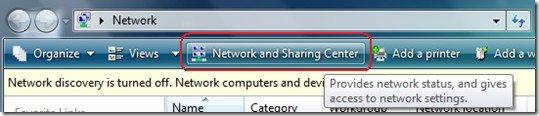
To begin, click Start and select Network. Now click on Network And Sharing Center as shown in the screenshot below. If you can’t find Network, then type Network in Start Search and hit Enter.
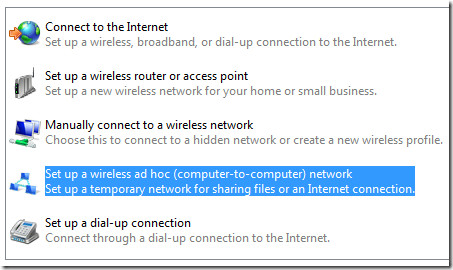
Now in the left sidebar, click Set Up A Connection Or Network. From the list select Set Up A Wireless Ad Hoc(Computer-To-Computer) Network option and click Next.
Click Next again and it will ask you to type a Network name and select the Security settings as shown in the screenshot below.
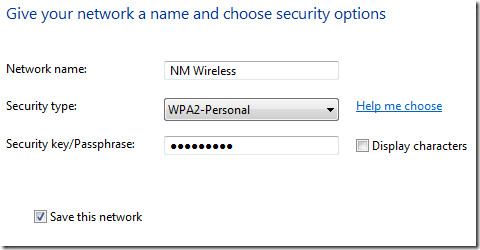
Make sure you select a good password, if you don’t know which security type to select, click on Help Me Choose link next to it. After you are done click Next and the Network connection will be ready.
Now in the Network And Sharing Center you can choose what to share as you can see from the screenshot below.
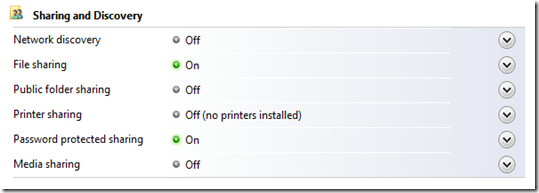
To Share an Internet Connection, click View Status next to the connection that you want to share. Now click on Properties button which you will find under Activity.
Click on the Sharing tab and tick the checkbox where it says Allow Other Network Computers To Connect Through This Computer’s Internet Connection. Under Home Networking Connection select Wireless network Connection and click OK.
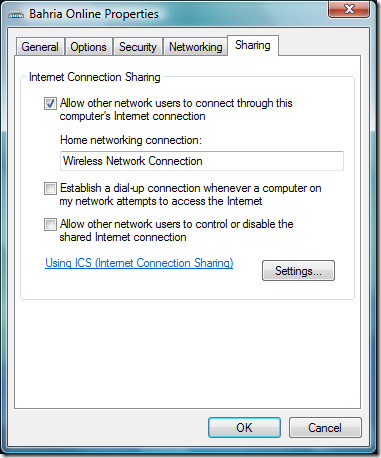
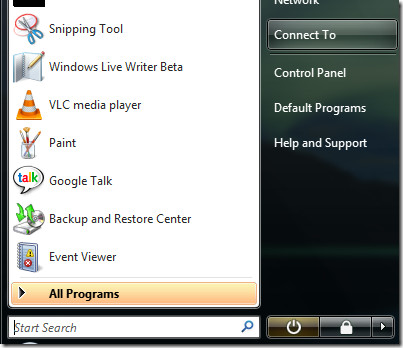
Now your connection is ready to to shared. To enable the wireless network connection you just made, go to Start and click Connect To.
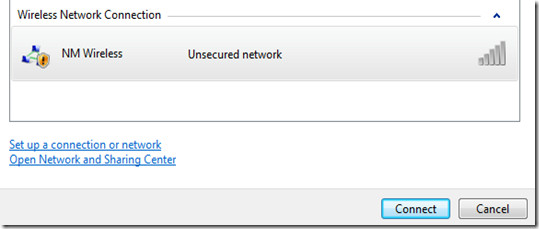
You will see your wireless connection listed there. Select your connection and click Connect.
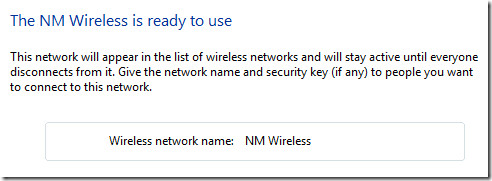
You will see a success message as shown below.
You will see your connection listed under Wireless Network Connection on the other computer. Simply connect from there and you are done sharing the internet connection.
Note: To connect successfully make sure the wireless hardware is enabled on both computers or laptops.

it’s win 8
i have a problem. Set up wireless ad hock is not visible in my PC. plzzzz help me
how to set up wireless ad hoc for windows 8
Hi
I have tried to connect to computers in ad Hoc mode both having the same OS(vista) but it is not working.
Please I need your help
how to pc and laptop connect for wifi
Is that really all there is to it because that’d be flabbregatsnig.
Followed the instructions and fine until after setting up the adhoc network, when connecting on the host computer says waiting for others to connect, but cannot get at the settings below the network list entry. (they are not shown) I already have a home wirless network for keeping the laptops updated etc and for loading files ready for off site work, that netowk entry has the list showing below it!. I want to get the pair of laptops I have to talk to each other away from the home network and then I can piggy back a smart phone to that network to become the internet access for both (my phone says it will do that) the second laptop finds the new network tries to connect but then fails?? tried many times.
I’m trying my ass off to connect my two laptop computers through Wireless connection and each time I try something, I end up with suggestions to create a HomeGroup. Guess what, Microsoft didn’t give the option to Windows 7 Home Basic users to “create a homegroup”. Why Microsoft? Windows 7 Home Basic didn’t come for free, I freagin paid loads for this computer which came with ShitSoft Windows 7 Home Basic Trash. God damnit I feel like throwing this computer out of the window and go buy a MAC. Since I’m so happy using Windows operating system, let me make this sweet announcement, this is MY LAST WINDOWS based computer. It is about time I quit using all Shitsoft products. FFS I’m no hotshot geek, I’m just 19 years old girl who is trying to connect my laptop with my friend so that we can share internet connection for college assignments. I have limited time and here I’m fu***g with these super computers installed with ShitSoft Windows 7 Home Basic Crapload. Argh, sorry for all the complaints but hey MeatSoft, MicroFags, I’m pissed off to the point I did like to punch Bill Gates right in the ….. never mind.
I love you!
fk you
Hi,
I am trying to create Wireless Network Connection Between Two lap tops to share Internet. One has Windows Vista OS and other has Windows 7. I created ad hoc network on one lap top by following the above shown steps. After that I tried to connect to this network from other lap top. However other lap top recognized the connection, sometime it fails to connect to that network and sometime after connecting to network, Internet have not worked.
I have tried creating ad hoc network first on lap top having Vista OS and then on the other Lap top having Windows 7. But till now I am not able to find the solution to the above problem.
If some has solution for this issue,I will be very appreciate.
Thanks in advance for help
Hey i tried this and it keeps switching on and off. I think it might be because one of the pc’s im trying to connect is on windows 7 basic and the other professional. would this make a difference?
I have yow lap tops that I want to connect. The one lap top has vista premium and the other windows 7 home premium. I did all the steps shown above an it’s connected but it’s saying there is no network acess. I’ve tried diagnosing the problem but there’s no network acess. Please help!!!
Mission impossible as above, instructions are wrong !!!It is very easy however every time you want to connect another pc to the network, (internet) for sharing ad hoc in Windows vista or 7 it means a new connection and causes problems if you have an active firewall.Another minus for windows.Sharing is caring !!!
Hi guys,
I have the following issue. I connect my two laptops via ad-hoc network. Everything is OK. I share my internet trough ICS. I have on both of laptops Internet and I can surf all over the Internet. Then suddenly (after not more than 2min) the laptop which is connected to the ad-hoc network, but without the LAN cable for internet, is losing connection first with internet then disconnect from the ad-hoc network unexpectedly. If some has solution for this issue I will be very appreciate.
Thanks, in advanced.
Try these apps:https://www.addictivetips.com/windows-tips/conne…and…https://www.addictivetips.com/windows-tips/share…
You can have an Ad-hoc network with one on Vista and one of XP, I have this working right now. However, while I can share files and printers, I cannot get it to share an internet connection?
Try these apps:https://www.addictivetips.com/windows-tips/conne…and…https://www.addictivetips.com/windows-tips/share…
You can have an Ad-hoc network with one on Vista and one of XP, I have this working right now. However, while I can share files and printers, I cannot get it to share an internet connection?
You can have an Ad-hoc network with one on Vista and one of XP, I have this working right now. However, while I can share files and printers, I cannot get it to share an internet connection?
Try these apps:https://www.addictivetips.com/windows-tips/conne…and…https://www.addictivetips.com/windows-tips/share…
Hi there,
I have two laptops, one is with Vista and other running with XP. Can I make any ad-hoc connection with them for sharing Internet? I am little worried. can you please help me…
Thank you:)
I’ve set up a network between two laptops both having Vista and do not want to connect to the internet. How can I share files in this capacity? Each laptop shows correctly as shared and I can share a document on each side, but can’t get to the other laptop’s document to view.
Do I have to be on the internet in order to share? I thought I could network two computers this way. They are less than 300 feet from each other at all times.
both mine are running vista ultimate, they are connected to the network. But the internet doesnt seem to be sharing properly. I can connect to the net on this comp but the other 1 cant. Ive enabled sharing in the options and stuff. and on the other comp it says connected with limited connectivity.
I have vista on two laptops and it connected and share the internet connection but when we wanted it the next day it only connects the computers but not the shareing of internet connection.
You will have to go to Internet Connection Properties and enable the Connection to be shared in a network.
i hv windows vista starter. it doesn’t have the option for ‘set up a wireless ad-hoc’. what should i do?
i hv windows vista starter. it doesn’t have the option for ‘set up a wireless ad-hoc’. what should i do?
type wireless adhoc in search bar in the start menu
hope that helps
I have the same problem. Using Windows Vista Home Premium and cannot see the “ad hoc” selection. HELP!
I think the option is there, you will have to scroll down to find it.
If you still cannot see this option, it could be because you don’t have wireless driver installed properly. Try updating your wireless card driver, and keep your vista up-to-date by using the Windows Update.
Let me know if the problem still persist.
Hmmm I wonder what your problem could be, I am using Vista Ultimate and the option is showing. Maybe it is restricted to Ultimate only.
I have a problem with the picture #2, that’s I can’t see the option to chose “create ad hoc connection”. there are only: connect to the Internet, setup wireless, manual, dial-up … What is the problem ?, some parts is not installed? My OS is Vista Business. I could connect to the Internet normally (either by broadband or wireless).
Please help me. Thanks you so much.
Email: miranamoonshade@yahoo.com