From time to time we need to analyze and find the files and folders that are taking the most space. Windows will only show the amount of space that is taken and free in a local drive, but it is impossible to determine which folders are taking the most space, specially when you have hundreds of folders with thousands of files.
Meet Disk Space Fan, an awesome eye-candy disk analysis tool that can display the amount of space taken by each folder and the files residing within. The directory structure is neatly laid out to make it easier to browse the folders and sub-folders.
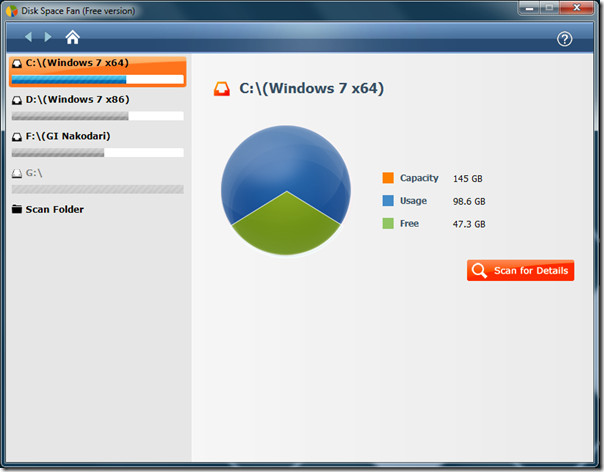
On the main interface you will find the overview of the local drives, hit Scan for Details to begin.
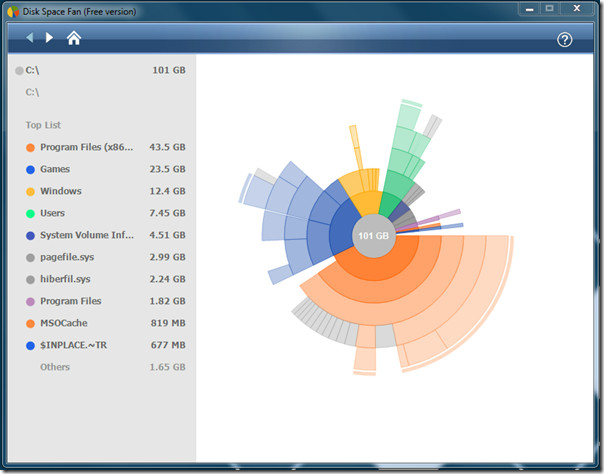
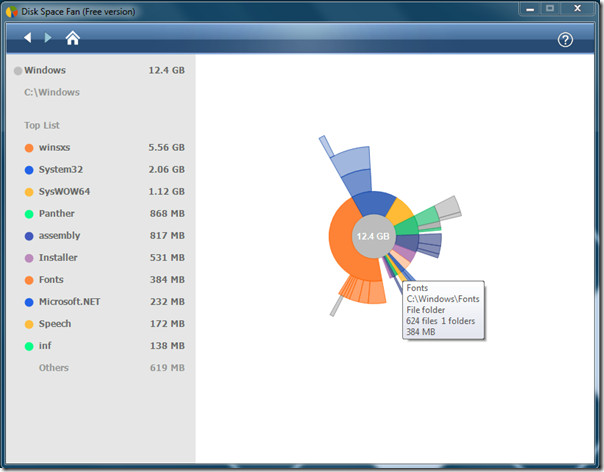
Once the analysis is complete, you will find all files and folders taking the most space on the left side, with the graph shown on the main window. Move the mouse over each block to find out the folder they represent, clicking it will take you further inside.
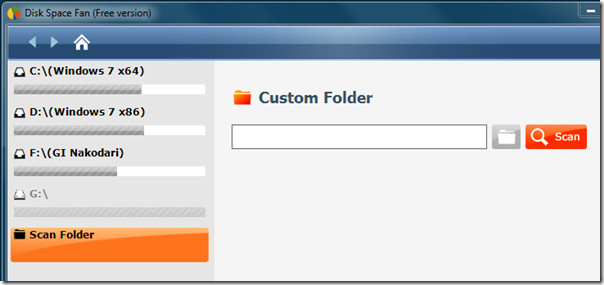
You can also choose to analyze a specific folder by selecting Scan Folder from the main window(Home).
The app supports context menu which can be used to jump to root, open selected folder, browse the content of selected folder, preview the folder, delete it, or go to Properties.
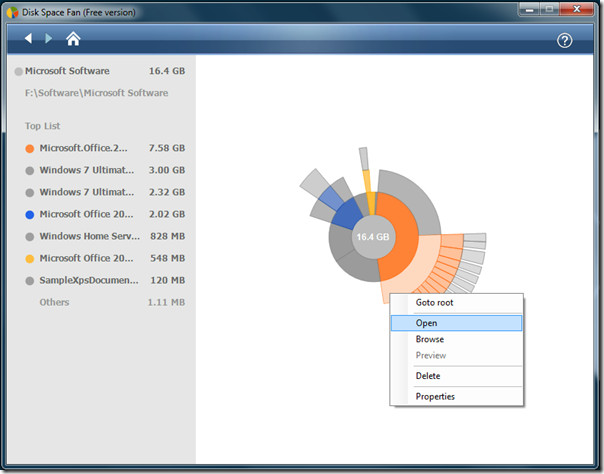
All-in-all, it is one complete utility to analyze the content of local drives and folders. The disk visualization with great animation manages to make it easy for users to sort out files and folders quickly.
It comes in both free and paid versions, the paid app has a build-in functionality to find duplicate files, allow users to apply filters, scan network path, save scan history, and more.
It works on Windows XP, Windows Vista, and Windows 7, both 32-bit and 64-bit OS are supported. This app is a great alternative to previously reviewed FolderSize.

6 Comments
Seems good. I actually use TreeSize Pro for this purpose
I still like Windirstat. It's what I have installed and I also have a portable ver. on a stick.
Looks neat. It reminds me of my favorite disk space analyzer, Scanner.
This is a blatant (yet faint) ripoff of DaisyDisk for Mac http://www.daisydiskapp.com
I use Directory Report instead
http://www.file-utilities.com
I’ve used Report and although its great, I’ve had better luck with WheresTheFreeSpace. It is Modeled after a PC application that is very popular called Treesize (but its for Mac).
23 Trackbacks
[...] which folders are present in a specific destination and how much space they are taking.Update: Disk Space Fan is a new tool which is more advanced and stable than FolderSize, check it out here.You can see the [...]
Belegten Festplattenspeicher mit Disk Space Fan analysieren…
Mit dem Programm Disk Space Fan lässt sich der belegte Platz auf der Festplatte anschaulich analysieren. Die Freeware ist sehr praktisch um herauszufinden, welche Ordner und Dateien den meisten Platz verbrauchen. Dazu wird die Verzeichnisstruktur …
[...] Pro Version hat noch einiges mehr zu bieten, kostet dafür aber auch knapp 20€. [via] Tweet This!Subscribe to the comments for this post?Share this on TechnoratiShare this on [...]
[...] addictivetips Comparte / [...]
[...] Space Fan [via AddictiveTips] Tagged:hard [...]
[...] Disk Space Fan is a free download, Windows only. (Mac users, check out previously mentioned GrandPerspective.) A Pro version is available with a few more features, the but core that makes it great is available for free. Disk Space Fan [via AddictiveTips] [...]
[...] Disk Space Fan is a free download, Windows only. (Mac users, check out previously mentioned GrandPerspective.) A Pro version is available with a few more features, the but core that makes it great is available for free. Disk Space Fan [via AddictiveTips] [...]
[...] Disk Space Fan is a free download, Windows only. (Mac users, check out previously mentioned GrandPerspective.) A Pro version is available with a few more features, the but core that makes it great is available for free. Disk Space Fan [via AddictiveTips] [...]
[...] Disk Space Fan is a free download, Windows only. (Mac users, check out previously mentioned GrandPerspective.) A Pro version is available with a few more features, the but core that makes it great is available for free. Disk Space Fan [via AddictiveTips] [...]
[...] Disk Space Fan is a free download, Windows only. (Mac users, check out previously mentioned GrandPerspective.) A Pro version is available with a few more features, de but core that makes it great is available for free. Disk Space Fan [via AddictiveTips] [...]
[...] a few more features, the but core that makes it great is available for free. Disk Space Fan [via AddictiveTips] Back to top [...]
[...] Disk Space Fan is a free download, Windows only. (Mac users, check out previously mentioned GrandPerspective.) A Pro version is available with a few more features, but the core features that make it great are available for free. Disk Space Fan [via AddictiveTips] [...]
[...] Disk Space Fan is a free download, Windows only. (Mac users, check out previously mentioned GrandPerspective.) A Pro version is available with a few more features, but the core features that make it great are available for free. Disk Space Fan [via AddictiveTips] [...]
[...] Disk Space Fan is a free download, Windows only. (Mac users, check out previously mentioned GrandPerspective.) A Pro version is available with a few more features, but the core features that make it great are available for free. Disk Space Fan [via AddictiveTips] [...]
[...] Disk Space Fan is a free download, Windows only. (Mac users, check out previously mentioned GrandPerspective.) A Pro version is available with a few more features, but the core features that make it great are available for free. Disk Space Fan [via AddictiveTips] [...]
[...] Disk Space Fan is a free download, Windows only. (Mac users, check out previously mentioned GrandPerspective.) A Pro version is available with a few more features, but the core features that make it great are available for free. Disk Space Fan [via AddictiveTips] [...]
[...] Via Addictive Tips [...]
[...] inside any directory, DiskSorter will come useful. You can also try out previously reviewed Disk Space Fan. It works on Windows XP, Windows Vista, and Windows 7.Download DiskSortervar linkwithin_site_id = [...]
[...] Disk Space Fan is a free download, Windows only. (Mac users, check out previously mentioned GrandPerspective.) A Pro version is available with a few more features, but the core features that make it great are available for free. Disk Space Fan [via AddictiveTips] [...]
[...] Analyze Hard Drive Usage with Disk Space Fan A fast and beautiful hard drive analyzer that can help you determine what’s eating up all your space. [...]
[...] out the amount of space taken by each folder and files within is some really cool graphical forms.Disk Space Fan14. Advance Tweak Windows 7 & Vista With VispaTweaking Windows has never been easier. With the [...]
[...] & can remove specific folders promptly. We have also covered an awesome application namely Disk Space Fan which offers aesthetic visuals to analyze which folder is taking more space.It runs on all Windows [...]
[...] on all Windows based OS, we tested it on Windows 7 x86 systemDownload TreeSizeFor more, check out Disk Space Fan and JDiskReportShare this article!google_ad_client = "pub-8700613758610196"; /* AT Below Post [...]