Doit.im – Free Awesome Software For Task Management
When it comes to managing important tasks, we all love Remember The Milk but today I came across a newly launched service called Doit.im which could soon become a serious contender.
It is a free service that allows users to manage all types of tasks easily, it comes with a cross-platform Adobe Air app that works on Windows, Mac, and Linux. All you have to do is sign-up with them and start adding and organizing the tasks.
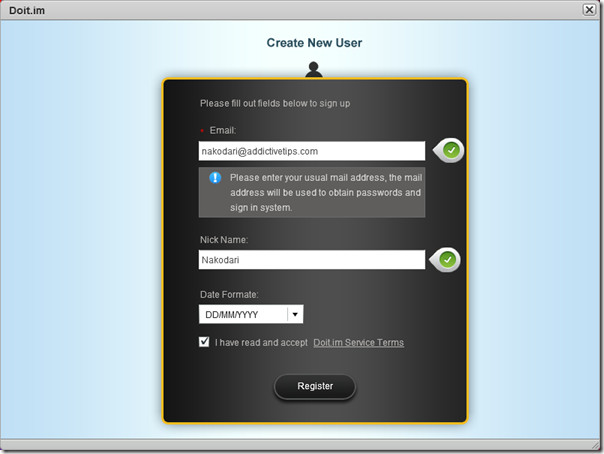
When you start the desktop app for the first time, hit the Sign Up button and fill the form as usual. It will then send you an email address with the password(which can be changed later).
Now sign-in with the email and the password provided and you will be taken straight to the main window.
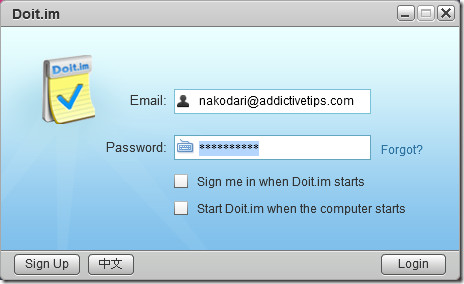
You will also find two additional options, sign me in when Doit.im starts and start Doit.im when the computer starts. The user interface is much similar to that of Mac OS X.
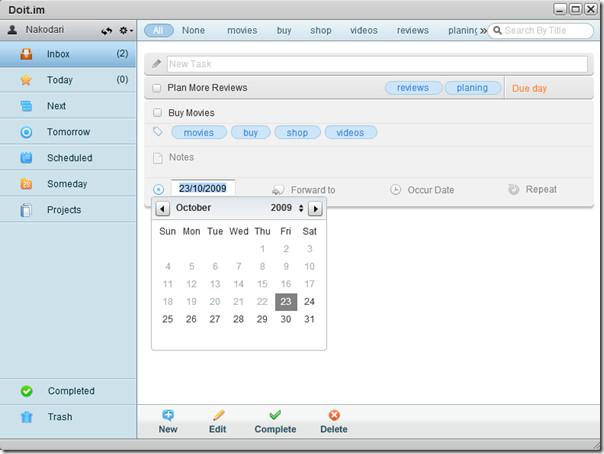
On the left sidebar you will find Inbox, Today, Next, Tomorrow, Scheduled, Someday, and Projects.
- Inbox is used to quickly collect and record To-Do Items when you considerate what to do in future.
- Today shows tasks that needs to be done today, all items here will also be listed under Next from where you can review, evaluate, and arrange the tasks.
- Tomorrow shows tasks that needs to be done tomorrow, they will be added to Today after 12 O’Clock Midnight.
- Scheduled holds all tasks that are not in Today and also those tasks that have not been completed yet.
- Someday holds tasks that you can’t commit now but plan to perform in future.
- Projects holds all projects that needs to be done, it includes multi-step tasks.
Once you understand the purpose of every folder, using the app becomes a breeze. The tasks support drag & drop, you can drag and drop the tasks from one folder to another easily. You will find two more folders on the bottom of left sidebar – Completed and Trash. Completed will hold all tasks that have been marked as complete and Trash will hold the tasks that you have deleted.
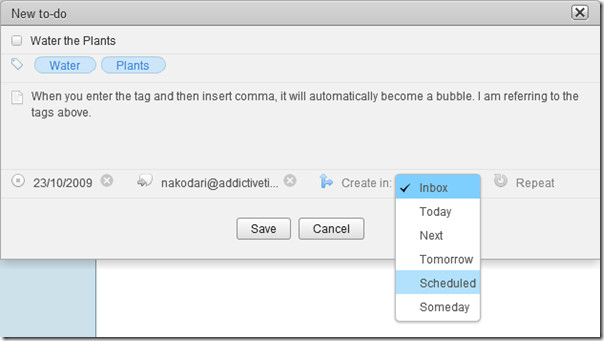
Adding a new to-do task is quite easy, just hit the New button, enter the task name, tags, notes, and choose the due date, select if you want to forward the task to anyone, and finally choose in which folder this task should be added. There is also an option to repeat a certain task after every few days.
The option to forward the task is very useful indeed since it helps sending tasks to other Doit.im users. Once you send them, the tasks will appear in their Inbox folder.
Did I mention that it supports hotkeys too, you can manage and perform tasks by using simple hotkeys. To view the hotkeys or to modify them go to options and then navigate to Keys tab.
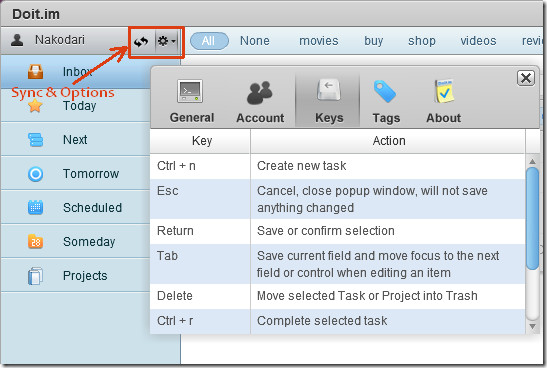
Sync and Options button are both together(See screenshot above). If you want to access your tasks from anywhere else, simply hit the sync button and it will synchronize all the tasks with the server.
The apps for Android, iPhone, Windows Mobile, and Symbian are coming soon according to the developers which will allow users to remain up-to-date with their tasks anytime, anywhere, and on any device.
The only downside of is that it doesn’t have a web interface, but that could probably change in future. Otherwise having said that, it is one of the best complete task manager I have come across and thankfully it is free.
Enjoy!
Update: Reader BrianC400 notifies us in the comment that this app seems like a ripoff of Things. Since Doit.im is developed by some Chinese developers(who have history of ripping off stuffs), surprisingly it seems 80% similar to Things. Anyways, the good thing is that Doit.im is cross-platform and free while Things cost $49.95 and is for Mac OS X only.
Update 2: Doit.im gets UPDATED, the latest version has plenty of new features. Read the full list of new features here.

Be VERY careful of using doit.im. I foolishly opened an account with them. I cannot change my email address in their system, they will not close my account and are ignoring all my support requests to remove my details. I suspect they are harvesting email addresses and user details for marketing purposes. BE WARNED.
We use http://www.dooster.net but we paid for it and it’s all ours and very good. A couple of partners in the office have brought their own Dooster.net packages for managing their own portfolios since the owner installed it for us. It’s totally affordable and seeing as we’re in business and expect to be paid we’re happy to pay for a service if it’s good and Dooster.net is certainly good.
Not really digging the new kitschy interface since they’ve updated it, but seems to deliver and do what it says. Things is a very simple, straight-forward task manager and ripping off means you’re stealing a fairly unique design/idea so I don’t know if I would call this ripping off. However, I wouldn’t be surprised if these guy just took the same idea and made it better and free.
I kind of understand the Chinese throwing people off (especially when the FAQ is all in Chinese…umm…), although it is kind of messed up to make a general statement about Chinese developers. I’ve worked in the web industry for awhile and yes there are some sketchy developers in China who basically mirror someone else’s site and add a different title bc they are lazy and cheap and they have no concept of intellectual property, but not all are like that.
currently, as opposed to a few months ago, their site looks horrible. Looks like its in the mid-stages of a revamp and the UX flow doesn’t make sense to me, not professional at all. And I’ve tried to look for a way to cancel my account, no luck yet.
I would look for other options, this may be an app for Chinese-speaking areas
Frankly I find the inference in this article Regarding Chinese people and software rip offs highly offensive, and bordering on the racist.
Doit.im is a superb application, I also own ‘Things’ and it never even occured to me the two are similar.
That said, it doesn’t take much to understand if you are designing an app based on GTD with modern standards and a minimal interface, one that focuses on getting your ideas and tasks out of your head and recorded as quickly as possible, it follows that of course various interface elements will be similar.
This doesn’t constitute ‘ripping something off’, though.
God you Americans (and now I’m referring to the commenters on this article) can be so damned America-centric when it comes to the supremacy of the English language. And you didn’t even invent English! Ha!
heya,
Lol, and as a Chinese person, I find your stupid “politically correct” pandering to be insulting in the extreme. What a joke.
Seriously, the interface is a rip-off. Deal with it.
I won’t use the product because of this fact *shrugs*, but I’m sure other people don’t care.
To me, it’s the point that not only do they rip it off, but they don’t give credit, or say “inspired by…”. If they were actually decent enough to do that, I wouldn’t see them in such a bad light.
Look, Chinese, particularly those from PRC have a slightly different perspective when it comes to these things. It’s partly that quite frankly, many of them don’t see it as wrong, and or they do, and couldn’t care less (unless you get caught, in which case it’s shameful). They’ll do anything to get ahead – and that’s probably partly a product of spending the last 400 years being backwards and behind, and ridiculed as being the weak men of the East. There’s some Chinese idiom about how when you’re poor, your morals are “short” – still, hopefully, as the situation improves, things will change.
However, you have to understand, with the cultural purges that happened under Mao’s regime, some (not all) Chinese may feel there’s some of a vacuum in terms of a moral compass. The Confucian ideals we originally subscribed to were purged – and it’s only recently that they’re back in “fashion”. Organised religion, like Christianity is opposed, on the grounds it could be a threat to the CCP.
So please, take your silly ignorant PC pandering elsewhere, and try to actually understand a little bit about the culture you’re self-righteously trying to defend.
Cheers,
Victor
It would be great if you could make a comparison of “producteev” (another similar app) and doit.im
Think of it this way: if you already have a good task management system, and are just looking for a better tool to implement it, Things may be just the ticket. It's very good software.
It can be uninstalled by going to Uninstall Programs in Control Panel.
DOit…Please help:Anyone figure out how to uninstall this app? I can't find it except in programs. It doesn't show up in Start menu nor can I start it. And I cannot reinstall it due to “it already in installed.”
It can be uninstalled by going to Uninstall Programs in Control Panel.
DOit…Please help:Anyone figure out how to uninstall this app? I can't find it except in programs. It doesn't show up in Start menu nor can I start it. And I cannot reinstall it due to “it already in installed.”
DOit…Please help:Anyone figure out how to uninstall this app? I can't find it except in programs. It doesn't show up in Start menu nor can I start it. And I cannot reinstall it due to “it already in installed.”
It can be uninstalled by going to Uninstall Programs in Control Panel.
email isn't coming through for me.
Same. No e-mail.
been 5 hours now. still no email. when i press send again, it says that the email was sent successfully and i should check my mail. and i wanted to try it out! not so much anymore.
Maybe they have now restricted the number of users due to high demand or probably their server is under high load. You should check it back again in 48 hours.
yeah good idea.
yeah, nakodari, it works now. however, i much prefer the hit list.
I'm going to leave this alone for now;a) Because Doit.im gets UNRESTRICTED access to your file system and the internet.b) The theft of the Things interface and concept will put me off, because at some point there may be a suit files that will kill doit.itm, taking all my data with it.c) The terms and conditions are in Chinese – so who knows what is being agreed to when the “I agree to the terms and conditions” button is pushed?c) Any company that will happily steal someone else's software and re-issue it, just isn't that trustworthy in my book.So if you're happy with the above, then good luck with doit.im. I'll pass on this one.
Why does this program have to connect to a server when I am one computer one internet connection and will not use anywhere else
Even so, who care? Things (which I use and am a fan of) still doesn't really sync., let alone have web access.
Things is a great program…although I wasn't one to dish out the $50 once it came out of beta. But for those who did: you may want to check out using Drop Box in combination with Things. It won't give you web access, but if you set up Things to save all it's system files to a subfolder within your Drop Box, you'll be able to install and use Things from multiple computers (just not at the same time). Their free account gives you 2GB's for free, and this referral link will give you an additional 250MB of space: https://www.getdropbox.com/referrals/NTY1NTYxNzkCheck it out.
Wow, could this be more of a ripoff of Things? http://culturedcode.com/things/
Go to their website. Even the screenshot they use to showcase the UI is a direct ripoff (with the bubble-like magnification call-outs.)
How exactly is this a ripoff. I mean they are both Todo apps and both seem to use GTD principles but other than the fact that they use lefthand navs, they don't look the same at all.
Looks really nice! Going to try it out.Love your blog!