Fix For uTorrent In Windows 7
uTorrent is by far the most popular desktop client to download torrents. Even though it works flawlessly for me in Windows 7, some people are having trouble using it in Windows 7. There are reports in various forums that uTorrent exceeds memory limit and shoots up to 100% in other cases some downloads will stop at 99.9%. In few cases uTorrent shows false reports and works oddly.
uTorrent is not the first app that is encountering such problems, Mozilla Thunderbird was also having trouble running in Windows 7 for some users. I have listed few fixes below that might help your uTorrent to act normally. 😉
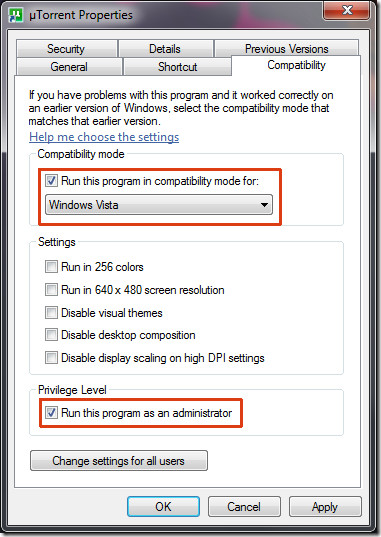
1. Right-click uTorrent and go to Compatibility tab. Here, select Windows Vista under compatibility mode and make sure that it is checked to run under Administrator privileges. See screenshot below.
2. Make sure you have added uTorrent in Firewall Exception. This step is just a reminder for those who might have forgotten it.
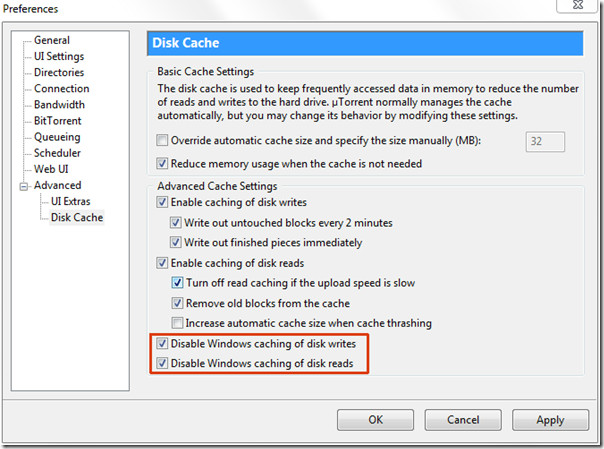
3. Go to Preferences > Advanced > Disk Cache and make sure both Disable Windows Caching Of Disk Writes and Disable Windows Caching Of Disk Reads are checked. This can help reduce the I/O Reads and I/O Writes, thus resolve the HDD speed and overload problem.

So…it seems that my problem is quiet unique.My utorrent speed seems to be limited to 150 kb/s and yes i have checked the limit thingy there is no limit set manually.No matter how many seeders the speed doesn’t cross 150 i need help!
None of this works. Why doesn’t this work any longer?
F7 PEOPLE, PRESS F7
just changed compatibility to windows vista service pack 2 on my windows 7…utorrent is
now working fine for me
It now works great, thanx
i don’t have those 2 options u mentioned , so what should i do ? i use ver 3,4.3 of utorrent
Well my problem is that it limits my download speed to 3-4kb although uploads at 20-40kb——-i can clearly see that it goes to 10kb and suddenly starts to drop to3kb HELP cause download is stuck at 60% and seeds are around 70 while peers are 10
Using the uTorrent as Admin. fixed the problem for me , it’s EASY !!! 😀
Just click the uTorrent starting icon with the right mouse button then click run as admin. and it will work 😀 !!!
how to get to preferences menu
Did not work for me. Looks like installing LAN driver recommended by the MoBo manufacturer instead of Win default one solved the issue. My mobo is ASUS P5K.
utorrant 3.2.3 doesn’t have the disable functions
I had this problems for months… and then I figured works great in windows 98 compatibility mode. (even, tooo fast!) tryit!
I have had uTorrent working with Win 7 without any issues; however, once I reinstalled my OS for various other reasons, it keeps saying uTorrent is not a valid win 32 application? I mean, this is after I have followed the above mentioned steps.
My proble is ..the torrent run well as it is started. But downloading speed decreases to 5 or 10 kb/s after one or two hour. The speed keeps study on that. Only after a restart the download attain maximum speed. Torrent application is utorrent
utorrent even wont intall on my system!!!!!
utorrent even wont intall on my system!!!!!
Thanks for the advice. Yet, I’m unable to open utorrent. The problem started when one day it didn’t want to open. I managed to uninstall it and then install it again, and still it doesn’t want to open. The program shows it’s running though… Any advice? I have tried your advice as best I could but no success
lemme tell you what i did and this worked for me, i just turned off the windows firewall and that was it. the i reinstalled utorent
ok so i have 2 opperating systems on my pc on separate hdd’s, u torrent runs fine on winxp but on win7 it won’t download, yes i have checked firewall exceptions, yes my internet is active . but still no go.
I just discovered it was my Dlink router who was the problem
Hello!
I have just followed a couple of sites tips, and now this one. But I still get the lag spikes when a download gets over 1.0mbit/s.
I have changed it to admin and also the 2 boxes are checked, but still I get those anoyying lags.
Any help would be appreciated
I get the same issue when I´m using skype and/or playing “world of tanks” for ex.
Maybee this might have a coincident
i am using windows 7 64-bit… my system also showed a blue screen error with utorrent…
now i am trying ur advice… i hope that works now…
i am using utorrent in windows 7…. after download starts the computer begin to restart.. how 2 solve this problem..
my problem is, when i try to open my uTorrent….. my internet conenction will lost????what happend
Error message that utorrent is not a valid Win32 file. I have a new computer with Windows 7 64 bit Home Premium. My old machine used XP Professional without all the security measures this new one has. Is this error related to these new measures? How do get beyond this impass?
Thank you so much, that’s super HELP!!!!!!
Its working like a charm… thnx a lot 😀
i had huge probs with win 7 i followed the steps above and installed utorent 1.7.1 now everything works perfect
GOD BLESS NAKODARI THE GREATEST 🙂
Thank you very much man, it’s running like hell!!!!!!!!
Thanks worked like a charm!
running win 7 64-bit ultimate here..
I tried all the things written here, but i’m still getting the “Access denied” error.
I also have vista home edition 32 bit installed in my laptop as second OS, and i have no problem in Utorrent downloads..
The green tick always there, download is in great speed but it shows no upload and then the damn access denied error..
U are Star
Thanks Man
i am still having issue in my windows 7 home premium. my utorrent gives error that its not a valid win32 file. what should i do?
I use the latest uTorrent version in Windows 7 Ultimate 64 bit and found that when you minimize uTorrent, it won’t go to the taskbar, but does show up and is still running in the task flag area (next to the notifications flag). With Clearwire 4G, it runs real good. But I’ve experienced some crashes of the O/S, and not sure if uTorrent is to blame.
THANK YOU! The simple step of changing ‘compatability’ to Vista in properties has worked. Previously, Utorrent was running in the background with the main screen unavailable.
Thanks a lot for the tips given here. I was pulling my hair over what was wrong but you guys helped me fix it. I changed the security settings to ensure that utorrent always ran as administrator and everything worked perfectly.
Thanks again
My speed is all over the place in windows 7
thanx really this setting is very usfull for win 7 and torrent is going well ..
I used utorrent with windows vista with no problem. Now I have 64 bit windows 7 I have to uninstall utorrent and reinstall utorrent everytime I want to download something. I can see the pers it just comes up blank with seeds. After reinstalling again I get great downloas speed. Any advice around this would be appreciated
utorent 1.7.1 doesnt have compatibility issues in win 7
Thank you VERY much! This works perfectly for me in Win7 Ultimate 64-bit and 2.0.2
I think this stuff applies to pre 2.0 versions as mine looks a fair bit different.
That said, mine has gone haywire under Win 7 and I am still looking for solutions.
always used utorrent with vista workd great now have windows 7 utorrent not working.when i would find a movie to download click on it box comes up i would click save to desktop then when i went back to my desktop the utorrent box would pop up with the name of the movie under it and a folder would pop up next to it with avi on it. when movie was done i would remove it and drag both boxes into my dwnload icon then i could clik on the folder and watch the movie.now utorrent box comes up avi folder doesnt come up and i cant find it and when i have found it its empty. iam not computer ileterate so i need help.any help is much appreciated.
There s a problem in Windows 7 about saving files to MY DESKTOP.. So Change your save files directory from Utorrent Options. Try other directory which is not shared by windows or other users. it would be work.
Thank u!Now it's work much better =)
always grateful for the time and commitment shown by contributors, it makes dealing with problems much less frustrating. Many thanks and please continue to help the 'less fortunate'! 🙂
Tried what you suggested and I am still having the same problems. Running Windows 7 Ultimate 64bit. I am getting a lot of access denied and with 100+ torrents the system gets unresponsive and when it does respond, I get errors saying that applications and system files are not there. (specs: i7 920 w/ 6 GB ram, ASUS RAMPAGE II GENE motherboard, and 1xSeagate 1.5 TB drive.)
works fine bitch
it doesnt work fine, BITCH
i tried everything and still get error access is denied
Have you try to run it as administrator ? it worked for me !
many times but it’s not working
utorr is not comaptible with windows 7, if you close it down when you reload it still running in the background but you can't view it , the only way to get it back is to log off then back on. Also you can't uninstall it, I suspect background processes even using task manager it will not stop the processes, but then you can't reinstall either
utorrent needs no installation :/
i try your suggestion but still i can’t get it back
Upgrading to W7. If anything goes wrong, I'll try this, and give feedback. 😉