Free Scan To PDF Software For Windows 7
I have seen various software that allow users to convert their scanned documents to PDF file format, but they all have one problem – they are expensive commercial apps. Then there are some free apps but they come with annoying restrictions. So far I have covered only one possible way to scan multiple pages and then save them as a PDF document. Luckily, I came across Scan To PDF(STP). It is a free tool developed to convert paper documents to PDF files. And guess what? It is portable. It can convert PDF files from scanned documents and JPEG images, you can also mix JPEG images with scanned documents.
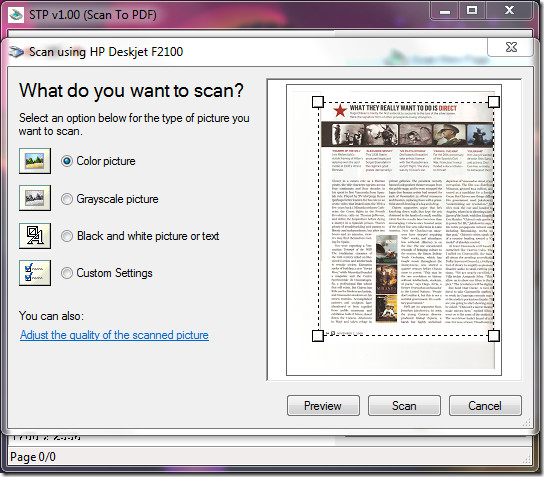
To begin, set up your scanner and hit Scan New Page. Choose from the list of scanner and hit OK. Now you will see the main interface which is much like any other scanner tools out there. Just select the type of scan you want and hit Preview, it will automatically select the portion for you. When you think all settings are ok, hit Scan.
Once the scan is complete you will see the image in the main window, you can scan new page and it will be added as next page. There is no limit on the number of documents you can scan.
Right-click the main window and you will find loads of options. Once all settings are done, hit Make PDF and the output will be saved in the same folder where the program is residing.
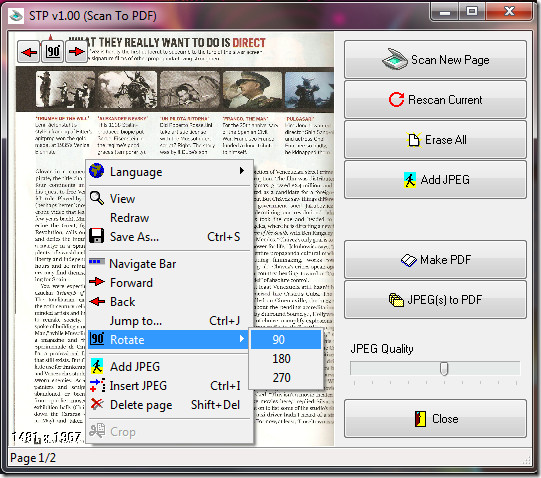
There are few other options, such as, selecting the JPEG Quality, Adding JPEG Images, and Inserting JPEG images. The scanned PDF documents can also be saved as JPEG images and later converted to PDF using the JPEG(s) To PDF option.
It is a portable tool and works on all versions of Windows, including Windows 7. Enjoy!

Dickwad!
NICE
Great looking invoice form guidelines to help small businesses manage their finances. I referenced these before moving onto the templates that I found here.
Simply the worst piece of software I have ever seen.
Anyone who goes the trouble to write this drivel about a program that is only slightly better than a trojan or worm, and then has the audacity to recommend it to others should be taken out back and shot. Own up… you don’t know what you are doing, do you. Your ability to type doesn’t give you the right to waste everyone’s time with things you know nothing about. Idiot.
> Have you even tested the website? It has several trojans, worms, and spyware.
Not sure about the spyware, but the website has some nasty, nasty in your face advertising.
PDF Studio imports images and saves as PDF. More merge/convert features are coming in the next release from Qoppa Software.
Have you even tested the website? It has several trojans, worms, and spyware.
Quit your job.
You can also save as PDF file in Adobe Photoshop if that fails.Visit for more scnning and conversion information:http://www.pearl-scan.co.uk http://www.pearl-repro.co.uk http://www.4document-scanning.co.uk http://www.forms-data-capture.co.uk http://www.microfiche-microfilm-scanning.co.uk
You can also save as PDF file in Adobe Photoshop if that fails.
Visit for more scnning and conversion information:
http://www.pearl-scan.co.uk
http://www.pearl-repro.co.uk
http://www.4document-scanning.co.uk
http://www.forms-data-capture.co.uk
http://www.microfiche-microfilm-scanning.co.uk