How To Extract Frames From GIF Animation Image
How many times do we come across some awesome gif animation and wish that we could extract some frames? GIF Frame Extractor(direct download link https://www.evanolds.com/dl/GIFFrame.exe) here is a free tool for Windows that lets you extract frames from any animated GIF and save them to JPG or PNG image formats instantly. You can use the extracted frame image as your profile picture or just share them with your friends and co-workers.
Run the tool, click Open and select the GIF animation whose frames you want to extract. You will see the number of frames on the left sidebar.
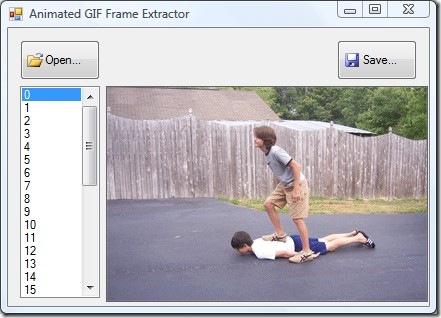
Select any frame that you want to extract and click Save. You can choose whether to save them in JPG or PNG format.
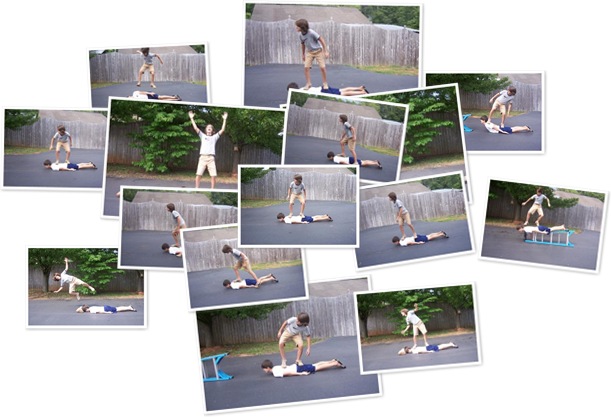
In the screenshot below, you will find multiple frames extracted from my favorite Awesome Human Skating GIF animation.

Does this program has a mac version, considering mac doesn’t have a nice support of `convert’ operation in Linux
But of course you can use “convert” in osx, install it with macports 😛
I have used Animation Shop 3 from Jasc Software. It opens the animated GIF and it displays the length of each frame. Some GIFs cannot be opened for some reason probably because of copyrights.
cool program thanx
just downloaded, you can now extract all frames at once.
thanks a lot !
Very simple method.. Works perfectly, thanks.. 😀
Actually you CAN batch extract all the frames in an animated GIF by clicking on SAVE ALL; then providing a name for an OUTPUT FOLDER (this can also be an existing folder); providing an OUTPUT NAME (all the frames will have this name); entering a PERCENT SIGN (%) in the output name where you want the frame number to be (most likely at the end of the name); and, lastly, selecting an OUTPUT FORMAT (PNG or JPG) for the files. Pressing OK will generate named and numbered files for each frame (beginning with 0).
Cool! very nice work!
Great and easy product
WWWWWWWWOOOOOOOOOOOOOOOWWWWWWWWWWWWWWW
I NEVER SEENNNNNNNNNNNNNN WOW!!! I TRIED TO SEARCH IN GOOGLE AND LOTS OF SITES BUT COULDN’T FIND THE EXATE THING WHAT I WANT, NOW I GOT IT 9999999999 MILION THANKS BROOOOOOOOO……….
WWWWWWWWOOOOOOOOOOOOOOOWWWWWWWWWWWWWWW
I NEVER SEENNNNNNNNNNNNNN WOW!!! I TRIED TO SEARCH IN GOOGLE AND LOTS OF SITES BUT COULDN’T FIND THE EXATE THING WHAT I WANT, NOW I GOT IT 9999999999 MILION THANKS BROOOOOOOOO……….
I’m endlessly amazed about how clever some people are! Thanks!
how to extract animated jpeg frames?
Cool small beneficial app…
Seriously, such a simple solution to such a not so simple to solve problem.. 5 starts bro! ;)!
Find free online gif image extractor here.
http://www.sanklan.uni.cc
this url no longer works…
hmm doesn’t seem to work i keep getting an error message
The application failed to initialize properly (0xc0000135). Click on OK to terminate the application.
You need .net framework
Is this great. Is there anything available for mac?
Dude, I've used this application once before and needed it today again. I couldn't find it, be sure that I've bookmarked it now.Thanks for this awesome post. And a def. kudos to this application, a gem!
I used GIF Frame Extractor to extract frames from an animated gif but I need to know the time of each frame display, Is it possible?
Thanks,
Normand