How To Lock And Password Protect A Folder In Windows 7
Do you want to lock and password protect your important folders in Windows 7? If you are an administrator and have multiple accounts set up in Windows 7, then you can block few important folders so that they can not be accessed by other users. Every time the blocked folder will be accessed, it will ask for administrator password. Therefore the folder will be locked permanently unless you don’t remove the lock yourself.
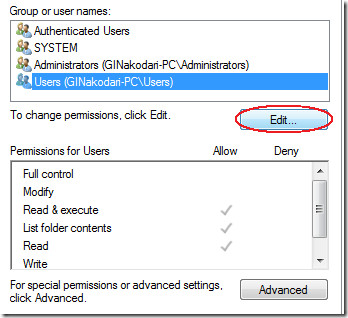
To lock a folder, right-click on that folder and select Properties. Now navigate to Security tab, and click Edit as shown in the screenshot below.
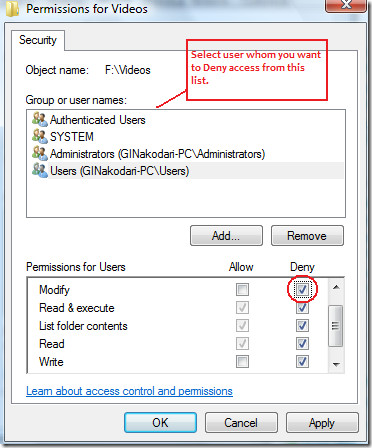
A new window will pop-up, now under “Group and User Names“, select the user from the list whom you want to deny access to a specific folder, now under “Permissions for Users” check the Deny checkbox next to Modify(all other checkbox will get ticked automatically) as shown in the screenshot below.
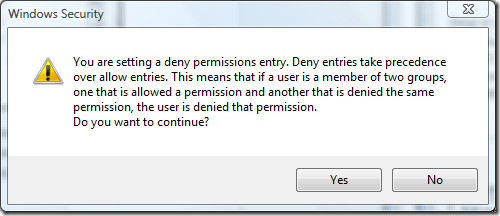
Click OK and then click Yes when a Windows Security window will pops-up as shown in the screenshot below.
Now click OK again and you are done. Now the specific user that you selected from the list will be denied access to this folder. If you find it hard to change file access permission for specific users each time you want to password-protect or hide folders, have a look at LocK A FoldeR, an application for Windows that lets you password protect folders with a click.
For the first time usage, it asks you to enter the master password to prevent others from accessing the application.
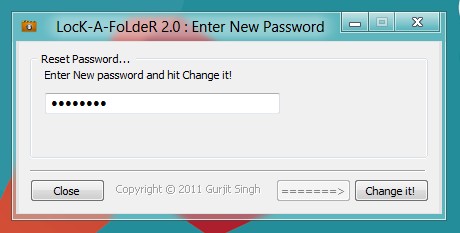
Just enter the password to open main interface. Now, click Lock a Folder, enter the master password, select the folder(s) you want to lock, and then click Lock it!.
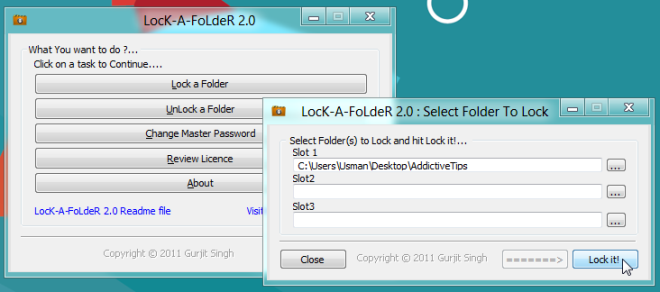
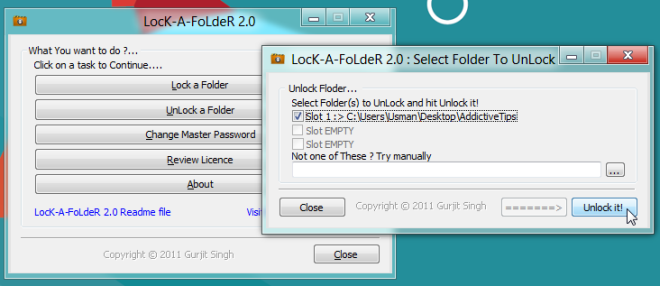
This will immediately password protect the folder and hide it from source location. To unlock the folder, launch the application, and click UnLock a Folder. It will ask you to enter master password, and then show all the locked folders. Just select the folder you want to unlock, and then click Unlock It!. It’s that simple!
LocK A FoldeR works on Windows XP, and Windows 7.
If you liked this application, you might want to take a look at the other folder locking and password protection tools that we’ve covered so far.

Okay, I locked my folder by removing permissions for everyone. But how do I give them back?
This solution may be useless when you login computer with admin account and then walk away. In this condition, people who know this folder can immediately find out your protected folder. If you store more important files on the folder, this solution is not enough, the strong encryption solution must be the better choice.
Kakasoft Folder Protector is an excellent file encryption program, you can have a try.
I cant unlock it ;x
THe problem is that …..going to the owner tab and click on the edit bot, I this “Can’t oopen access control editor. Access is denied. I will appreciate your feedback
my folders are locked! i cant access them now!
please help me, how do i unlock them?
very useful information thanks for the tutorial!
THANK YOU
If the folder is moved to different computer Does this restrication carry with it?
how can i lock a folder on a USB flash drive ??
Thanks…
when u select a folder open the security tab than u will clicl user/folder than go to edit and click the folder than click to remove…..
yeah, its true…..
if anyone just goto “Run” and type ” *.* ” then every thing will appears weather it’s locked or hidden 🙁
thats why i tested it for only one notso imp folder..you can revert back changes but thats not i was looking for …so 1 star but thanks!
THANK YOU VERY MUCH!!!!!!!!!!!!!!!!!!!!!!
without any apps …???
my folders are locked! i cant access them now!
please help me, how do i unlock them?
it locks but bad part is wen search with file or its content name d computer shows d it & can read it.
i have use the first method and my computer destroyed……… i am the only user ,but some folders are not opening … desktop.bat this data is every where ……if will it be fixed if i form at my pc ……..pls help .
I accidently locked the folder that this program was in, It now won’t let me open it. I need one of the folders I locked but can’t unlock it. I’ve tried re-downloading it but it just says “Lock-a-folder is not backwards compatible.” Then something about unlocking previously locked folders. I’ve clicked yes, but it doesn’t unlock them.
This doesn’t lock folders, although it says it does, on my windows 7 64-bit system. It doesn’t matter the folder, size, or permissions…it simply doesn’t work.
i installed the application on my windows 7 ent. 64bit, after giving the master password it gives an error message “can’t write registry, try to re-install with admin right or re-install it again” i did the same but no success. could you please tell me how to install it,
tnx for lock a foder…works great
FUCK OFF MAN!!!! U SPOILED MY WHOLE COMPUTER!!!!!!!!!!
fail!
how to revert back the changes
i don’t wanna deny to someone! I wanna put a password on the folder!
This post should be named “how to lock a folder in windows.” I want to know how to PASSWORD PROTECT a folder in windows so that every time I want to access or anyone for that matter, it asks for a password. I don’t want it permanently locked.
http://www.chicagoshorttermhousing.org/
the title of the article is misleading, it says how to lock and password protect a folder, but this is actually about how to deny a certain user permission to access a certain folder
Okay, I’m stuckedc as those guys. Is there anyone who solved the problem [unlocked yourself] or anyone who know how to do it? PLEASE ANSWER AS SOON AS POSSIBLE, thank you!
i may help…what exactly hapened?
Hi there.. I’m also had a problem like you regard to that matter, but I fixed it to myself, if you want I’ll teach you how to solved your problem regarding on that. 🙂
I think the simplest way to keep data secret from unauthorized view is to make a completely new USER PROFILE in your PC. You can manage it in either way, it is password protected, you just switch from one profile to another and nobody can ask you why…:)
Another cute way is to hide the folder in a route that nobody can find it, in system folder or subfolders for example
Hi,
This post should be named “how to lock a folder in windows.” I want to know how to PASSWORD PROTECT a folder in windows so that every time I want to access or anyone for that matter, it asks for a password. I don’t want it permanently locked.
Any way to do that?
ii did this and now even cant get into that folder ! ;(((
For all of you guys who are having problems with windows security – being locked out of a folder -access denied: Right click folder, properties, security, advanced, owner, edit, pick your current user, select replace owner on subfolders and hit apply. BE WARNED: This can be dangerous, so only do as last resort. Chill.
after using your instruction I locked my drive but now I cant acess complete drive what I do and the drive consist my all data
how I can unlock the drive plz help
I cant acess complete drive what I do
Hello,
what if I have several users, r even a single use, all, or who doesn’t have login passwords. I want to include a password to a folder BUT the login credentials aren’t password protected, and I don’t want to introduce passwords, what do I do?
SIR PLEASE HELP ME I HAVE SELECTED ALL THE USERS TO BLOCK A SPECIFIC FOLDER
SO I AM UNABLE TO USE OR OPEN THAT FOLDER
WHAT SHOULD I DO?
HELP ME PLEASE
I BEG U
LOL!!! I am so glad i didnt follow the steps until i read the comments. I was scared this was going to happen… hope u got your folder unlocked. sorry, i just had to laugh at the “HELP ME PLEASE, I BEG U” part of your message
Please contact an IT professional and prepare to pay some bucks. He/she will solve it quickly for you
THANK YOU SO MUCH !! :DD
me too got struck like one of the member , i was not able to open the folder as i only removed permission but i could not able to revoke it .
http://www.zsl.com/it-services-consulting/mobile-computing
i have did all these… i was able to open the folders earlier by following the backward process of the above.. but now… suddenly… it is saying… access denied… when i open the security tab all the options i checked in the deny column are already unchecked… but the access is denied… help me
hi Jay. u must rite clik on that drive. and then clik on Security option. and u have your own work now backward. ok
i have done all things but how should i open it please tell me
how to unlock the folder??I was follow your step to lock the folder, and i want to back to unlock
unselect the autorisation for pc
wish you selected before then unlock it
hi,
I got a problem with this security system. I have denyed all access permission for authentic users for a folder on my computer. and even i am the administrator user of my computer, but i cant open this folder. Could you please help me to get rid from this problem.
Thank you……………..
me also got same problem,how to come out with this problem?please mail me if you know.thanks!!!
probably a good thing that youre both denied access to you pc
If you use WinRAR or WinZip compress your files and password protect a folder and now forgot the password,one of best choice is RAR Password recovery 5.0 which proved to be an effective way to uncover lost or forgotten passwords.
Thanks..
Folder Protect is the best…from NewSoftwares
Thanks a lot! The best part of this is that there’s no need to install any software.
Question is how to password protect a folder and not how to filter out users… basically what we want is when ANY user including the user who created the folder clicks on the folder it will promt you to enter a password before that folder opens…..as far as I know there is no way to do this on windows pista I mean vista. Another dumb way microsoft does file management.
wow this is too gud OLE 🙂 :)Tnx a lot for sharing this…..
thanx man that little software waz great…..!!!
breif discripations abt the lock folders
Try take a look at this little nifty program:http://www.fsprolabs.com/download/distr/mylockb…
Try take a look at this little nifty program:http://www.fsprolabs.com/download/distr/mylockb…
Ive done this but now want to take the password off, how do I do this?
ok what ever thought right but if i want lock folder to.bat extension how can i do .bat extension to make a folder plz tell me it different thing but help me and sort out the my problem.”Thanks”
my question is how can i make to a folder under password proccess please send me deatils
thank you
I am also finding the solution….let you know when I have the exact solution….We all have some personal videos in our lappy..:)
how to lock a folder from Guest user to use ? email answer me plz.
BUT WHAT PROGRAM SHOULD I USE IF I SHARE A USER ACCOUNT ON VISTA AND A WANNA MAKE A FOLDER/FILE PASSSWORD PROTECTED FOR FREE?
Try take a look at this little nifty program:http://www.fsprolabs.com/download/distr/mylockb…
this link worked good, program was good, and best of all FREE for lifetime, not a trial.
The free version only lets you lock 1 folder. Still very good program. Thanks…
tnks men….
it’s name is mylockbox. right?
Thanks
IT’S MY LOCK BOX. RIGHT?