How To Recover Data From Scratched Or Damaged Dvds/Cds
One of my favorite TV shows is The office. I love that show but it also takes up a lot of the hard drive space, with each episode of 350MB. I clutter my hard drive space due to this show, and that’s just this one show, not including other shows like Grey’s Anatomy or Supernatural. So, naturally I burn the shows onto DVDs, as it’s a cheap and easily accessible way to store data. But the only problem is the fact that CDs or DVDs aren’t invulnerable to all types of damage, and in fact, even a small finger print or scratch can make a DVD/CD player not able to read the disk. If you try to copy/paste the file on the damaged disk onto a computer, you usually get an error saying the file is corrupted, or damaged. But I found some really handy programs that can solve such problems, which I thought I’d share with you all today.
Method 1: CD Recovery Toolbox
(https://www.oemailrecovery.com/downloads/CDRecoveryToolboxFreeSetup.exe) CD Recovery Toolbox Free was developed for recovering damaged files CD, DVD, HD DVD, Blu-Ray etc. You can use it to restore information lost as a result of some mechanical damage of the disk (scratches, chips, different spots on the surface) or as a result of incorrect recording. This program can recover data that was considered lost.
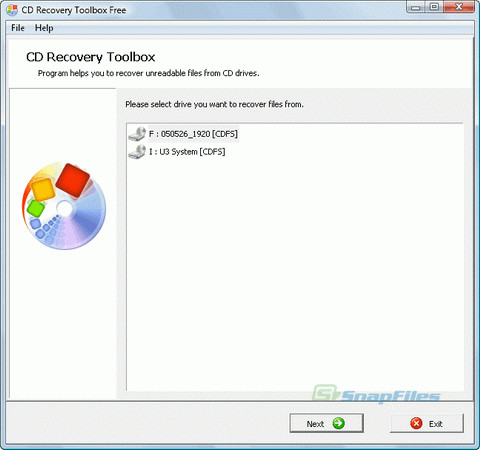
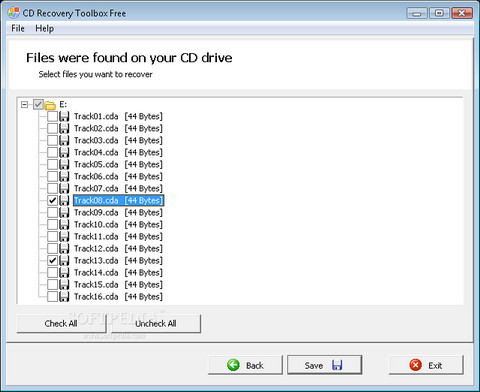
To recover your data, insert you DVD or CD onto your drive and the CD recovery toolbox will search for the files already present on the disc, select the files you want to recover and press next.
Method 2: Roadkil’s Unstoppable Copier
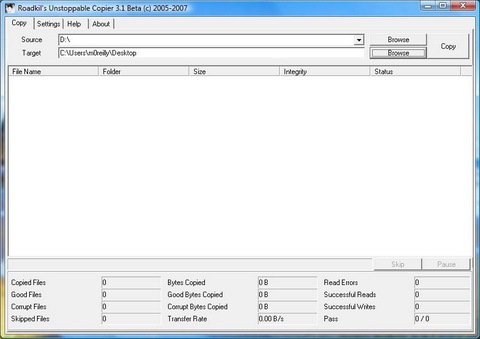
(https://www.roadkil.net/downloads/unstopcp.zip) Roadkil’s Unstoppable Cleaner recovers files from any kind of damaged disk. It allows you to copy files from disks that give ‘corruption‘ errors, and those that are scratched. The program attempts to recover all the parts of the file that are still readable, and ignore the damaged parts. The program is tiny, and it needs no installation, so you can just jump straight in.
Method 3: ISO Puzzle
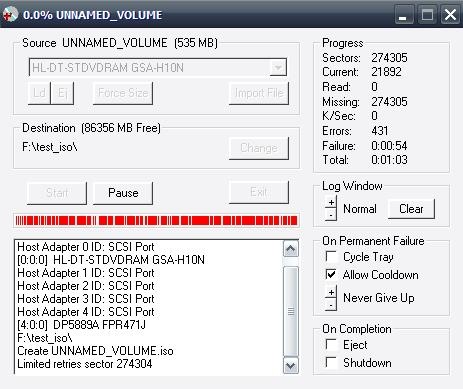
The goal of ISO Puzzle is to recover as much as possible data of damaged, bad burned or scratched CDs or DVDs. This version supports only data CDs and DVDs with sector size of 2048 byte – Audio CD, VCD and SVCD are not supported. Before you can start using IsoPuzzle, you’ll need to download WNASPI32.DLL from Nero and place it in the IsoPuzzle’s directory.
Just remember that you’ll have a part of the file that is recoverable, the part that was originally damaged, will be skipped, as these programs don’t repair the disk, but instead recover all other parts of the file. So, for example, if you’re watching a film, 2 minutes of the film might be skipped, due to the fact that the part skipped was damaged.

It is really a nice blog shared by you dear i am much pleased to tell you that i would like to say thanks
This is excellent! Thanks so much for sharing.
hai thankyou
Stumbled. Hope it works.
Good post!, another tip I'll add is using funiture polish spray (Pledge) to buff out scratches on CDs.
agree with phaoloo
Really useful and informative tips. But still believe the way is to keep dvds clean and safe 🙂
Good tips man…
good tip..thank…
This could come in handy some day, Thanks!
Sweeeeeeeeeet!
Thanks,
Please if there any good tutorial with screenshot… how to recover DATA and FILES from crack or damaged Mobile Hard Drive…? Please help with screenshot
E-mail: stainlesscoin@yahoo.com
Thanks
super,,,,,,,,,,,,,,
thanks
thanks affully man
Thanks man for that tip i have recovered my favorite movie “Borat: Cultural Learnings of America for Make Benefit Glorious Nation of Kazakhstan”
Nice to know it helped you! Check out our other tips, they can come handy anytime.
Thank you! It took about 6 hours for CD Recovery Toolbox, but I was able to recover Disk 2 of Star Wars: Knights of the Old Republic. There is a scratch ringing the outside of the disk, and it has been unusable for a couple of years now. I would say that about 99% percent of the time was spent on the first and last 1% of the disk, which is probably where the scratch is located.
There seems to be a .wav file that wasn’t fully recovered, but I can live with that since I am able to play my game again.
I’m going to burn a copy of the recovered disk so that I don’t have to go through this again, but it works 🙂
Thanks man. Very userful. Actually i was searching this kinda step.
Very helpful for me 🙂
Good tip
Good tip
STUMBLED!
Another useful tip, thanks.