Install Windows 7 From USB Drive [In 2 Simple Steps]
I have found a much easier way to install Windows 7 from a USB Flash drive. Unlike other methods where you have to write complicated commands, this method can be completed even by those who have very little computer background.
The whole process takes only two steps, run UNetbootin, load the Windows 7 ISO file, and finally restart your computer. See how we installed Ubuntu from USB using UNetbootin here.
Before you begin, you will require the following:
- USB Flash Drive (4GB minimum)
- Windows 7 ISO Image file
- UNetbootin
Note: If UNetbootin doesn’t work, try out the Microsoft’s official tool called Windows 7 USB/DVD Tool.
Now insert the USB drive, run UNetbootin, and select Disk Image as ISO. Browse your local drive for Windows 7 ISO that you downloaded and click Open. Now Select Type as USB and choose the drive. Once done, it will look like a bit similar to the screenshot shown below.
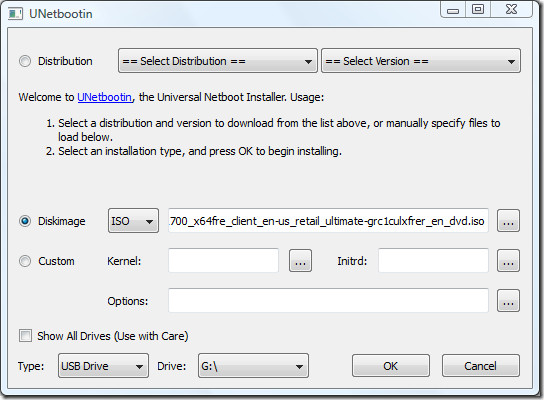
Click OK and it will begin extracting all installation files to the USB drive. The whole process will take some time(10-15 minutes), so have patience.
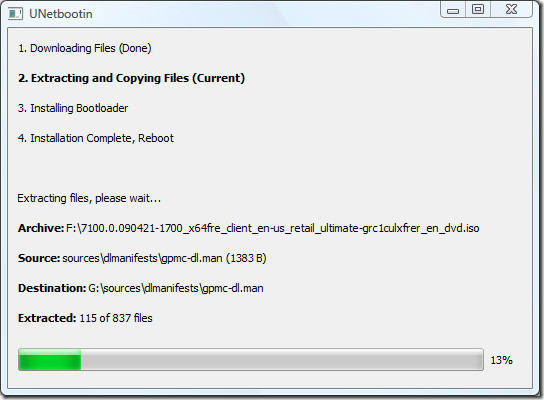
Once the installation is complete, reboot your computer. Now while your system is starting up press the appropriate button(usually F1, F2, F12, ESC, Backspace, or Escape) to bring up Bios Boot Menu. Change the startup order to boot USB by default, usually you will have to press F6 to move the selected USB device on top. Once done, save changes and restart the system.
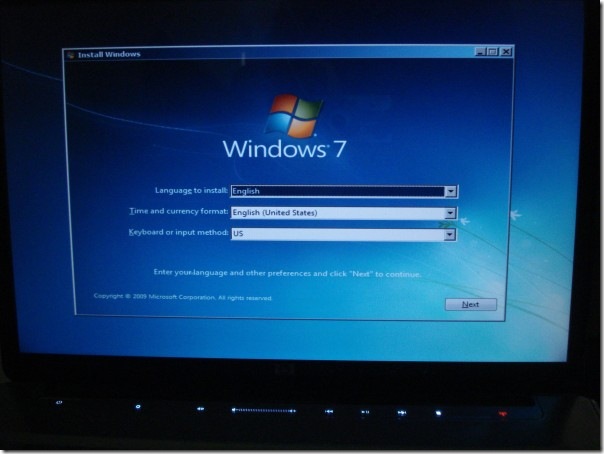
Windows 7 installation screen on my HP Dv5t laptop.
Wasn’t that easy? Enjoy!

Unetbootin does not work very well on macOS if anyone is curious. For it to work you must launch the executable in the app using sudo in terminal.
If the app is on the desktop it should look like this
sudo ~/Desktop/unetbootin.app/Contents/MacOS/unetbootin
im not going to have to install drivers am I? thats what happened last time i tried a winusb 😉
Yes, you will have to use drivers. Thats kind of how oses work…
thank u sooooooo much!!!
Thanks so much for taking the time of making the tutorial. I wanted to do the same thing for a friend and since i dont have a cd writer i was trying so much to make the boottable USB. But didn’t know that the older versions of Unetbooting are able to detects NTFS!
worked for me (NTFS)
Should nothing eles be on the flash drive as well or thats ok?
can i format the USB afterwards??? my friend tried a weird software tht kind of “burned” the files into flash and made it useless… plz help!
umm. Boot ERROR… Boot Manager:
Windows failed to start. A recent hardware of software change might be the cause. To fix the problem;
1.Insert your Windows installation disc and restart the computer.
2.Choose your language settings, and then click “Next”.
3.Click “Repair your computer.”
PLEASE HELP!
I will buy you a drink if this works.. send me donation link
I’m not sure, but can you install Windows like this when you just builded a new PC and you’r HDD or SSD is empty ?
its never too late to say thanks 🙂 but it worked. formatted the flash as ntfs. fat32 didn’t work based on my experience.
whenever i am trying to boot windows 7 from usb…it gives a file checksum error….why is that???
Regarless am using dos promt..power iso…microsoft official tool…or u netbootin???
any answers??
Best guide online!
Ya kept it simple, all the other guides are unnecessarily complicated.
This is not that simple. The thumb drive has to be formatted a specific way. I dont mean with a specific filesystem (fat32, NTFS, etc) but using a certain formatting method. I’ve tried this method with a drive formatted from within windows and it works perfectly. I tried this method from a drive formatted from Linux Mint 14 using the same filesystem and I am unable to boot from the drive. Linux works fine from within linux, however.
Nothing worked…at all…until I installed Windows 7 USB creator tool, which also failed at first with a can’t create bootsect.exe error.
Tried to boot regardless and got NTLDR missing error — as someone else mentioned in this thread, rename bootmgr to ntldr and voi-freaking-la, Windows 7 is at last installing on new laptop.
In other news, what an absolute piece of garbage the Windows experience is, like a never ending hellacious journey to nowhere
This worked well for me to create a window 8 usb boot stick using Ubuntu 10.04, Lucid Lynx. I had to check ‘show all drives’ before I could see the usb drive.
Thank you very much for the guide.
for “NTLDR is missin error” simply rename “BOOTMGR” file to “NTLDR”!.. Good Luck…
its not working i need help i did everything what it said but when i boot to installed i get an error File BootBCD
0xc0000225
info an error
awsome technique dude………….thanks a lot……………tat “ntfs” was so important………
what its work for macbook pro???
I wish the fact that the usb drive has to be formatted in NTFS would have been mentioned at the beginning of the article. What a waste of time that was. Off to try again.
If you had a large enough USB drive, could set it up so that you could have multiple OS on the drive and choose which one to load? Say Win 7 32 & 64, Server etc?
Step by step explanation helped me alot..
Why I cannot format my USB in NTFS, i can just FAT32…?
in xp you cannot format it in ntfs… but you can do it in WIN 7
Will this work with other Pcs~?
“Change the startup order to boot USB by default, usually you will have to press F6 to move the selected USB device on top. Once done, save changes and restart the system.”
Can sumone explain that to me my vaio seems doesnt have F6 working and i dont get the BIOS part?
*seems* cancel
What if the Image that I’m trying to copy has multiple Windows versions on it?
This worked like a champ. Thanks for pointing out the UNetbootin program. Installed successfully on Pavilion dv4
Remember to format your USB thumb drive to NTFS and not FAT
This doesn’t work. Unetbootin was designed for Linux. Because Windows uses different bootloader, you need to specify the bootloader manually.
Where it says “Default” hit tab and wipe out the string. Now type “/boot/bcd” without quotes and hit enter.
doesnt work for me either….i formatted it to NTFS and BIOS setting all fine…still not working =[
Well many commented that the drive needs to be NTFS.If thats true then make sure to give it on the requirements because all the flash drivers are by default as FAT32 -_- BTW nice tutorial 🙂
Fuck it!
Doesn’t work !
it will work…use usb formatted in NTFS and run unetbootin “as administrator” try again dude…
Not working for Windows 7 method
thankssssssss so much
After going through half the installation process, Windows restarts (as usual in any Windows installation) but after rebooting, the original installation process begins because it is reading from the USB instead of continuing with the installation where it left. What can I do?
Worked perfectly for me, and yes you need ntfs instead of FAT32. Thanks
will this erase my d partition?? i want to install it on my c partition
I made bootable usb using windows xp…but it didnt work
usb was ntfs formatted…it gave error “NTLDR is missing” press ctrl alt del to restart
but then I followed same steps in windows 7 and it worked 🙂
open the cpu and check the hdd cable if it is lose also it shows nltdr missing
Whoa this was really helpful thank you. I need to do this since I don’t have a dvd drive on the pc i was working on
So I have tottally lost my windows o.s and it won’t boot from.c.d,due to broken drive will this method be useful for a totally clean set up ? Literally can’t load anyhing?? Help plz
thank you very much, I was looking for this
thanks thanks thanks thanks words simply cannot describe how helpful your guide is, thanks a lot bro,
cheers from Kuala Lumpur, Malaysia 🙂
thanks thanks thanks thanks words simply cannot describe how helpful your guide is, thanks a lot bro,
cheers from Kuala Lumpur, Malaysia 🙂
When I Start It Says “NTLDR” Is Missing!
When I Start It Says “NTLDR” Is Missing!
fine. danx dude
many many many thanks… after about 15 different methods this one worked like charm.. first it didnt worked but then NTFS formatting is d trick. Remember to format NTFS way and DONT do a quick format. and after that just follow the above method..
thanks again.
PS: I loaded win7, previous os was vista.
good
wow worked fine for me (after i changed the usb to NTFS) and i was on 64bit before so this may not be working for 32 changing to 64bit user’s…unetbootin thank you soo much! 10/10
unetbootin does not support NTFS, so this instruction is wrong from the start. Unetbootin claims (at least in Linux) that usb disk must be formatted to EXT2 or VFAT. If it is formatted to NTFS, unetbootin just skips it as a available usb disk to write to.
Thanks for nothing.
use build 494, http://sourceforge.net/projects/unetbootin/files/UNetbootin/494/ . It allows you to choose any device as a target including ntfs partitions. Just used it to succesfully install windows 7 pro.
Hi guys ,
I have installed Ubuntu 11.10 on my laptop my mistake I wiped the hard disk and I lost windows
though I still have Ubuntu
Every time I try to boot it come up till the setup process and says that essential drivers are missing any ideas guys
Plzzzz
thnx. no problems whith installiation all working fine. 🙂
Works for Hired CD too….
Hiren CD*
Its really works
FS should NTFS
How can i “unformate” the USB, so it’s how it was before i formated it?
-Yes, i’m not that good with computers
When i try to boot through the USB containing the Win 7 setup files, I get an ‘invalid or damaged bootable partition’ message. I followed the instructions on this page perfectly, yet I am getting this error. What could be the problem?
so i’m not successfully with this method… 🙂
work to booting and start the installation but may be my iso image broken…
It is good one for who have computer at home to install windows 7 from usb drive
use bootice.exe from the net to recover your corrupted disks!
Useful one install windows 7 from usb drive requires 2 simple steps is given here.
when i boot via usb i get an error called ntrdl file is missing why i am seeing this error. pls tell the solution
for “NTLDR is missing error” simply rename “BOOTMGR” file to “NTLDR”!.. Good Luck…
After the installation is over, can i use my usb drive as a normal drive? I mean can i delete that win7 iso file and store other file?
The problem I run into is that when Win7 Install restarts to complete the install, the machine won’t reboot with the install media (I have the BIOS on my ASUS board set to boot to removable device, and all other boot devices disabled -but you have to use alt-F8 to boot from USB). If I hit the keys to boot from USB (alt-F8), the install process wants to start all over again from the install start screen (it won’t *complete* the process).
If I change the bios to boot into the hard drive, I get an error stating that the install is not complete and I need to restart with the install media in the drive.
Bottom line: though I have a good copy of the Win7 install properly created on a USB stick, the USB method of install doesn’t seem to be a viable option.
HANK YOU! I was having problems getting the boot sector to work…
and you fixed it. Definitely better than any other guide… SCREEN SHOTS = TEHWIN!, they help sooo much when you can’t see what you’ve done wrong, even picked up a few new cmd tricks.
i cant do this because when i format my usb stick from os x to ntfs, unetbootin cant install windows to the thumb drive
You shouldn’t be using OSX anyway.
Very nice indeed loved the little program and you helped me alot! thanks so much!!
He creado un pendrive booteable con el windows 7 y al bootear desde usb me aparece un mensaje que dice unetbootin auto boot in 10 seconds, despues de pasar los diez segundos, vuelve a empezar la cuenta regresiva y asi sucesivamente, ¿que puede ser?
IMPORTANT STEPS
1. Make sure that your USB key is formatted in NTFS and not FAT32 (thanks fazzayafuzzu for the tip!)
2. Run UNetbootin with administrative rights
3. Use UNetbootin as described above
at first i used FAT32 file system. then it didn’t work. after that i used NTFS , then it worked.
thanks a lot.
but booting from usb takes way more time than from dvd drive.
For those allergic to GUIs:
Requires: admin rights, 7-zip, thumb drive, ISO image
1) Open a command prompt with admin privileges.
2) Type diskpart
3) Type “list disk”
4) Locate the entry that corresponds with your USB thumb drive, and type “select disk ”
5) Type “clean”. This will wipe the partition.
6) Type “create partition primary”
7) Type “select partition 1”
8) Type “format”.
9) Type “active”.
10) Type “assign”.
11) Type “exit”, then close the command prompt.
12) Open the ISO file in 7-zip. Extract the contents to your thumbdrive.
13) Remove and boot.
Make step 8 “format quick” otherwise it may take awhile depending on the size of the USB disk.
madarchod tere gand me plug karake dekh lavade
This procedure really doesn’t work for me.
When I boot from USB it show countdown of 10,when it completes it again start countdown.
It is not starting windows 7 setup…
what now..what………i should do?
Use NTFS fhan FAT32 when you are formating your USB drive.
This procedure doesn’t work for me.
When I boot from USB it show countdown of 10,when it completes it again start countdown.
It is not starting windows 7 setup…
what now..
You can also use the following utility for the same:
https://sourceforge.net/projects/setupfromusb/files/
Hi guys,
Was thinking of trying this. But one question. Do I need to backup all my files? I have a netbook. Will I have to reinstall the drivers as well.
Don’t worry abut it. Just do it. If it f’s up you can always redo it.
Nice method. this really worked but when i boot via usb i get an error called ntrdl file is missing why i am seeing this error!!!
In English, you always capitalize the first person personal pronoun. This is correct: Why am I getting this error?
Well a nice post with simple guidelines, but you can make this more easily by using a tool called WinSetupUSB, you can visit http://www.alittlegeek.com/how-to-make-multiboot-usb-with-windows-7-xp-livexp-and-linux/ for more detail and full walkabout and video guideline. This article also describe how to make windows seven/xp and live xp multiboot usb disk.
thanx u so much for the software..it realy works like a charm…simply change d usb format from fat32 into NTFS…den run as admin unetbootin den follow d steps..thanx a lot..
i followed all the instruction got win7 loaded up all working fine then restarted and boom it kept going to msi recovery manager, only options were wipe hard drive, but am trying a ne install again, any ideas how i can avoid it going to recovery manager everytime i restart
Hey, how should i create a bootable os disk without the help of a floppy drive successfully?
This is so great thank you!!! I’ve read so much BS and this is by far the best advice on the Internet for installing windows from a jump drive!! I installed Windows 7 USB/DVD Tool , not the unetbootin and it’s working great!! My problem was some code 5 error when I tried to install Windows 7 from the DVD drive on a brand new hard drive. Every website I read NEVER gave an option for installing Windows 7 from a USB drive onto a brand new hard drive! Sure if I had XP already on there using the DVD would be no problem! But I can’t believe there is really nothing out there for people who are installing windows on a brand new hard drive with no OS! Any how thank you again! I’ve installed Windows on probably 100 different computers over the years and it’s CRAZY how it ALWAYS different!!!!!!!! Well I guess I should not complain…I work for a company who provides tech support for businesses with windows environments…and if windows didn’t suck and have so many issues…we would not be in business! 🙂
Actually speaking this method sometime works or sometimes gives me error @ the bootscreen itself.Truth is it worked for me @ first.Dunno whats wrong now!Anyway there are a few more alternatives to this like using microsoft tool or use WintoFlash utility like the one mention here:http://sunil-bhaskar.blogspot.com/2010/08/windows-7-installation-from-usbflash.html
It isworking randomly. One time is working another one not. It is the f**ng unbnutu ,, what a fu..ing name
The easiest method yet
OFFICIAL AND FREE FROM MICROSOFT
http://store.microsoft.com/help/iso-tool
Using Win 7 32bit and Unetbootin on my laptop to create an image for Win 7 64bit to install on my PC but it won’t work. I’ve tried Fat32 and NTFS but neither works.
I also tried DiskPart but got this error message “This version of F:boot\bootsect.exe is not compatible with the version of Windows you’re running. Check your computer’s system information to see whether you need a X86 (32-Bit) or X64(64-Bit) version of the program, and then contact the software publisher.”
Do I have to put up with Win 7 32bit?
This is SO easy and IT WORKS! (wish I found it earlier! – Thanks so much for your instructions Nakodari!)
I followed a few instructions on the net including this one:
http://www.maximumpc.com/article/howtos/how_to_install_windows_7_beta_a_usb_key?page=1%2C1
But failed miserably up to the point of doing the Bootsect.exe /nt60 H: (my drive was H) (keep saying access denied) So I picked it up from there and downloaded UNetbootin on my current (Window7) machine. The goal was to upgrade from XP to Window 7 Ultimate (ISO file) on my CD/DVD Drive-less Acer Aspire One Netbook and everything worked without a glitch.
The only thing that I should mention was that after Windows 7 has finished installing it requires restarting again to complete the process. At that final restart I had to pull the USB out of the drive (remove the boot disk? lol) to prevent the computer from running the whole process again.
After that it just runs through the initial setup process with the date/times, wifi, etc.
Thanks again for the great tutorial! 🙂
Please do not use this method, it took 5 hours to write the iso to the disk, the disk wouldn’t install the os and i tried 3 different 8gb sticks, i destroyed them all and they are corrupt. big waste of time and money
You “corrupted” 3 8gb sticks? You’re officially a lying idiot.
reformat it dumbass.
hahahaha 3 8 gig sticks if you did you just failed got it to work first time 😛
awesome but now my keyboard doesn’t work
here is a very simple way of doing that:
dd if=windows.iso of=/dev/usb
for windows users get dd from the net. All *nix osx should have it installed by default.
Wait, what if i don’t want to install windows were im doing all of the files. Please help
The obvious problem under XP is that diskpart doesn’t support removable disks. I just ran across a nice app called Bootsage that works great under Windows XP as well. Link here: http://firesage.com/bootsage
I am getting the Error 730 which says cannot format the USB. Unknown error.
What next?
I have no boot menu on my laptop.
And installation Windows 7 DVD was scratched.
What i did was:
1) download windows 7 installation ISO;
2) unpack it on flash drive;
3) boot from any installation CD/DVD (just to get close
to command promt);
4) format c:;
5) copy contents of flash drive to c:;
(xcopy f:*.* c:);
6) reboot.
The PC will boot from c: as it was some DVD and will actually install Windows on itself.
This is very awesome. This is also unbelievable. Thanks for unetbootin……….
u get it to work?
ThanX
Hey guys tried a lot but failed to do so. Reason was that i was using XP. This is beacuse Xp’s version of diskpart doesnt recognize USB as a disk when we type list disk . Thus Game Over. But still I found a video that shows you how to make bootable usb on xp. http://www.metacafe.com/watch/4405749/install_w…
Hey guys tried a lot but failed to do so. Reason was that i was using XP. This is beacuse Xp’s version of diskpart doesnt recognize USB as a disk when we type list disk . Thus Game Over. But still I found a video that shows you how to make bootable usb on xp. http://www.metacafe.com/watch/4405749/install_w…
wat de jr said i too aggre tht is not working for windows …….its fully relaible for linux only thts de problem ……. can u said any thing different version works properly …….its not supporting for the portable live version also …!
The problem with UNetBootin (current version 408) is that it boots SysLinux and runs its menu from there. You can get out of the menu to the boot prompt (Esc key), but Windows setup.exe isn't an executable file under Linux, so I don't see any way this is ever going to work. If you look at UNetBootIn's website, they divide Linux distros into those whose installations are supported, those which can be booted, and those which can't. There's also a short list of other supported bootable apps. So it isn't even reliable for Linux, never mind Windows. If you look at SysLinux's configuration, it is possible to set it up to boot NT, but you'd need to update syslinux.cfg and provide some more files. UNetBootIn has set it up to run a Linux boot menu.Maybe previous versions worked differently?
easy dude :Punetbootin windows and linux distros just depend on the machine ur installing the unetbootin, it has nothing to do with the OS u wanna boot from ur USB hard disk drive.hope it helps;)
Okay, laugh if you want, but i was trying this from win98, it worked fine… well untill i chose the unetbootin boot option…. then it just starts trying to read from the floppy drive???? why? and is there any other way i can do this???? i have no internet acces on the computer im trying to install it to and it cant read dvds, but i cann transfer files from this compter to it .. help plz if u can …
this one doesnt work for me at all whenever i try its say try to reformatting it as fat 32 thats wat im fucking doing since mornin…any solution?
this one doesnt work for me at all whenever i try its say try to reformatting it as fat 32 thats wat im fucking doing since mornin…any solution?
I just want to know how to install Windows 7 or Windows XP from the same USB.You know both install in the same USB and choose which one install from the USBMany thanks
Does anyone know what it mean when you did everything right, buy upon boot from the usb, the screen goes black with a little underline thing blinking and nothing else.
it means you didn’t do something right.
same here…..
No work for me. No extract any file in the second operation and only copy the Syslinux in root directory of USB. When i reboot computer the default option bucles eternity.I copied the ISO content to the root directory and no work again… (how is the USB directory structure in yours exitous PENS?) xDFinaly i tried the oficial Microsoft Windows 7 USB/DVD Download Tool but i think that this utility requiers original ISO file (for me no work…)Sorry for my horrible English, and i hope we learn something tonigth…
No work for me. No extract any file in the second operation and only copy the Syslinux in root directory of USB. When i reboot computer the default option bucles eternity.I copied the ISO content to the root directory and no work again… (how is the USB directory structure in yours exitous PENS?) xDFinaly i tried the oficial Microsoft Windows 7 USB/DVD Download Tool but i think that this utility requiers original ISO file (for me no work…)Sorry for my horrible English, and i hope we learn something tonigth…
No work for me. No extract any file in the second operation and only copy the Syslinux in root directory of USB. When i reboot computer the default option bucles eternity.I copied the ISO content to the root directory and no work again… (how is the USB directory structure in yours exitous PENS?) xDFinaly i tried the oficial Microsoft Windows 7 USB/DVD Download Tool but i think that this utility requiers original ISO file (for me no work…)Sorry for my horrible English, and i hope we learn something tonigth…
i am using unetbootin in ubuntu, and i want to create a usb bootable win xp…is it possible?
where do i get the Windows 7 ISO Image file?
external hard drive didnt work for me.
My Flash disc is damage and I will pring another
When i reboot i get an error “NTLDR is missing”.Any ideas what to do?
I am having the same problem.
Microsoft has a tool available that can do this much easier. download it here http://images2.store.microsoft.com/prod/cluster…
Does this RTM work on Desktop or laptops only?
thank you
NOT WORK for me
Doesn’t matter if you format your flashdrive in Fat32 or NTFS, it simply doesn’t work. Either way it just boots into a menu that does absolutely nothing. I only tried it with Win7 RTM, so who knows how it might work with other operating systems.
My USB is format with NTFS, I follow the guide and what I got is “No bootable partition in table”
Any ideas how this can be fix?
This works…make sure you format your USB drive as NTFS. Thanks!
Will this work for an upgrade?
Nice Article… and saved my time as I seen this while I was doing disk part. thanks. I should add a note for the version of unebootin is matter you to do. I tried it with Version 3.19 but did not work. Download latest one. Cheers
Does it have to be a flash drive or will an external hard drive work as well?
I haven’t tested it with an External Hard drive, but it may work. You can try it out and let us know. 🙂
Do i need to format my usb or external?
Do i need to format my usb or external?
Great idea…
I’ve followed instructions and when I reboot, UNetbootin window appears on screen, Default is highlighted near top of window and at bottom it says “Automatic boot in x seconds….”. Once it does countdown to 1 second it just starts countdown over again saying “Automatic boot in 10 seconds….” and starts countdown again and again, etc…
So, never boots into Win7 installer….
Any suggestions???
Thanks!
This seems to be a weird error that I have never heard of before. You can try re-installing it on your USB and give it another try. 🙂
You are facing this issue because your flash drive is not using NTFS file system. Right-click your flash drive, click Format and choose NTFS in the file system drop-down. After this you can follow the method in the guide.
Not necessarily, I used NTFS and still get this error. I am beginning to believe it is an issue that you get when using Win 7 32bit to create a Win 7 64bit image.
FYI this indeed solves this particular issue. Thanks!
This is really really appreciated. Thanks for sharing this and saving me time and aggravation! :]
Author, please update this article as I went through this process twice without realizing it needed to be NTFS first. And it takes a long time to extract the image. Thanks Ravi for this.
same here… 🙁
very simple method .. nice will give it a try tmmorow . need to find a usb drive first 😛
Dude, thank you so much. I’ve been looking for an easy way to mount this from file onto a jump drive without the .ISO, and this seems to be the only logical way.
It’s not only logical, but it actually works! Since I have tested it myself. 🙂
Being a regular user of various linux distros, I use the same method for all of my installs. I probably would have tried this one way or another, assuming it would work! It’s nice to know that Windows folks have the same kind of flexibility, these days. It wasn’t so easy with previous Windows versions.
You’ve heard of logical fallacies I take it. I’m five years too late to this party; who wants to be the first one at a party ? I’m using my craptop as my machine is just giving it the big BOOTMGR is missing. I’ll admit a pang of nostalgia swept over me when I saw that. It reminded me of the HAL.DLL error. It’s been a long time historical errors, glad to know you still get some action. Anyway since nobody will ever read this I’ll quickly point out that BOOTMGR can be fixed with a windows 7 repair disk made on any machine running windows 7/
More to the point my first and quite serious response started the old multiple choice of who do you want to abuse your personal information so that you earn the honour of commenting dilemma. I chose Disqus. Disqus if you’re out there and reading this then please note ; By selecting you as my comment enabler I gave the thumbs up to destroy my entire original comment. For ever more this will be floating around the information superhighways. I resent you for this. This sort of crap went out with guest books on web sites.
So why not modify the comment form to create a user account at the same time?
This could be as simple as adding optional fields for username / password / password confirmation. If the user has no interest in coming back, they don’t need to create an account and clog up your user database. Otherwise, you are asking for a tiny bit of extra information in addition to what they are already providing. And you could pre-populate the username field with something based on their name, and use AJAX to check for duplicates, to make the process even easier.
In summation, the original thing being reviewed on this page is dangerous in the hands of the nontech-savvy.
Boot partitions, indeed any partitions are not to be messed with unless you totally know what you are doing. And disqus are disappointingly inefficient.