Jester: Text Editor For Comparing Documents & Creating Song Parodies
Using the right tool for the right job is very important for the successful completion of any project. It can save you a lot of time and energy, enabling you to use it in other more important and productive tasks, rather than wasting your time in trying to make the wrong tool work. Speaking of right tools, what do you do when you have to compare two documents side by side? Open them in two separate windows and switch between the windows again and again? If you have to frequently perform this tedious exercise, give Jester a try. Originally compiled by the developer for creating parodies of song lyrics, in my opinion, this portable application can prove to be useful in a lot of other situations. With options like synchronized scrolling, syllable count and a built-in rhyme dictionary, Jester offers a completely different package from other programs if similar nature. Keep reading to find out more about Jester.
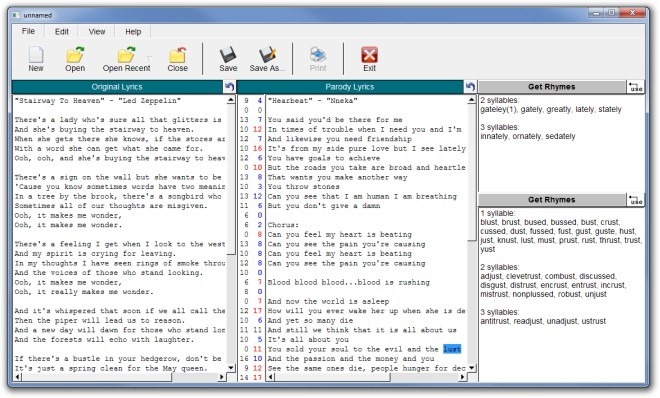
The options offered by the application are pretty simple and placed in File, Edit and View tabs at the top. The File tab contains New, Open, Open Recent, Close, Save, Save As and Print options, Edit has Cut, Copy and Paste, while View has toggles for Syllable Counts and Synchronized Scrolling.
To compare two documents or create parodies of song lyrics, either copy & paste the lyrics in the Original Lyrics section, or select Open to import them from an existing file. One the text is copied, you will be able to see a count of the number of syllables in each line, you can copy the text which needs to be compared with the original one under the Parody Lyrics section and easily compare both pieces. To use the built-in rhyming dictionary, select a word, and click Get Rhymes on the right side to view its rhyming words. All the words rhyming with your query are listed according to the number of syllables in them. In View tab, click Sync Scrolling to toggle on synchronized scrolling of both Original Lyrics and Parody Lyrics panes.
The application doesn’t have, or support, the Undo and Redo functions, something that can be very annoying when editing text, as these are among the most important functions of a text editor. Hopefully, the developer will include them in the next release. Jester works on both 32-bit and 64-bit versions of Windows 2000, Windows XP, Windows Vista and Windows 7.
