Measure Your LAN Speed/Bandwidth With LAN Speed Test
If you are looking for a tool to check network speed, then try the useful Local Area Network speed tester, LAN Speed Test, it is an easy-to-use portable utility which helps you accurately measure the LAN speed.
Its working mechanism is very simple, it writes a file to a particular folder (you will specify this file and folder along with the file size as well), then clears the windows file cache and reads the file back then clears the cache again, deletes the file, and displays the results. It is a very light-weight application as when running, it consumes even less than 1 MB of memory.
Just download it from the link mentioned at the end of the post and run the executable file. Then specify the location for the write file and click the Start button in order to initiate the LAN speed test. Once completed, you will get useful speed statistics about your network. For optimal network performance, you may also want to disable WiFi when on Ethernet to ensure your system uses the faster wired connection.
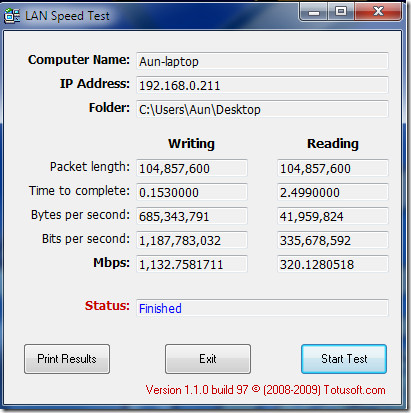
According to the developer’s web site, it works on windows 98SE, Windows ME, Windows 2000, Windows 2003, Windows XP & Windows Vista, but we tested it successfully on Windows 7 as well. Enjoy!

indeed. but the program doesn’t work because it needs registration.
There is no registration in Version 1 (Free version) only Version 2.
hello,
By using a file to be written to hard drives is a bit wrong, for example imagine the network drive being a bit slow.. especialy when you want to test gigabit lan.. secondly, the protocol for file transfers slows the whole process..
I think the best way to test lan speeds would be to have a server-client pair of programs, and the client would send some random data to the server and then take back some random data, it should not use any storage for them, just discard hem, or by using some megabytes of ram (that is very fast) the server could store the data there and then send them back
That way you could measure the lan speed without relying to other factors like disk drive speeds
Sincirely,
Berdux
I agree… there are so many other things that could go wrong or might cause the speed to be incorrect.