Open .DAT File Extension In Windows Quickly
Do you have a .DAT file in your computer and don’t know how to open it? Firstly .DAT file could be anything like a picture, video, data, email attachment, etc. To open .DAT file you will have to find out what kind of file it is, you can than convert the extension to open it easily. If you don’t know what kind of file it is, you can determine it too. More details after the jump.
.DAT file is never associated with any one program. You can try opening it with notepad and MS Document. If it is a chat session or some text document then it will display the content, otherwise it will show some rough data that only programmers can understand.
Your .DAT file could be anything like a video file or a document, the best way to determine would be to add different extension in place of .DAT extension and see if it works. To do this, follow the method below.
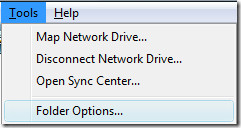
Go to Tools > Folder Options and click View tab. Now uncheck the Hide Extensions For Known File Types checkbox and click OK.
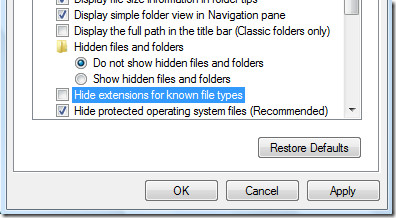
Now you will see file extension at the end of every file on your computer. Now change the extension of your .DAT file to .JPG, .PNG, .DOC, .XLS, .AVI, one by one and check if it works. Opening it with IrfanView might solve the problem, as it opens most Picture and Video extensions.

If this method doesn’t work, then it means either you have a Email Attachment, or a Video file.
Winmail.Dat Email Attachment
If you have a file named Winmail.dat, this means you have received this file as an attachment in the email and the sender has used Microsoft Outlook, Outlook Express or MS Exchange Server to send you this mail.
To easiest way to open it is to use an online converter called WinMailDat.
VCD Video File
If you find a video file in .DAT extension. You can easily open it using VLC Media Player. But if you want to convert it so that it can be easily played on other video players than you can use VCD Gear to convert .DAT extension to .MPG easily.
That’s all. If it solves your problem, don’t forget to say thanks. If you are still in trouble, feel free to leave a comment.

Please, how do i open a .dat file with geographical locations. Maybe using GrADS which will open a data file with .dat file into different geographical location that will give the data like temperature, wind speed or relative humidity.
Chinedu
thanks so much
Thanks. Simple advice of changing file extension did the trick
Thanku very much 🙂
Thanks for that miracle cure. I can now watch my videos
Thanks for that miracle cure. I can now watch my videos
where is tools in windows 7
Thanks. Ur narration was simply great…
please don’t suggest wrong idea
This is totally fake
No one program could open a .DAT file except .. PDF…!!! TRY IT FIRST..!!!
thanks so much!!! was able to open a file for ielts review…
I have my message conversation in my mobile. And i bakeuped aal msgs. All the msgs are converted in one DAT. File.
And now i want to see aal these msg in my computer in ms word or like a text document…
Plz tell me how to do it…
Thanks! It’s really solve my problem.. Now I see my file!
Hey, my .dat is the level.dat which holds information for a minecraft saved level. It holds mainly text but when opened gives me half of it and half square characters([]) as if they are unreadable.
where do find the tools button
thanks
Thank you very much for the trick on how to rename the “,DAT” file, it now works perfectly with my player.
thanks dear….!!!!!!!!
Thanks Lot, I tired to convert .DAT file then i see your advice and my .DAT file converted to MPEG file in 30 second, its amazing for me Thank Again
Thanks for the help. I can now open DAT video file in VLC.
Mine turned out being a .pdf… Thanks for your guide!
thank you very much, I could see xls file in dat file
thanks for your kind suggestion, now i am able to my all DAT file of my pc.
Thanks for the help.
A .dat file is often a file from a popular application that got its extension changed by Outlook, the computer or the copier that saved the file.
When receiving a .dat file, try to think what kind of file it could be: a Word doc, an Excel file, a Powerpoint file, an Adobe .pdf or a scanned jpg?
According to your estimation, try to change the extension to the expected extension and see if you can open it.
In most case, when I try to open a .dat file I try to open it with Adobe Acrobat or Irfanview and that works in 70% of the cases.
Once opened with the right software you can save the file with the right format.
Hope this helps, good luck!
Didn’t help. I gave up after trying numerous ways.
Sir,
I was having a problem to play my video files with .dat extension name. With your kind guidance I changed its extension name to .AVI and now these are playing very nicely.
I am grateful to you for your valuable guidance. The problem resulted from Re-Formating of my PC by some body who downloaded software/programs which were not in consonant with the data already available on my disc. A lot of thanx please.
Thanks a lot for the information.It’s working…..!
i have a .dat i couldn’t open, it was taken from a mobile phone games. i’m sure, it is a png file cuz the hex viewer told me so
I can not play dat files in my media player and also can not open dat files in my pc please any idea………..
Thanks for the info.
So simple and clearly explained! Thank you. Obviously, just the trick.
thanks, it is very helpfull
Thanks I am still working on it.
thnku dude…
I was dat file but coud’t not open.But this articles vey useful to me that i opend as per above advissed from Adobe file.
Thanks to all.
This article helped. I was able to open my .dat file with Adobe. Thank you!
How do I open a map that is a .dat file?
Hi,
I have a .dat file that was created by Yahoo messenger, its in the messages folder of yahoo, how do i open it?
I have tried changing the extension to .doc, .rtf, & .txt; doesnt work, just displays a bunch of characters…
Thanks in advance
Hello Sir/Madam,
I have a couple of files possibly e books which I could not open, I could not even determine their extensions. I actually went to the folder options and unchecked the ‘hide the extension box. Their extensions were not shown. So I decided to go online to see if I can get solutions and came across this website. I would be happy if you could help. Many thanks.
Thanx Dude It works for me….Thnx a lot…
thank you math……
good day!
the above information helps me a lot about .dat file extentions.
more power to you and this site.
god bless
thanks its working!!
I am trying to open a customer database file extracted and saved as .DAT still having no luck
Thanks, now i am able to open the file, after changing its extension from .dat to .doc
i have some music video which i cant open ……………….. and im big fan of wwe but i cant watch from my labtop i can warch only 1.30minute.plz give me a idea
Maybe you should download a WWE video from youtube with the help of www.savevid.com.
You just have to paste the url and it will take care of the rest.You can also watch the full video.
How to open a .DAT file, which is an application file and I do not know to what format it is to be converted.I tried renaming it as .ZIP and .EXE, but it never works.
hi actually i am also trying to open some temporery files of internet explorer like index.dat history.dat but my all efforts failed, lastly i download some spy s/w with the help of which i got success to open these file if u wish to know the name thne mail me regarding that
hi actually i am also trying to open some temporery files of internet explorer like index.dat history.dat but my all efforts failed, lastly i download some spy s/w with the help of which i got success to open these file if u wish to know the name thne mail me regarding that
Thanks for the info. I had a file that I couldn’t open. I googled it to find your site. Your information was great. I was finally able to open and read it. Thanks again for your help.
Can I open the file NTUSER.dat from an unbooted drive? thx
Hello,
i am having .dat, .blb, .bbk, .ibk, .idx. these all files are related to some database files. but problem is i am not understanding how to open these files and how to see content of these files and in which software (MySQL,SQL server) i have to open these?
Kavita
hi actually i am also trying to open some temporery files of internet explorer like index.dat history.dat but my all efforts failed, lastly i download some spy s/w with the help of which i got success to open these file if u wish to know the name thne mail me regarding that
Kindly give the details of spy s/w.thanks
please send me the software name
Appreciate u send me the s/w name/source that opens the xx.dat files
just drag the file to notepad window/icon and check to see if notepad window shows some comprehensible content. if it doesn’t then it probably doesn’t have any text data in it that could be worth of you. if you expect any type of multimedia in it then just open it by dragging *.dat file to vlc media player as it is able to play any media container file irrespective of it’s extension.
I have backup my sms.dat but it can’t be restored by my phone software. I tried to change the filename to txt , doc but it never succeed to see my sms again. all coded. HOw can i open the sms.dat file with my window XP ?
thanks for the assistant, i was able to open a DAT file with media player classic, as you suggested. thanks for the advice.
Advertiser >.>