Outlook 2010: Enable Blind Carbon Copy (BCC) Option
If you wish to send an email to someone secretly and don’t want the other recipients of the email to know this then you keep that person’s email address in the BCC field. The BCC field is disabled by default in Outlook 2010, lets see how to enable it.
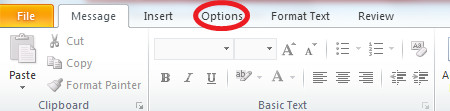
Click the New Email option on the Ribbon and once the new email dialogue box is displayed, go to the Options tab.
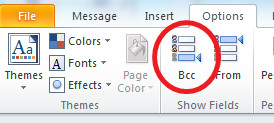
Now in the Show fields category, click the the BCC option to enable it.
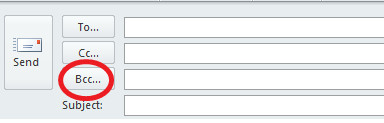
The BCC field will be added to your message.

How do you display the Bcc addressees of a message you already sent?????
Rather annoying having to go through the steps every time BCC is used. No setting to automatically have the BCC show when a new message is composed?
I suggest putting it on the quick access toolbar. It’s still annoying you can’t have it always show but at least it’s a one-click operation
I followed these steps once, and it set my preference so that now the BCC field is always there when I create a new message.
Did no one see the irony here of a blind person wanting to turn on the blind cc??
Did no one see the irony here of a blind person wanting to turn on the blind cc??
Thank you ‘e’
Great. Easy and very accurate description
Navigate the ribbon by holding Alt then tapping h (home), then click n for new mail
when the new mail options hold alt again and tap p (for options) then b for bcc
Shannon: did you not understand his complaint? He can’t see well (or at all). These easy instructions are not so easy if you can’t see where to click. If there are keyboard shortcuts, I think there are sighted and less-sighted individuals who would appreciate knowing them.
A more polite way of saying that would simply be to ask about keyboard commands, and explain that people with visual impairments need them. It’s always better to kindly educate people than criticize them for not being all-knowing.
thank you for your pertinent explanation. very helpful. take care.
I don’t like this because it fails to give keyboard commands for the steps. Too sighted in my opinion and lacks appreciation for blind users.
Wow! He gave you an extremely easy to follow step-by-step option that only takes about 2 seconds to use. You are impossible to please. Next time try to figure it out on your own and see how well you do.