Run CCleaner To Clean Your System Before Shutdown [Windows]
CCleaner is the best system and web browser cleaning tool out there. Yesterday we covered an app called AutoCleaner which uses CCleaner to clear all web browser history, cache, temp files, etc on close. Here is another trick using CCleaner which will make it run automatically before shutting down the system, but this time it requires no 3rd party app.
Create a desktop shortcut of CCleaner and add the /AUTO /SHUTDOWN after the target. The complete target would become:
"C:\Program Files\CCleaner\CCleaner.exe" /AUTO /SHUTDOWN
To automatically clean up your system before Shutdown, run this shortcut and you are good to go.
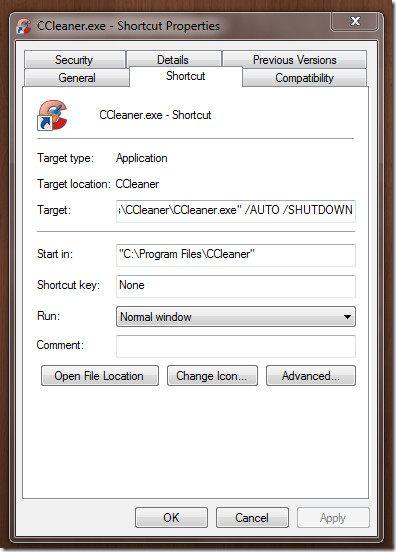
This method has been tested to work on our Windows 7 32-bit system. It will work on all Windows OS where CCleaner can run. It is a small but very useful tip for users who have to occasionally clean up all the temporary files before shutting down.

Thanks a lot!
excellent tip thank you!