AddictiveTips Apps: send2XBMC Sends File Or URL To XBMC Media Center
send2XBMC is a small tool developed by one of our authors, William Nuijen. It allow users to easily send a URL or the address of the remotely shared(SMB) or local media file to your Xbox Media Center(XBMC). This can be done by opening the file via the dialog of send2XBMC or opening the path/URL by a command line parameter.
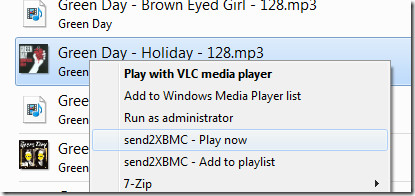
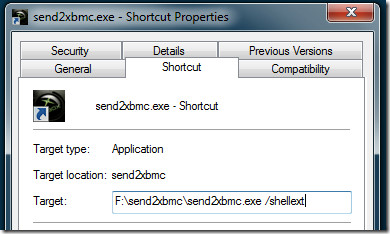
To make it easier, integration is provided for Windows Explorer, Opera Browser, and Total Commander. For Windows Explorer you need to create a desktop shortcut and start it with the following command:
“[path]\send2xbmc.exe” /shellext
When prompted, click Yes.
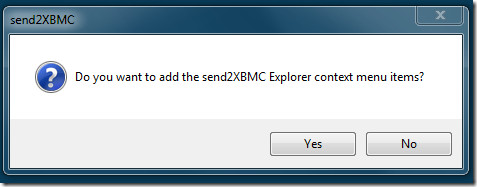
To remove it from the Windows Explorer context menu, hit No, when prompted. For detailed usage and integration, check out the ReadMe included with the app.
Planned features include:
- Include scripts or functions for context menu support for:
- Internet Explorer
- Firefox (in the mean time, use XBMC Fox)
- Let send2XBMC check inside folders for playlist files to prevent files from being added to the XBMC playlist twice (through directory listing and a playlist file)
The program has been tested on both Windows XP and Windows 7(32-bit and 64-bit) but should work with all other operating systems as well.
(https://www.addictivetips.com/app/uploads/software/send2xbmc.zip) Download send2XBMC
Editor’s Note: Willem is looking for developers who can help implement the planned features, if you think you know some coding and can be of help, leave a comment below.

send2xbmc does not work with my Raspberry Pi (newest RaspBMC version) 🙁
This is the error message I get. Does anyone know how to fix this?
Hmz, try to unshare Users and share another parent folder of that file, like “Desktop”. Give that a go.
Even if I share my whole HDD it doesn’t work.
Maybe I have to enter my Windows username somewhere in the XBMC settings in order to give XBMC access to the folders?
Yesss! 🙂 Try and go into a samba share from within XBMC first, so that it asks you for the Windows share user/pass. I don’t know if it’s still the same in RaspBMC, but on an XBOX (1) it saves the SMB user/pass in UserData/guisettings.xml under the element.
I followed this article in the XBMC-wiki: http://wiki.xbmc. org/index.php?title=SMB/Windows#Windows_7
Now I am able to add my shared folders to XBMC and to play the media that is stored in them. But if I try send2xbmc with a file that is in my shared folder, I get the error message that I already posted here.
Any ideas?
In send2xbmc.ini, try setting XboxIP=192.168.1.123:8080
8080 has become the default port for the web interface, you can also try – instead – to change the port number from within XBMC.
Tried with ports 80,8080 and 1337 (changed them in xbmc and in send2xbmc.ini) but still the same error message…
it could be the fact that this was made years ago and XBMC changed their API to now require JSON api calls. If this has never been updated then it is probably using the old API and therefore will not work.
hmm 🙁 my xbmc (Raspbmc) is able to open files on my PC via a shared folder and a user I created in windows, but send2XBMC still says “Path is not shared” 🙁
send2XBMC uses the registry key HKLMSYSTEMCurrentControlSetServiceslanmanserverShares to check for valid shares. This is a bit of hack, honestly, since the key is updated only after a reboot. You might want to check if the share you want to use is indeed present in that registry key, so send2XBMC is able to use it. Also, be sure you’ve enabled the XBMC webserver.
Does not seem to work with Frodo
Hi, it would be nice to have the source for this script. XBMC is opensource, having a closed source controller kind of doesn’t encourage me to install it or use it. If you’re asking for help on planned features, this could be an easy way to get people to add those to your code.
The source code has been included from the beginning.
FANTASTIC tool! I suggest making an installer to help those less technical – if you do I think this will spread like wildfire.
It says not shared path about a file in downloads and wont open?
Be sure that your XBMC computer/xbox is able to access the folder containing the file: it uses Windows SMB, so XBMC should be able to access the folder, which at times requires you to set up in XBMC a username&password of one of the accounts from the system sharing this folder. (Suppose you want to share file F on computer C to XBMC, then you should enter the username and password of a user account on C into the settings of XBMC.
Foxytunes is similiar.. I am going to try this though..
Im trying to get this working with my Mac running Plex. isn't there anything you need to setup in XBMC like web access? What about user name and password in the ini file?EDIT: Found answer here http://www.asymmetrics.nl/send2xbmcBut what about user name and password? Is this only using the default xbox/xbox authentication?
I would love to implement support for username/password webserver protection. However, simply using http://username:password@url does not work. If anyone has some more experience with AutoIt or Basic with regards to a HTTP client object, I'd like to hear from you!
I keep on getting this error error: “The server name/address could not be resolved”I have tried modifying the .ini file to XboxIP=http://192.168.2.13/, XboxIP=http://xbox, and a few others.Any suggestions?Thanks
If it asks for an IP address, then give it the IP address. That has nothing to do with any protocol like HTTP, only the address. So if your Xbox OR the PC running XBox Media Center has the IP 192.168.2.13, then the .ini file should have the entry:XboxIP=192.168.2.13
Thanks, that's what i should have tried first! Unfortunately your program was to good to be true/work for me. I realized another problem that I had in the past… I am one of those poor souls who can't figure out the Windows 7 SMB issue.
This seems way too confusing. Then again, I'm pretty new to the whole media sharing world.I've been using Windows Media Center on my XBOX360 and have no issues whatsover. I highly doubt streaming MKV's remotely will be doable.
streaming MKV works fine if your network and devices can handle it.