Shrink Pic – Free Automatic Batch Image Resizer
At AddictiveTips, we have covered various image resizing software and all of them require manual input. Shrink Pic is a brilliant app that takes a totally different route and makes the whole procedure automated.
Before we go further, lets discuss the uses of such a tool. It is a headache to manually resize the image(s) and then send them as attachment, upload them, or share it over IM(Instant Messenger). Wouldn’t it be great if the images are automatically resized instead of having to manually do it?
When you attach a photo, upload it, or send it over IM, Shrink Pic will automatically compress the image to the user-defined level, save a copy in the temporary directory and then use this image instead of the original photo. Thus, in this way a compressed image is send quickly while keeping the original photo intact. Sounds brilliant?
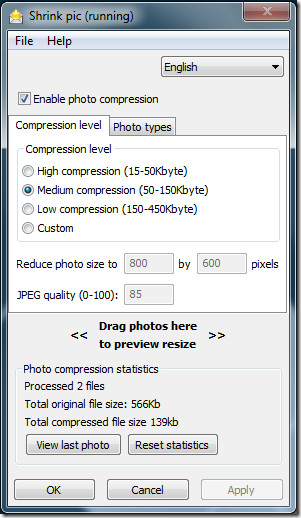
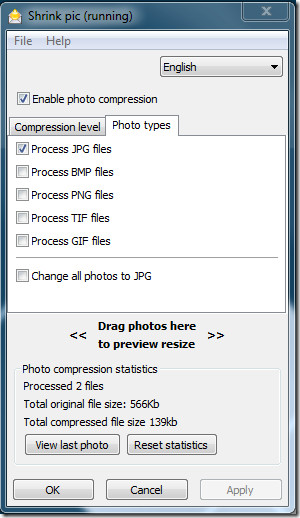
All the user has to do is to select the Compression Level and the Photo Types. Hit Ok and the app will silently monitor from the system tray. When it recognizes an image which is being uploaded, it will automatically resize that image and use it instead of the original one.
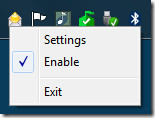
You can temporarily disable;e it by right-clicking the system tray and un-checking Enable. When an image is compressed(resized) a small notification is shown on the lower-right side of the desktop.

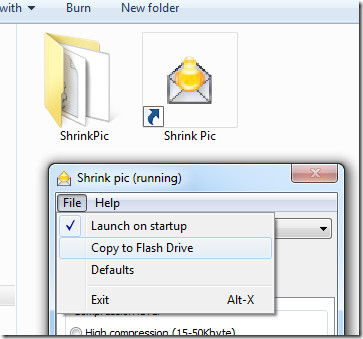
The best part is that you can install a portable version on any removable storage device. Go to File menu and select Copy to Flash Drive option(make sure a USB drive is connected to the computer).
It works with IE, Firefox, Chrome, Safari, and Opera web browsers, Windows Live Mail, Outlook 2003/2007, Outlook Express, Thunderbird, Eudora, Poco Mail, and Incredimail email clients, and Skype, Yahoo, and Windows Live IMs.
While uploading an image to WordPress, it was able to resize(compress) the image to the exact settings as chosen by me. It works on Windows 2000, Windows XP, Windows Vista, Windows Server 2003/2008, and Windows 7.

Just 3 years back when I was using Windows XP I commented in these columns about Shrinkpic and expressed my happiness. But alas, now that I upgraded to Win 7, I find that Shrinkpic is not monitoring Firefox though it works fine with IE 9 and Chrome browsers. The support prople at Shrinkpic has not so far answered my mails to them. Really disappointed as FF is my favourite browser.
It is not working on Win7 and Outlook 2007. While I am attaching photos it works and make they smaller. But when I click to send button Outlook sends they with original bigger size..
It is not working on Win7 and Outlook 2007. While I am attaching photos it works and make they smaller. But when I click to send button Outlook sends they with original bigger size..
Will Shrink Pic work with Windows 7? I used it with my XP computer and loved it, but I have Windows 7 now. Will Shrink Pic still download and work?
Ditto to what Rag says. This program never worked for me on XP SP3 using Gmail with my Firefox browser. The pix always came out at full size, no matter what settings I changed. Unlike the tutorial, you cannot “drag” photos into gmail. You have to use the “attach” button and navigate to the pictures, one pic at a time. Or likewise use the “insert image” button for inline images.
But this Photorazor program works perfectly! It resizes the whole batch and – unlike TidyTinyPic, it doesn’t require one, fixed length x width size (which squashes Landscapes if you enter a Portrait size, and vice versa). It proportionately reduces them to a maximum width OR length that you select. And it doesn’t REPLACE the pix in that folder with the new, smaller ones. It automatically makes a new SUBfolder in your picture folder, and puts the smaller ones in there.
Once again, the link is: http://www.stormdance.net/
Happy New Year! Think you should give a mention if somebody has referred a software which you found to be useful to review.
Happy new year! Nobody referred it . While searching for something else, I come across this. And out of curiosity I installed it and using it. I thought it may be wellknown and hence I did not think of referring it to anybody. Similarly I am using one Antenna editor for my web site creations. Another application Photorazor (www.stormdance.net) comes with it. For batch resizing of images it is very good. You can review that also.
Really a very great utility. I am using it for the past three years. Daily I am sending many photos and scanned images to friends. This shrinkpic is helping me very much. The speed with which it reduces the size of the image without affecting the original image is exciting.