Split Large Folder By Number Of Files And Size With Folder Axe
Folder Axe is small yet smart folder management tool to split folder by specified size and by number of files. There are, certainly, endless usage scenarios where one can make use of it. With By Size distribution method, you can limit resultant folders to the specified size, whereas, By Amount method distributes same number of files across all the resultant folders.
The app usage is extremely simple. You just have to specify the folder which you want to split. After selecting the folder, choose the Split Type – By Amount and By Size. Choose the required type and enter the parameters needed to split the folder. Underneath Split Type, you will find Folder Naming Scheme which will be applied to all the resultant folders.
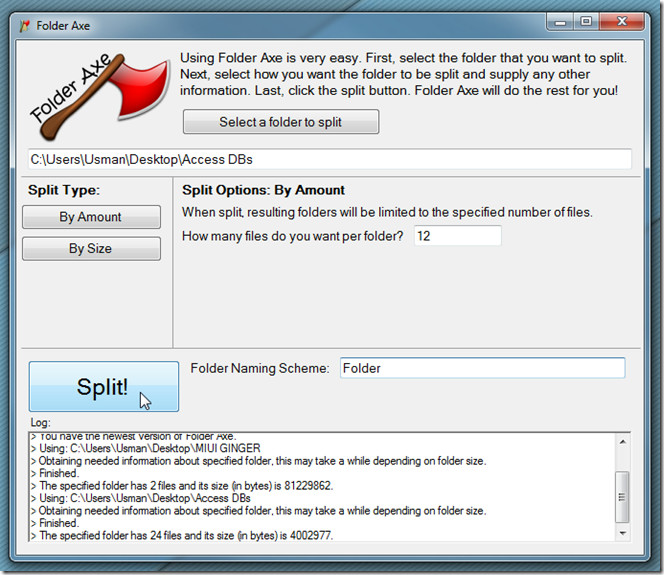
Just click Split to distribute the the file load in the way specified. Folder Axe works on Windows XP, Windows Vista, and Windows 7, provided you have .Net Framework 4 installed.
Update: The developer just contacted us to tell that Folder Axe is in active development stage so you should expect more features soon. If you have any feature suggestion, leave them in the comments.

Thanks very much for the review! Strangely, it says at the top of this article that there are two comments, but I’m unable to see them, hopefully posting this comment will allow me to see them. I’d like to remind the readers though, the quickest way for me to see any suggestions is to use the contact form on my website.
Pingbacks and comments appear as no. of comments below the post (this is default in WordPress). We have hidden all pingbacks in this theme. The 2 comments you see are actually pingbacks. 🙂