Sync Google Calendar With Windows 7 Desktop
After some great overall improvement, Microsoft made one stupid (I hate to say this but it is true) decision – removing Windows Calendar from Windows 7. Thus, stealing away the ability for users to sync their Google or Windows Live Calendar with their desktop. Luckily, I came across a Windows Gadget called Windows Live Calendar Gadget developed for Windows by user poulicek. It allows user to sync both Windows Live Calendar and Google Calendar(yes, it supports syncing of multiple calendars). Technically it supports any calendar in iCal format.
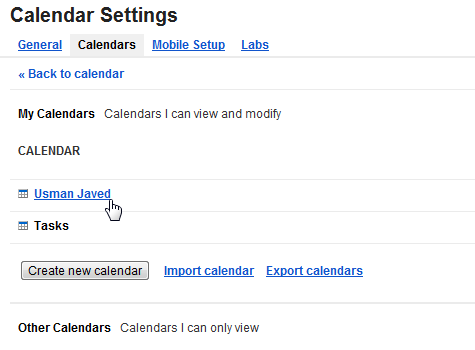
Now first head over to Google Calendar, hit Settings, and visit Calendars tab. Here, click the calendar that you want to sync.
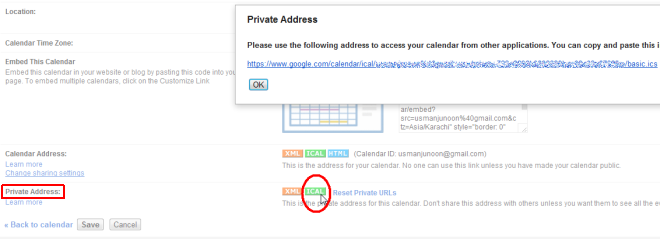
You will find a Private Address section at the bottom of the page. Click ICAL and copy the URL.
Now install the Windows Live Calendar Gadget, go to Options, and paste the URL. If you have more than one calendars, you can paste the URL(one per line).
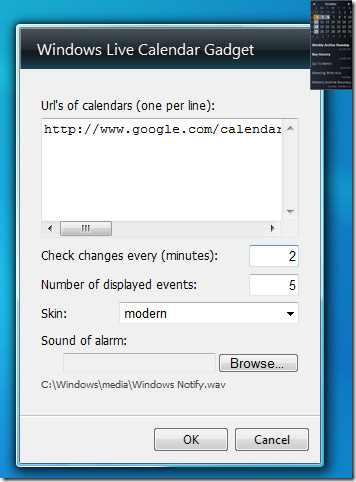
You can also choose when to check for changes and the number of displayed events. For now there is only one skin but the developer is working on more. Lastly there is an option to select the sound of alarm which will alert you when the event approaches it’s time.
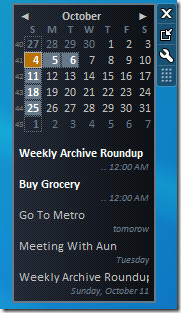
In the screenshot below you can see how events are displayed. Clicking any event will show you the complete details, information such as, Summary, Location, Start/End Date & Time, and Description are easily viewable.
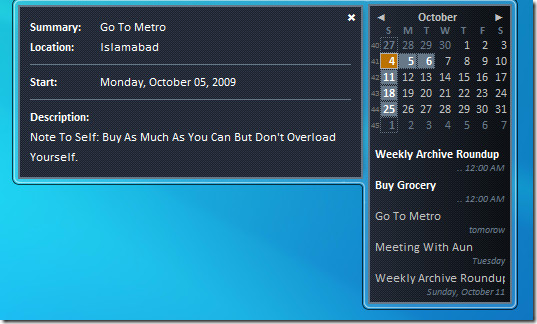
The events which have approached their date are highlighted while others are not. Click any date and it will take you to that day’s events.
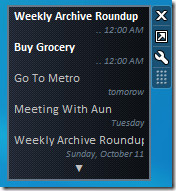
You can also view the gadget in smaller size where only the events are displayed and the calendar is hidden.
It is an excellent little gadget for Google Calendar addicts like me who love to keep an eye on the upcoming events. It’s developed exclusively for Windows 7.
Download Windows Live Calendar Gadget

Doesn’t work with Windows 7 at all.
Excelente gracias
Could this gadget use proxy agent?
Nice, clear destription, easy to set a calendar
Great, works well!
Works very well!! thanks.
Thanks, work well!
Thanks! I have been looking for a good desktop calendar since the discontinuation of Google desktop and this works great!
Its wonderful, but shows my events half hour early(like 6:00 instead of 6:30). my time zone is utc+5.30
Any fixes?
That was exactly what I was looking for. Thanks for this hint and the good explanation.
Thank you very much.
Good Widget. Too bad there is no way to add an event through it.
I’ve got windows 7 and I followed instructions on this tutorial, I downloaded the gadget but for some reason I can’t find “options”??? if I right click there’s no options.. please help really want this to work..
I have been looking for the perfect desktop calender to be able to sync all my Google calenders to! THANK YOU SO MUCH!!! I SERIOUSLY need this!
Thanks so much for sharing your decent discovery! Such a Eureka
Thanks dude!!
That was great and helpful! 🙂 Thanks.
Kudos to the developer. Great gadget! Thanks for your clear instructions!
Can I somehow sync my google task to this gadget ???
I cannot load google calender .ics to the gadget. it says could not load the calender(0).
I am accessing interney via proxy. can that be a problem?
also with same settings I can download the .ics of same calender with the same url.
your feedback is highly appreciated
I’m a little late to the party(last comment 2yrs ago). This works for me to display my calendar but I would like to be able to add/edit events too. Is this possible or is there another app that allows for this?
I’m a little late to the party(last comment 2yrs ago). This works for me to display my calendar but I would like to be able to add/edit events too. Is this possible or is there another app that allows for this?
Excellent and Exhaustive tip; Thanks..
Thanks, nice write up 🙂
How to I display my Outlook calender in this gadget? thanks
Can anyone help me with this Error 404 could not load calendar https://www.google.com/calendar/ical/ghernbone81%40gmail.com/public/basic.ics
It would be nice if I could write event in gadget and it appear in google calendar
Thank you so much for this tutorial. I didn’t manage before to synchronize this calendar with Google’s calendar 🙂
Thank you for this tutorial! I followed it exactly and it works just like it’s supposed to! Thank you!!! I saved my life!
I have the same problem as Janice.
Only one week shown.
Excellent tip! Just what I needed.
How come it doesn’t show the full calendar on top? It’s just on the small gadget view – calendar is hidden. There is no option in the “Options” to show calendar above the items. It only shows one week.
i heared 2-way syncing works with google desktop. but im afraid of installing that…
does somebode know the problem, that the gadget shows appointments, that are removed long time ago in google calendar? i removed one appointment out of a series. but the gadget keeps on showing them… how can I trust in such a programm?!?
Thank you so much, this is just what I’ve wanted since I switch back to Win7.
great, works perfect !
Thank you so much for this great tip. I use Google calendar but didn’t want to install Google desktop just to get the Google calendar gadget. Works great as a 1-way viewer of upcoming events. If you want to add new events then you still need to go into Google calendar via the web as far as I can tell.
I appreciate you sharing these great tips
REALLY WANTED THIS GADGET! MANY THANKS FOR YOUR CLEAR INSTRUCTIONS!
The installation went fine and the calendar is now synced with my Google Calendar.
Thank you
Regards,
Mohammad
Computer Science student
Saudi Arabia
is there any way to sync this widget 2-way
It would truly be awesome if you could add/edit events through this gadget. But I guess then you would need to sync 2-way instead of 1-way. I can imagine that would be harder to implement. Does anyone know of any 2-way syncing google-calendar desktop gadgets?
Keep getting 404 error cannot load calendar–do i have a setting wrong?
Never mind. Got it by using Private Address. Sorry.
is there any such gadget that can be linked to ‘google notebook’ ?
Yeah, it would be more useful to me too!
Great Gadget ! the one that i required badly u can say !
So the calendar has to be public? You can't add credentials to the gadget?
Is there anyway in the Windows Live Calenda to double click in a specific day and create an event?
you a legend. thanks mate works fine
you a legend. thanks mate works fine
you a legend. thanks mate works fine
windows 7 by the way, sorry. and im talking about the windows live calendar gadget, dont understand how to open in.
The gadget is downloaded in .zip format by some browsers. What you need to do is to remove the .zip format and hit Enter. Then double-click the gadget and it will automatically get installed.
i don't understand, i download the gadget in zip form, use win rar to unzip then no install file or anything. how do i load the gadget in the first place? please help i really want this
Any way to make it bigger??? I love it, but it's way too small.
Its a great gadget but it shows the times wrong. My google calendar and computer are both UTC +5 US Eastern, but it shows all my appointments 4 hours ahead (whats 8am is 12pm). Any ideas? Thanks
This problem has been fixed in the latest release. 🙂
Great tip! But could you please explain how to use this widget with windows live calender?
Same usage. You just need to go to calendar settings and copy the URL of your calendar.