Sync Outlook 2010 And Google Contacts
If you are looking for a way to sync your Google Contacts with Outlook 2010, give GO Contact Sync a shot. It is a small tool that have 5 sync options and includes both one-way and two-way syncing.
Enter your Google Account credentials, give sync profile a name, choose the sync option, and hit Sync. The process will take some minutes, depending on your internet connection and the number of contacts in Google Account. One great functionality is the ‘Sync Deletion’ option. If this option is enabled and you delete a contact from Google, it will be deleted from Outlook as well and vice versa.
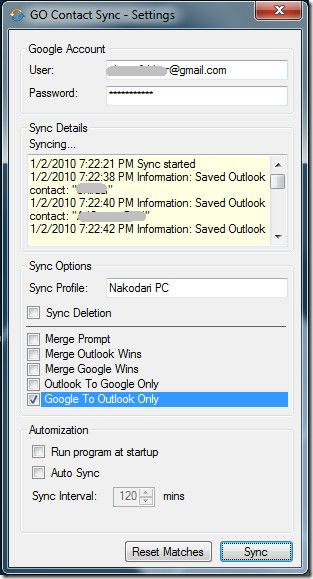
It runs from the system tray and can be set to run on Windows startup. If you want up-to-date contacts on both Gmail and Outlook then you can choose to auto sync every defined minutes(default is 2 hours).
It was originally developed for Microsoft Office Outlook 2007 but works find on Outlook 2010 as well.

Tried to use this software with 2010 and Windows 8. The software kept asking for .NET 2.05 to be downloaded – .NET 4.5 is already installed. Cannot get this neat tool to work…
that is a cool way to suck your gmail data as contacts, credit cards passwords recorded in chrome for all the websites!
Worked great!! Just used this to move my contacts from my old bb to my new droid, thanks!
Version 1.6 worked for me, I was facing with the problem using the latest 1.7.7 version
Virus do not download
Did not work me, sorry, ..
Does not import any of outlook contacts to gmail ..
says in the log I have 10 contacts but I have 100s of them,,
The way to sync Outlook to Google Initially is using the Export/Import Meathod: Outlook>File>import/Export>export to file>CSV (dos or windows doent matter); then Gmail.com>conacts>import>select CSV file.
Decent program but it syncs “All Contacts” and not just “my contacts”. So the search is back on.
Wow – Go Sync, just works, finally i can sync gmali to outlook and forget about it.
I just installed Go Contact Sync and on the first try received this error message. I cannot find a description of what it means or how to fix it. Can you help?
Retrieving the COM class factory for component with CLSID {0006F03A-0000-0000-C000-000000000046} failed due to the following error: 80040154.
5/21/2011 9:41:45 AM Sync failed
Hello,
Please exist this program to instal without Admin rights? In our company I can’t install programs. Than You.
I downloaded GO Contact Sync and ended up removing it because it showed an error when 2 of my contacts (who are husband and wife) showed the same Home Email. I keep them separate because they hold different jobs and have other contact information that is different, but they can’t be synced because they share an email.
Hello,
as the development of the beta software GO Contact Sync has stoped, we have created a fork and fixed mayor issues and enhanced the software in some parts.
Find Go Contact Sync Mod at http://googlesyncmod.sourceforge.net/
Txh man!