Test Laptop Battery Life With Imtec Battery Mark Tester

So you buy a new laptop and start checking out the battery life by reading the manual that comes with it. Well wait, doesn’t every notebook manufacturer these days calm to have the longest battery life? Ofcourse their calms can be a bit farfetched. So how would you know what is the exact battery life?

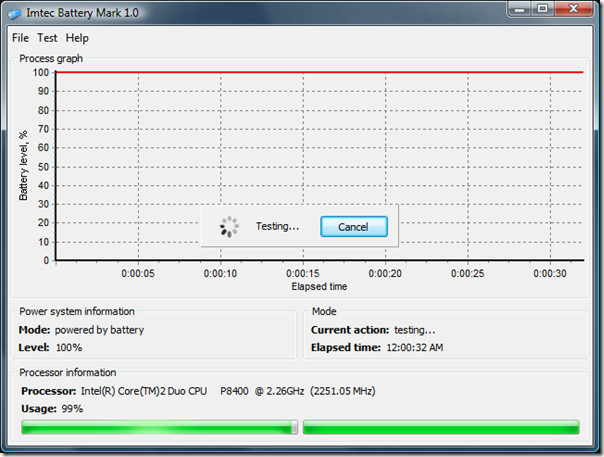
One common way is to use your laptop on battery to see how long it lasts, but there is now a more easier method. Imtec Battery Marker is a free tool from a Russia developer that has been designed specifically to test laptop battery. There are two modes available fast and normal with an additional option, full load or without it. Just go to Test menu and select the mode along with the full load option.
Imtec Battery Mark Tester

It is recommended that you perform the test with both full load and without full load. In this way you can compare how long the battery life lasts when playing games or performing CPU-heavy activity and how long it lasts when the system is idle.

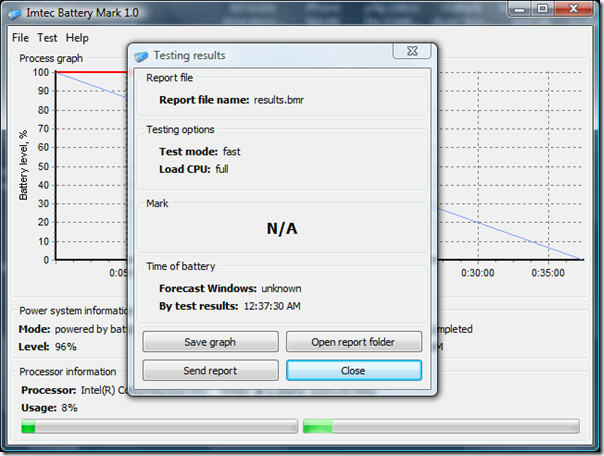
At the end of the test, you will get the complete report, with options to save the graph, open report folder, and send report. During my testing I got N/A result, perhaps it was because I ran it in fast mode rather than normal mode.

battery tester results

Fast mode normally lasts for 10 minutes while the normal mode can last upto 20 minutes or more. It will only work if your laptop is running on battery, if it is connected to A/C then the test won’t work at all.

Download Imtec Battery Mark Tester

It works on Windows 2000, Windows XP, Windows Server 2003/2008, Windows Vista, and Windows 7. Enjoy!

  • Share this article!

    • Digg this!
    • Bookmark on Reddit
    • Bookmark at Delicious
    • Stumble this!
    • Share this post at Facebook
    • Tweet this!
    • Share on Yahoo! Buzz
    • Add AddictiveTips to your Technorati favorites
    • Share on Friendfeed
This entry was posted in Windows and tagged , , , , . Bookmark the permalink. Post a comment or leave a trackback: Trackback URL.

4 Comments

  1. Posted August 15, 2009 at 1:22 am | Permalink

    I”m a heavy laptop user and I’ve learned that heat can quickly eat up the battery life.
    I recently downloaded a program called, Battery Care, which does a pretty nice job. This Imtec Battery Testing product should compliment it nicely. I’ll look into this right away.

    I’ve spent the last 3-4 years trying to find ways to preserve a laptop battery.

    Thanks for the info.

  2. Posted August 15, 2009 at 2:20 pm | Permalink
  3. Posted August 27, 2009 at 12:54 pm | Permalink

    New version of Imtec Battery Mark here (1.1.1.22).

3 Trackbacks

  1. [...] Addictive Tips « Crea un respaldo de tus drivers en Windows con Double [...]

  2. [...] l’effetto memoria. Per farvi aiutare in questo compito potete servirvi di BatteryCare. (via) Tweet This!Share this on FacebookShare this on FriendFeedStumble upon something good? Share it [...]

  3. [...] resources. It works perfectly on Windows XP, Windows Vista and Windows 7. For windows OS users, the Imtec Battery Marker is also a cool tool for monitoring the laptop’s battery life, and for Linux users PowerTop does [...]

Post a Comment

Your email is never published nor shared. Required fields are marked *

*
*

You may use these HTML tags and attributes: <a href="" title=""> <abbr title=""> <acronym title=""> <b> <blockquote cite=""> <cite> <code> <del datetime=""> <em> <i> <q cite=""> <strike> <strong>


More in Windows (5 of 5 articles)