Top 4 ePub Readers You Must Know About
ePub (also written as EPUB or EPub) stands for Electronic Publishing and is a standard e-book format which is used by all popular e-book readers out there, including Barnes & Noble Nook, Sony Reader, iPhone/iPod Touch (using various e-book apps), and more. ePub files have .epub extension.
There are various online as well as desktop tools which allow users to read .epub formats. We have covered four ePub readers which we believe you all should know about.
Bookworm (Online Service)
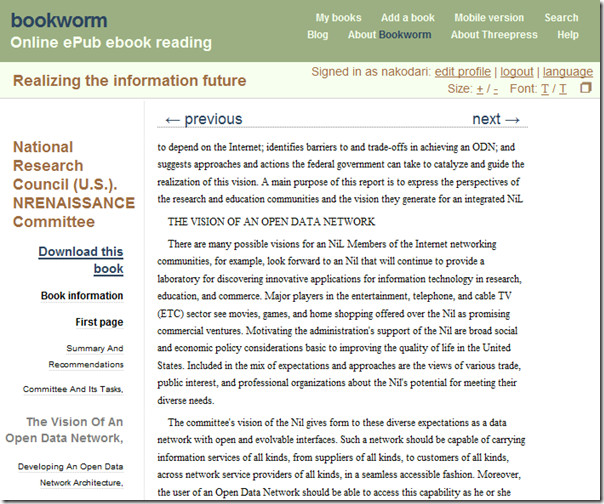
Bookworm is an online service that aims to be become a leading free platform for reading ePub books online. It is part of O’Reilly Media. It takes only three steps, create an account, upload an ePub book or magazine, and start reading.
The benefit of this service is that you can read the e-book online no matter where you are located and which device you are using.
EPUB Reader Firefox Add-On (Windows/Linux/Mac)
EPUBReader is a handy add-on for Firefox that can directly open any ePub format quickly. It is indeed faster and quicker than desktop software and shows the graphics far better than bookworm service.
This add-on opens the ePub file just like you can open PDF file in Firefox browser. Just hit the download link of any ePub book and select Open. If you have already downloaded the ePub book, then you can open it with Firefox.
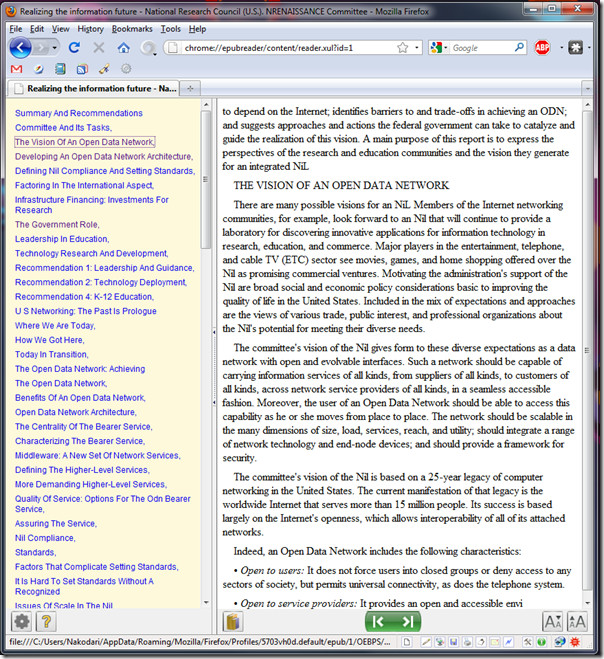
The interface is customizable, which means you can change the background colors, etc to your own liking. The navigations buttons are given at the bottom along with the option to change the fonts.
Stanza (Mac)
Stanza is a desktop ePub reader and converter that is fast, light-weight, and simple. It can be used to save bookmarks and quick conversions. You can convert .epub format into tens of different other document formats including doc and pdf formats. If you want to read the ePub file in Amazon Kindle, there is an option for that as well.
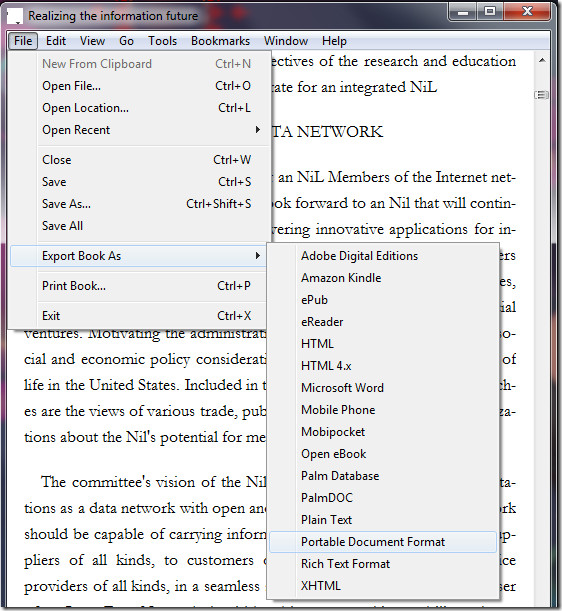
The only downside is formatting and navigation, the two most important aspects. For formatting it can be compared with Bookworm service but is not as great as EpubReader add-on for Firefox.
MobiPocket Reader (Windows)
MobiPocket Reader is not only an advanced ePub books reader but is also a great professional books organizer. You can import books in PDF, ePub, or Office formats and organize them quickly. Just double-click a book and start reading.
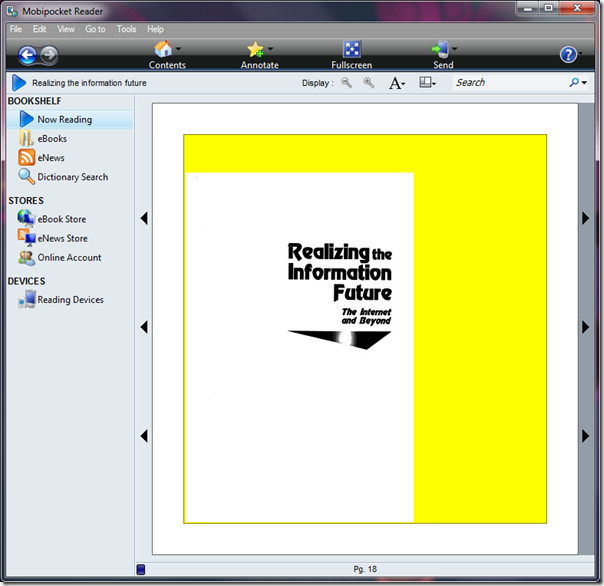
The formatting of MobiPocket is better than the above mentioned tools and has an option to zoom into the book, useful for those who want to read the tiny text on the book. Also there is an advanced search box given on the top-right side which can drastically help in saving time.
Update: Also check out FBReader, which is an outstanding eBook reader, manager, and downloader.
Update 2: As a side note, you will also be interested in PaperCrop. A free tool that allows optimization of PDF file so that it takes less space and opens faster on mobile devices.
Conclusion
For quicker distraction-free reading, I found EPUBReader add-on to be the best. For traveling, I would prefer using Bookworm since all uploaded books can be accessed from anywhere in the world. For converting ePub books and reading them without worrying about Firefox crash, I would prefer Stanza. Lastly, if I am looking to organize all the books in one place, then MobiPocket Reader is the app to of choice.
All the above mentioned tools are great but the final selection would depend entirely on the user. Choose your app and let us know which one you like the best. If you know of any other app, do let us know. We love to try out new tools and services. Enjoy!

Great Tips, calibre is great open source app for epub.
Take a look at Infinity Reader. It supports audio, video and all
ePub3 features. The reader comes with a free book, which contains youtube
video. You can also download a lot of free books directly from the reader.
I use it with Readium(Chrome plugin) for Windows and Mac
Download no longer available for PC
I am having trouble down loading books from Kobo to a Sony reader using epub. Any suggestions about what I may be doing wrong
bookworm isn’t available anymore. Some blah blah about how the ebook environment has changed and they can recommend other programs.
sumatra as gerry says does the job absolutely fine. my uread application stopped working and has not been updated for 3 years so i guess they stopped supporting it. i use adobe reader for my pdf’s as it scrolls smooth and is fast, yes fast, and sumatra for all other and the occasional doc
Sumatra PDF Reader can read numerous files including CBR and EPUB along with PDF and TIFF
thanks for the help
Thank you for these recommendations.
لا لا لا
Не очень удобно на компе, в отличии от того как читать на планше или електронке))
please update it… links ae dead
Please note that Bookworm program is no longer available
Hi all,
The Mobi Pocket Reader Version : 6.2 Build 608 or higher can be opened the EPUB file format.
Please don’t open by clicking direct to the file. Just open the Mobi Pocket Reader, then go to FILE—>OPEN—–>select the file that you want to open.
Have fun!
Very helpful tip. Indeed some EPUB files (about 15-20% of all files) failed to open with Mobipocket. This is good to know that there is a workaround.
@google-ff9333e07fa75fe2856cf78f92484686:disqus and Xaun Loc: Mobipocket reader does read ePub format. Just open mobipocket, go to import, don’t use open file or folder options, but just look down to other options, like office document, pdf document, html document etc. and click epub document. open your file, and thats it. I am using mobipocket reader 6.2. Don’t know about previous versions. Good luck 🙂
Bookworm is no longer available..seems your suggestions aren’t so helpful.
There is also an addon for Google Chrome that works well for epubs. I like the scroll feature it has too. Check it out, just search the Chrome store for “epub” and take your pick.
I have just opened an epub with Mobi reader, you have to click on the properties of your epub and change the reader. thats all.
mobi pocket reader does not open epub files. Please revise your review.
You are wrong, sir.
It does read EPUB as easily as MOBI.
I am unable to download Stanza, do u have any other alternatives..?
I want to add my own two: Sony Reader Library and Adobe Digital Edition. Sony’s eBook Library software supports all the same files as Sony Readers: BBeB, PDF, EPUB, TXT, RTF, DOC, MP3, AAC, JPEG, PNG, BMP, GIF.
Mac support is now available, and apps for iPhone and Android.
I want to add my own two: Sony Reader Library and Adobe Digital Edition. Sony’s eBook Library software supports all the same files as Sony Readers: BBeB, PDF, EPUB, TXT, RTF, DOC, MP3, AAC, JPEG, PNG, BMP, GIF.
Mac support is now available, and apps for iPhone and Android.
I don’t know why this site pretends that MobiPocket Reader (Windows) is an ePub reader when that simply is NOT TRUE. As its name suggests, MobiPocket Reader reads books in the mobi format, not ePub format. Sorta makes the recommendations here worthless.
Sorry, but what YOU say is NOT true.
Despite its name Mobipocket reads EPUB file as easily as the Mobi.
Thanx
thanks verty much
mobi pocket reader doesn’t open epub format… 🙁
Adobe Digital Editions is very good.
Thank you so much!
Finally i know how to open ebooks with different formats.
Raccoon Reader: – Windows Phone 7 reader for ePub, fb2, txt, fb2.zip. A free, trial version with limitations, removed in the paid version. Link is – http://www.raccoonreader.com/
Calibre is the way to go folks. As the previous poster said once you get the hang of it it, it is the best.
Just my two cents worth.
Are there ANY ePub readers that can handle video playback yet? My textbook is an ePub with video embedments, but they just show up as blank spaces with any of the above programs. :\
Jack H.– Any luck with your predicament? I have the same problem, I am making textbooks with video as well and have found that apple devices are the only products with this capability. Let me know!
uread is the first ebook reader that supports embeded or remote audio and video playback.
how to convert microsoft HTML file ( as in my ebooks are in this format) to convert it to a pdf/ e pub format for my galaxy tab
Any portable?
I have heard of the Ibis Online Reader. If you already have ePub ebooks you can upload them to your cloud library then read them on any computer or wirelessly sync to your mobile device.
Peter Shen, founder http://koowie.com
Great review! Thanks for pointing out Firefox as an epub reader as I am always trying out new epub ereader software looking for the best fit; ADE is my least favorite epub ereader. Yes, mobipocket is capable of reading epub but I sometimes find the look of the text unsatisfactory. But have you heard of Ibis Online Reader? True, it’s seems a rip-off of Bookworm but an improvement. Better text display and it remembers last page read which Bookworm does not.
I do not get add my library folder in the program and some book in .epub format do not are read for this program
Thanks a lot. Great job really. I’ve just uploaded a book on Bookworm, added the firefox addon and downloaded mobireader and downloading stanza. Thanks
thank u so much. it savd me. can FireFox also open a Diuv file?
do you kow how read a file in .pdb??
Here is a very detailed article on epub readers.Good luck:)
http://www.jedisaber.com/ebooks/readers.asp
URead (Universal Reader for epub) has been upgraded to 0.56.442. The Menus are in English now. It’s very small (comrpessed to less than 2M), but powerful enough, and with a large user base (more than 50,000 in less 5 months). download address: http://superfection.com/uread/index_en.html
Stanza “light-weight”? It’s 50+ megabytes – that’s outrageous if you only want a reader.
MobiPocket Reader was unable to open a couple of epubs I had and so was Uread that someone recommended in the comments. Furthermore Uread’s GUI is in Chinese. The Firefox plugin read and rendered them albeit with a bit glitchy layout – but the book layout isn’t attractive as in Uread in which a book looks like a book with two pages and nice shortish lines.
I’ll stick with the FF plugin for now.
Once you have downloaded the add-on for Firefox you do not need to connect to the web to read the eBook. This saves you money if you are paying per min for your internet acces and is especially true if you have a 3G connection (mobile) and you take your PC abroad where web access (via mobile calls) can be very costly. Just make sure you have enabled Firefox to work offline.
check out uread (universal reader) which support epub as well as other format. Small, fast, pretty and powerful!
I want to introduce MultiReader an Android speech application.MultiReader speaks Word, Power Point, EPUB, PDF, RTF, text documents in several languages.There is also a direct access (search & download) to Gutenberg online library.Currently availables voices are : English, Spanish, French, German, Dutch, Portuguese, Italian, Finnish, Dog, …Many more file formats & languages will come soon !This application can be usefull in public transportation, to listen documents while driving, while doing sports, for people having difficulties with fine characters on mobile phones, for eLearning, etc …Available on Android Market and http://www.handango.com/catalog/ProductDetails….Official web site :http://bsegonnes.free.fr/multireader/en_multire…
You can also use Talking Clipboard to read ePub books, PDF, HTML webpages, Word documents and scanned images.
You can also use Talking Clipboard to read ePub books, PDF, HTML webpages, Word documents and scanned images.
You can also use Talking Clipboard to read ePub books, PDF, HTML webpages, Word documents and scanned images.
Thank you for the review–I had not thought of using the Firefox plugin for epub files I had already downloaded.Have you used Calibre? Any thoughts on how it compares with the others?
calibre is an amazing open source app for epub.
but so sad about its not-so-nice interface…
for bookshelf alike reader, see koobits:
http://www.koobits.com/
I have used Calibre and although some say it is not that user friendly I find that it is an excellent program for saving, organizing, converting, and reading pdf and epub books on your desktop. When I first purchased my Pandigital ereader I had most of my files saved on my computer in pdf format but found that this format did not work well with the ereader, so after some searching I found Calibre and was able to convert all my pdf books to epub and transfer them to my ereader without any problems. I think Calibre is the best no nonsense free program that you can use, it just takes a little bit of practice and reading to familiarize yourself with the various functions that this great tool has. Trust me, once you get the hang of Calibre you’ll find that the effort in learning it was well worth it.