Turn PC Into Virtual WiFi Hotspot With WiFi HotSpot Creator
With the advent of Wifi, internet usage was revolutionized, getting rid of tangled wires. Every device comes out today contains a Wifi, from your PC to smartphone, laptop to tablet and TV to Blu-ray players, it seems as if Wifi has now dominated our lives. The beauty of Wifi is that you can get instant access to the internet wherever there is a hotspot. However, sometimes we need to access internet in places where Wifi hotspot is simply not available. Luckily, there are various tools available for Windows that turn your PC into a Wifi hotspot, so it would work exactly like a Wifi router or access point. If you have been looking for one, then today is your lucky day. Try WiFi HotSpot Creator, a handy tool to create a WiFi hotspot and share your internet connection, so WiFi enabled devices like laptops, smart phones, and tablets, can connect to internet via PC. It auto-enables the ICS (Internet Connection Sharing) option of your current connection to seamlessly turn your PC into a WiFi hotspot; you don’t have to go through the tiresome process of opening Network & Sharing Center. Just launch the tool, enter the connection name and passphrase to create your WiFi hotspot. Moreover, it creates WPA/WPA2 PSK based secured connection, allowing you to connect those WiFi enabled devices which cannot connect with wireless ad-hoc network. More details ahead after the break.
The application has a very simple and neat looking interface design. To share your internet connection, the first thing you need is to enter the name of WiFi hotspot and then enter a minimum 8-digit password in the Passphrase field. If you need inspiration for naming your network, check out some creative hotspot names to make your WiFi stand out. Now from NIC drop down menu, select the internet connection which you want to share.
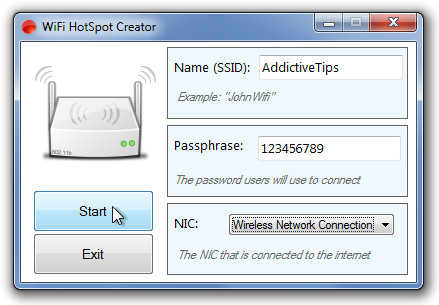
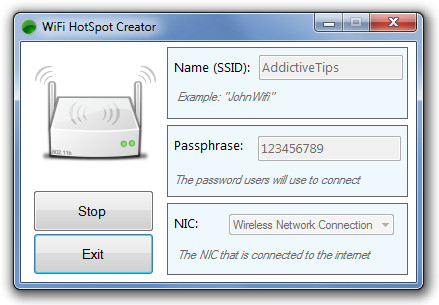
Once you’re done entering the required information, click Start to create your WiFi hotspot. You can minimize the application and the connection will still remain, however, clicking Stop button to the left stops the connection.
During testing, we did not find any issues. However, it attempts to install a toolbar in your browser without asking for permission. It must be noted that if the application is not working on your PC, you might have to upgrade your network adapter, as older adapters do not support creating virtual WiFi hotspot. Testing was carried out on Windows 7, Ultimate 64-bit edition.
Download WiFi HotSpot Creator (Softpedia link provided since the application is not listed on product page)

I create the hotspot by OSToto Hotspot. It works as a portable router. I like it.
Well, I like OSToto Hotspot more. With simply setup, my phone could connect the wifi without any barriers.
Avast says the file is infected.
For Windows 8 users:
well Chrome says the file download is “malicious”, so whatever on that, but I found another method, Just as easy to setup, and Even simpler to use.
1: Open notepad
2: Copy and paste these two as two lines:
netsh wlan set hostednetwork mode=allow ssid=”myOwnWiFi” key=”mypassword”
netsh wlan start hostednetwork
(TIP: you can substitute MyOwnWifi and mypassword for your own preference, but leave the double quotes as they are)
3: Save the file as: StartWiFi.cmd to your documents, or desktop, or your choice.
4: Right click the file and “Create a Shortcut”, place short cut on your desktop.
5: (the secret sauce): Right click the short cut, Chose “Properties”, click “Advanced” button, last, check box for “Run As Administrator”
(without Admin rights, the file will not run properly)
Now when you want to start your wifi, just double click on the “shortcut” (not the .cmd file iteself) and Presto!
It’s 100% safe since you wrote the code, and there is nothing to install.
The WiFi turns off when you shut down computer and you have to restart it the next time you need it.
(Alternative: Instead of a shortcut, you can right-click the StartWiFi.cmd file and choose “Run as Administrator” option. )
TIP#2: make a second file called StopWiFi.cmd
paste this one line in the file:
netsh wlan stop hostednetwork
Save file, make shortcut, edit shortcut properties, click advanced, check box to run as administrator.
Now you have Start & Stop on desktop
Well now uber this does look interesting and more than a little useful.
I’m going to have to try it out…
Thanks for posting it…
Excellent instructions. Well done.
I got through everything and it showed up as an option to connect to with my iPad; however, when I tried to connect to my adhoc wi-fi with my iPad, the ‘connecting’ circle just kept going around and around, i.e. no check mark.
Help? 🙂
hi
I’be beem trying to use in windows 8.1… But it stucks this way:
I’ve never seen a program with so many intrusive attempts to install junk in your pc : be extremely careful with installation
what do I do? I installed it but when I click start nothing happens but a spam says “disconnected”
Now Intel my wifi technology says no adapter found -_- .. can you please say how to revert this action ?
it doesnt open -.-
ITS WORK MAN GOOD
DONT DOWNLOAD IT HAVE 7 VIRUS ITS FAKE PROGRAM
hi am using ADSL broadband connection, connecting it to wifi enabled laptop can u tell me the procedure of how can i turn my lappy to hotspot
I am using windows XP SP2, with a USB ( dongle type) modem for internet connection on a desktop PC. I want to share this internet to my other wifi enabled devices like TABLET and Phone. PLS help…. My pc dont hav any wifi capabilities, so, what gear i have to buy to make wifi hotspot?
i istalled it but when i clic on start it fix on starting and don’t do any thing
how do I ugrade my NET.framework on win.7-please
Horrible SPAMWARE! and didn’t work anyway!
i lost almost all of my frickin memory trying to download this stupid thing i highly recommend that you dont ever try to download it on a windows xp pc because…it really sucks bad.
Can one disable SSID broadcasting or enable MAC filtering using this tool? If not, it’s not so useful.
its is taking too long on my dell laptop….
Same for me but it works
Does not work on my HP laptop after 3 times install and uninstall try! I have to switch to a new app who has the similar name “virtual hotspot” which I found in Google.
If you’re a windows 7 user, with a Wireless Card installed, just use “netsh.exe” in CMD… to create your own Wifi… took me 5 minutes to setup the Temp Wifi via Virtual Wifi Miniport and to share the internet connection from my usb modem..
work fine for me.. =)
dell inspiron 1420, OS win7
thx.. ^^
After watching Hak5 when Darren Kitchen showed you how to set up Hostednetwork in windows 7, I found Wi-Fi hotspot creator and although HostedNetwork it’s just 2 lines in the CMD this program is so much easier. Thanks
My AV reports a trojan in the installer.
My AV reports a trojan in the installer.
Yep it took my pc out virus from hell
Solid, worked fine on my Dell Latitude E4300 w/Centrino processor.
Since there are so many of these programs appearing–MaryFi, Connectify, Virtual Router, MHotspot, 7th Gate–maybe we need an article with a chart showing pros/cons. Virtual Router didn’t work for me; it may for others. Sounds like WiFi Hotspot Creator may or may not work.
I know another free software named Virtual Hotspot can help create virtual WiFi hotspot on your laptop. It works perfectly on Windows 7, XP, Vista. Super easy to use. Only several clicks, I have my iPhone connected. Never have a problem to connect to the Wi-Fi. Most importantly, it’s free! Free! Free again! That is why I love Virtual Hotspot the most. Try it
I tried this, and as you said it installs 2 different toolbars, and revo uninstaller could only find one of them, even thouh i had it in hunting mode. The other one I was able to deactivate with the soluto software.
I tried the application but it didnt work at all. I was able to find the hotspot with my Iphone and enter passphrase, but it could not connect at all.
Crapware.
Will this work with Windows XP 64-bit? Thanks 🙂
Confirmed working on the Intel Centrino Wireless N-1030 network card in my Dell Inspiron laptop.
I found this thread regarding a possibly unrelated but similar program, and it said that results will depend on what network card you have, so your mileage may vary:
http://www.betaarchive.com/forum/viewtopic.php?t=16230
Note that it requires .NET Framework 4 and installs some toolbar despite you trying to tell the installer not to.
Anybody try?
Is this just for PC or would it work with my laptop? Thanks for program. Appreciate it.
omg